
.png)

TL;DR
- Qwen3-VL is Alibaba's latest vision-language model family, available from 2B to 235B parameters with a native 256K-token context window and stronger multimodal reasoning than its predecessor.
- VLMs produce different outputs than traditional CV models. Instead of bounding boxes and class labels, VLMs generate free-text descriptions, answer visual questions, and ground phrases to image regions.
- Datature Vi lets you annotate data for VLMs (phrase grounding, VQA, chain-of-thought), configure training (system prompts, LoRA or full fine-tune, GPU selection), track runs with loss curves and advanced evaluation, and export your fine-tuned model with a few clicks.
- Coming soon: DPO Trainer for RLHF-style preference tuning and RAG integration to give your VLM access to external knowledge at inference time.
What Is Qwen3-VL?
Qwen3-VL is the third generation of Alibaba Cloud's vision-language model series, detailed in their technical report (arXiv:2511.21631). Released in September 2025, it brings meaningful upgrades over Qwen2.5-VL: a native 256K-token context window (up from 128K), DeepStack integration (a multi-scale feature fusion mechanism that extracts representations from different layers of the ViT encoder, giving the language model richer visual detail than a single-layer output), and improved spatial-temporal modeling through enhanced interleaved MRoPE (Multimodal Rotary Position Embeddings).
The model retains the ViT-based vision encoder with dynamic resolution support, processing images at their native aspect ratio rather than forcing a fixed crop. The model family spans six sizes:

For fine-tuning on custom datasets, the 8B variant hits the sweet spot: large enough to capture complex visual patterns, small enough to fine-tune on a single GPU with LoRA.
How VLM Outputs Differ from Traditional CV Models
If you have worked with object detection models like YOLO, the output format is familiar: bounding boxes, each with a class label and a confidence score. Most deployed YOLO models can only detect classes they were trained on. (Open-vocabulary variants like YOLO-World have started to blur this line, but they remain the exception.)
VLMs work differently. They take an image and a text prompt as input, then generate natural language as output. This opens up three distinct output types that traditional CV models cannot produce.

Comparison of YOLO object detection outputs and VLM outputs like phrase grounding, VQA, and free-text descriptions.
Phrase Grounding
You give the model a natural language description, and it returns the bounding box coordinates for that description. (See the phrase grounding concept in the Vi docs.) Instead of fixed categories like "car" or "person," you can query with flexible phrases: "the red car on the left side of the frame" or "the scratch near the weld joint." This is powerful for scenarios where the objects you need to detect change frequently or are too specific for a predefined label set.
Visual Question Answering (VQA)
You ask the model a question about the image, and it generates a natural language answer. (See the VQA concept in the Vi docs.) "How many screws are missing from this assembly?" "Is the label oriented correctly?" "What color is the liquid in the third beaker?" The model reasons about visual content and responds in plain text, not structured coordinates.
Free-Text Description
The model generates an open-ended description of the image contents. (See the freeform concept in the Vi docs.) This is useful for captioning, reporting, and creating searchable metadata for large image collections. Combined with chain-of-thought reasoning, the model can walk through its observations step-by-step before arriving at a conclusion.
The key tradeoff: YOLO gives you fast, structured output that is easy to parse programmatically. VLMs give you flexible, expressive output that handles novel queries. For many real-world applications, you want both, using VLMs for the tasks that require reasoning and traditional models for high-throughput detection.
Fine-Tuning Qwen3-VL on Datature Vi
The rest of this guide walks through the full workflow on Datature Vi: annotating your data, configuring training, monitoring runs, and exporting your model. Each section includes screenshots of the platform interface.
Step 1: Annotate Your Data for VLMs
VLM annotation is different from traditional bounding box or polygon labeling. Instead of drawing shapes and assigning class labels, you are creating text-image pairs that teach the model how to interpret and respond to visual content.
Datature Vi supports three dataset types for VLM training:
Phrase Grounding
Phrase grounding pairs a natural language description with a bounding box. Follow the phrase grounding annotation guide to get started. You draw a box around an object and write a description: "cracked solder joint on pin 3" or "ripe tomato in the second row." The model learns to locate objects based on flexible text queries rather than fixed categories.
This is the closest VLM annotation type to traditional object detection, but with a critical difference: the label is a free-text phrase, not a category from a dropdown. The same object could be described differently depending on context.

For production-quality phrase grounding, Datature recommends a minimum of 500 phrase-box pairs across 100 or more images. Include specific attributes in your descriptions (color, position, size, material) and vary your phrasing so the model generalizes beyond exact wording.
Visual Question Answering (VQA)
VQA annotations are question-answer pairs tied to an image. See the VQA annotation guide for step-by-step instructions. You write a question about the image content and provide the correct answer. The model learns to reason about visual information and generate accurate text responses.
Good VQA annotations cover a range of question types: counting ("How many items are on the shelf?"), spatial reasoning ("Is the label above or below the barcode?"), attribute identification ("What color is the warning light?"), and yes/no verification ("Is the safety guard in place?").
Aim for diverse questions per image. Five different questions about the same image teaches the model more than five identical questions across five images. For a solid starting dataset, target 500 or more QA pairs across at least 100 images. Consistency in answer format matters: decide early whether yes/no questions get "Yes"/"No" or longer responses.
Chain-of-Thought Reasoning
For tasks that require multi-step reasoning, you can write annotations that include explicit thinking steps using <think> tags (see chain-of-thought reasoning in the Vi docs). The model learns to show its work before producing a final answer, similar to how chain-of-thought prompting works at inference time, except now the reasoning pattern is baked into the model's weights through training.
This is especially valuable for complex inspection tasks. Instead of just labeling a part as "defective," the annotation walks through the reasoning: "The surface shows a linear mark approximately 2cm long near the edge. The mark is darker than the surrounding material and follows the grain direction. This pattern is consistent with a tool drag mark from the stamping process, not a material defect."
Step 2: Configure Model Training
Once your dataset is annotated, the next step is setting up a training workflow. Datature Vi guides you through four configuration screens: system prompt, dataset, model architecture, and training settings.
System Prompt
The system prompt defines the model's task and behavior. It tells the model what to look for in images and how to format its responses. Datature Vi provides preset prompts for phrase grounding and VQA tasks, or you can write a custom prompt for your specific domain.
A good system prompt is specific about the task, the output format, and the domain context. For a manufacturing inspection use case, your prompt might specify: "You are a quality inspector analyzing images of welded joints. Identify all visible defects and describe their location, type, and severity. Output your findings as a structured list."
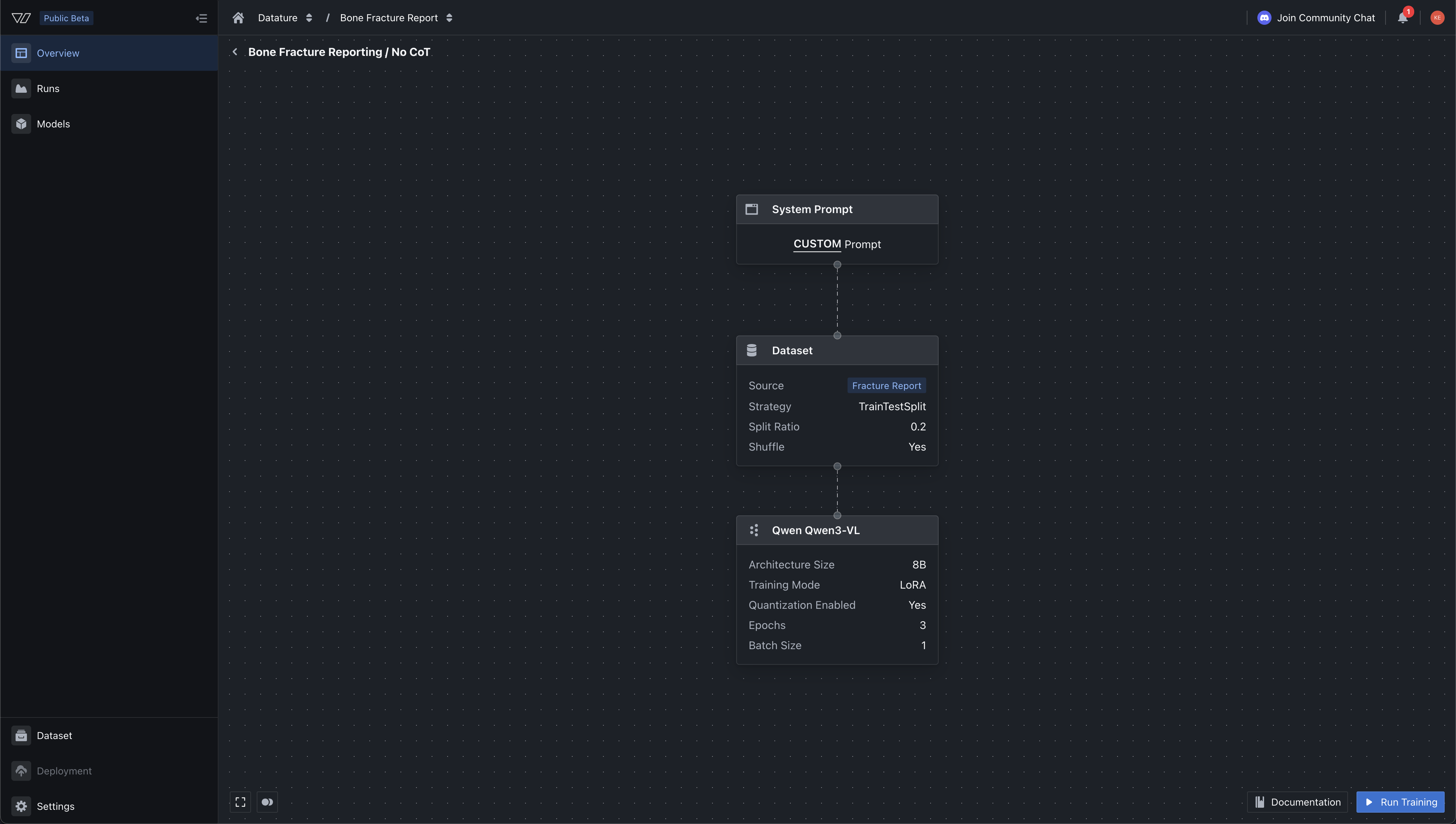
In our case, we wanted to add in phrase grounding specifications into the system prompt as we want it to give the output boxes, so we can render it later for visual aide. We specifiy the bounding box coordinates format, the JSON objects, and other constraints that we want the output to have when its running inference. To recap - system prompts are attached to every training example at the top of the message, followed by your image and annotations - from there the model will make an inference, and the approproaite loss functions will be applied. Hence, if you change the system prompt, generally - you'd have to run a new training should it specify say a totally different constraint (e.g. outputing polygonal masks instead of bounding box, or constraints on say maximum number of paragraphs, etc)

Model Architecture: LoRA vs. Full Fine-Tune
Datature Vi offers two training modes (see model architectures and model settings for full details):
LoRA (Low-Rank Adaptation) injects small trainable low-rank matrices into the model's existing weight layers while keeping the base parameters frozen. It uses a fraction of the memory (works on GPUs with less than 32GB VRAM), trains faster, and lets you experiment with multiple configurations cheaply. The tradeoff is a small potential accuracy gap compared to full fine-tuning.
Full Fine-Tuning updates all model parameters. It can squeeze out the best possible accuracy but requires more GPU memory (32GB or more) and longer training times. Choose this when accuracy is critical and you have the compute budget.
For most users starting with Qwen3-VL, LoRA on the 8B variant is the recommended starting point. You can always scale up to full fine-tuning or a larger model variant once you have validated your dataset and task definition.
Additional model settings you can configure:
.png)
GPU Selection
Datature Vi offers GPU tiers from entry-level NVIDIA T4 cards up to H200 and B200 hardware. Multi-GPU configurations scale training speed: a 4x A10G setup runs roughly 3.5x faster than a single card.

Step 3: Monitor Training and Evaluate Results
Once your run starts, Datature Vi tracks training progress in real time.
Loss Curves
The primary metric is total loss, measuring how far the model's predictions are from your ground truth annotations. Training loss (recorded at every step) and validation loss (recorded at evaluation intervals) are plotted as separate curves. A healthy training run shows both curves declining, with validation loss tracking close to training loss.
Expect starting loss in the range of 2.0 to 6.0 for an untrained model, dropping to 0.5 to 1.5 for a well-trained model. If validation loss starts climbing while training loss keeps dropping, the model is overfitting. This is a signal to stop training, reduce epochs, or add more training data.

For a deeper look at reading training graphs, see our guide on how to interpret training metrics and graphs.
Task-Specific Metrics
Depending on your annotation type, Datature Vi reports different evaluation metrics:
For phrase grounding:
- Bounding Box F1 Score (balances precision and recall)
- Average IoU (overlap between predicted and ground truth boxes)
- Precision and Recall
For VQA:
- BLEU (n-gram overlap with reference answers)
- BERTScore (semantic similarity using contextual embeddings)
- METEOR (considers synonyms and word order)
- ROUGE (overlap of n-grams and word sequences)
Advanced Evaluation
The advanced evaluation tab provides a side-by-side comparison interface. On the left, you see the ground truth annotation. On the right, you see the model's prediction. A checkpoint slider lets you scrub through training stages (Step 0, 5, 10, 15, 20...) to watch the model improve over time.
This is where you catch subtle issues: bounding boxes that are too loose, hallucinated objects that do not exist in the image, or VQA answers that are technically correct but miss the point. Early checkpoints will show poor predictions. Final checkpoints should align closely with your ground truth.
For phrase grounding, check that boxes are tight, all ground truth objects are detected, and false positives are minimal. For VQA, check that answers match ground truth meaning, are factually correct based on visible image content, and handle edge cases gracefully.
Step 4: Export and Deploy Your Model
When training is complete and you are satisfied with evaluation results, export your fine-tuned Qwen3-VL model.
Download via the Platform
Navigate to your training project's Models tab, click the three-dot menu on your model, and select "Export Model." (See download a model in the docs.) The platform generates a ready-to-use Python code snippet with your credentials pre-filled.
Download via the Vi SDK
For programmatic access, use the Vi SDK directly:
from vi.inference import ViModel

# Download your fine-tuned model
model = ViModel(
    run_id="your-run-id",
    secret_key="your-secret-key",
    organization_id="your-organization-id"
)
The downloaded package includes model weights (full parameters and LoRA adapters if applicable), configuration files, training metadata, and performance data from your training run.
Loading and Running Inference
Once downloaded, running inference is straightforward:
# Single image inference
result, error = model(
    source="/path/to/image.jpg",
    user_prompt="Describe any defects visible in this image."
)

if error is None:
    print(result.result)
The SDK supports batch processing, streaming output, and memory optimization through quantization:
# Batch process an entire folder
results = model(
    source="./test_images/",
    user_prompt="What objects are visible?",
    show_progress=True,
    recursive=True
)

for result, error in results:
    if error is None:
        print(result.result)

# Load with 8-bit quantization for lower memory usage
model = ViModel(
    run_id="your-run-id",
    load_in_8bit=True,
    device_map="auto"
)
For production deployment, you can also containerize your model using NVIDIA NIM for scalable serving. The Vi SDK NIM integration guide covers container setup and configuration.
What's Coming Next: RLHF and RAG for VLMs
Fine-tuning teaches your model what correct outputs look like. But two upcoming capabilities on Datature Vi will push this further.
DPO Trainer (Coming Soon)
Direct Preference Optimization (DPO) is an alternative to traditional Reinforcement Learning Human Feedback (RLHF) that achieves similar alignment without training a separate reward model or running a reinforcement learning optimization loop. Instead, you provide pairs of outputs: one preferred and one rejected. The model learns to produce outputs closer to the preferred examples. We think this will be especially helpful when trying to provide output feedback on say the language needed to describe certain defects, or say video captions, etc. This way, you can adapt the model to output sentences in a certain way without having to completely do a full fine-tune. We intend to add this feature by April 2026.
.png)
On Datature Vi, the DPO Trainer will let you:
- Select a fine-tuned model checkpoint as your starting point
- Generate candidate outputs for your evaluation images
- Choose preferred vs. rejected outputs through the platform interface
- Run DPO training to align the model closer to your quality standards
This is especially valuable for inspection and quality control tasks where the difference between a good and bad answer is subtle. Fine-tuning gets the model 80% of the way there. DPO closes the remaining gap by teaching the model your team's judgment calls or preference.
RAG for VLMs (Coming Soon)
Retrieval-Augmented Generation (RAG) gives your VLM access to external knowledge at inference time. Instead of relying only on what the model learned during training, RAG retrieves relevant context from a document store and feeds it to the model alongside the image and prompt. The reason we are working on this is because many of our users want the VLM to search certain documents tied to say certain defects, or medical anoimaly or even pull-up SOPs when it encounters those cases - adding on to the model output with more context rich information. This is particularly useful for teams who may have frequent-changing documents or reference PDFs that needs to be shown after the model run its initial inference - without having to retrain the entire model.
.png)
Practical use cases for VLM RAG:
- Inspection with specs: The model sees an image of a part and retrieves the engineering drawing and tolerance specifications to compare against
- Medical imaging with history: The model sees a scan and retrieves the patient's prior reports for longitudinal comparison
- Field service: A technician photographs equipment, and the model retrieves the maintenance manual to guide troubleshooting
RAG solves a fundamental limitation of fine-tuning: your training data is static, but real-world knowledge changes. Product specs get updated. New defect types appear. RAG lets the model access current information without retraining.
Wrapping Up
Fine-tuning Qwen3-VL on your own dataset follows four steps on Datature Vi: annotate your data with phrase grounding, VQA, or chain-of-thought reasoning; configure your training run with the right system prompt, model size, and GPU; monitor loss curves and evaluation metrics to catch issues early; and export your model for local inference or containerized deployment.
The diagram below shows how all of these pieces fit together, from raw data through to production inference, including the upcoming DPO alignment and RAG capabilities. We believe that building a comprehensive, fine-tuned vision-language model should be easy, and teams should focus on dataset curation, application-level testing, rather than fighting libraries and GPU quotas just to fine-tune their own model on their own dataset. Datature Vi will solve this in the long term for developers.
.png)
The Datature Vi platform handles the infrastructure complexity so you can focus on what matters most: your data quality and your task definition. In our experience, those two factors drive model performance more than any hyperparameter or architecture choice.
If you have worked with traditional CV models and are looking to explore what VLMs can do for your use case, Datature Vi is the fastest path from raw images to a working fine-tuned model. For more context on VLM fine-tuning approaches, see our primer on fine-tuning VLMs, our VQA guide, and our walkthrough on fine-tuning Cosmos Reason2.
FAQ
What GPU do I need to fine-tune Qwen3-VL?
With LoRA and 4-bit quantization, you can fine-tune the 8B variant on a GPU with 16GB VRAM. Full fine-tuning requires 32GB or more. Datature Vi offers GPU tiers from T4 (entry-level) to H200 and B200 (maximum performance), so you can select hardware that matches your budget and accuracy requirements. All of these are one-click spin-up on the Datature Vi platform, which is in open beta right now.
How much training data do I need?
For phrase grounding, start with at least 500 phrase-box pairs across 100 images. For VQA, aim for 500 question-answer pairs across 100 images. More data generally improves quality, but annotation quality matters more than quantity. A smaller dataset with precise, varied annotations will outperform a larger dataset with noisy labels.
Is Datature Vi different from Datature Nexus?
Yes. Datature Nexus is a platform for more geometric / traditional vision workflows - like annotating dataset for training on Unets, MaskRCNN, YOLO26, and more. Datature Vi is our latest platform focusing on fine-tuning vision language models (Qwen 3, 3.5, InternVL, Nvidia CosmosReason2, and more). The long term vision is to serve computer vision development needs of developers on both fronts with an easy-to-use platform.
What is the difference between Qwen3-VL and Qwen2.5-VL?
Qwen3-VL introduces a 256K-token context window (doubled from 128K), DeepStack integration for better vision-language alignment, improved spatial-temporal modeling, and mixture-of-experts variants (30B-A3B and 235B-A22B) that offer strong accuracy with efficient inference. The dense model sizes also expanded to include 4B and 8B variants.
Can I use my fine-tuned model outside Datature?
Yes. That's the point - we want to help you fine-tune your model with a suite of intuitive, graphical annotation tool + model experiment tracking. The model belongs to you and you are free to host it somewhere else. The exported model includes standard HuggingFace-compatible weights and configuration files. You can load it with the Vi SDK, deploy it in an NVIDIA NIM container, or integrate it into any pipeline that supports HuggingFace transformers. That said, we are launching our own Datature Vi Deployment feature, that will allow teams to deploy their models on our GPU infrastructure that is capable of auto-scaling and active learning (an important feature that we are announcing in weeks to come)
When will DPO and RAG be available?
Both the DPO Trainer and RAG integration are actively being built and will launch on Datature Vi in April 2026. These features will be available through the same platform interface you use for fine-tuning today.
How do I get started with Datature VI?
You can go to https://vi.datature.com to create a free account, and join our open beta. You should be able to annotate your images and videos for VLM training, and export your first model quite easily. If you have any feedback or feature requests, feel free to contact us and we'd love to hear your ideas!
.png)
.png)