Lorem ipsum dolor sit amet, consectetur adipiscing elit, sed do eiusmod tempor incididunt ut labore et dolore magna aliqua. Lorem ipsum dolor sit amet, consectetur adipiscing elit, sed do eiusmod tempor incididunt ut labore et dolore magna aliqua.Lorem ipsum dolor sit amet, consectetur adipiscing elit, sed do eiusmod tempor incididunt ut labore et dolore magna aliqua.
Visual Question Answering (VQA) represents a groundbreaking intersection of computer vision and natural language processing, enabling AI systems to answer natural language questions about images. This multimodal task requires models to not only understand visual content but also comprehend linguistic queries and reason about the relationship between them. As Vision Language Models (VLMs) continue to evolve, VQA has emerged as a critical fine-tunable task that bridges the gap between seeing and understanding, transforming how machines interpret visual information in context.
At its core, VQA involves three fundamental components: an input image, a natural language question about that image, and generating an accurate textual answer. This seemingly simple task demands sophisticated reasoning capabilities, from identifying objects and their attributes to understanding spatial relationships, counting, reading text, and even inferring abstract concepts. This blog explores how modern VLMs can be fine-tuned for VQA tasks, the architectural innovations that make this possible, and how Datature's platform enables organizations to harness this technology for their specific use cases.
Where is Visual Question Answering Applied?
The applications of VQA extend far beyond academic research, revolutionizing industries where visual understanding combined with natural language interaction creates tangible value. Consider these transformative applications:
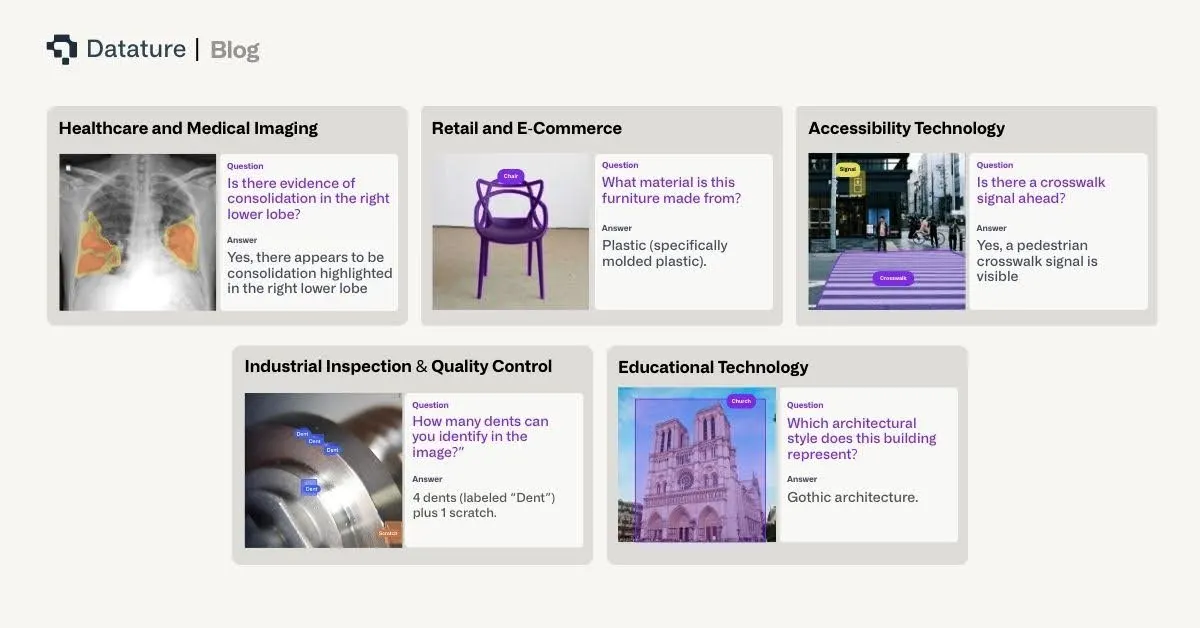
In healthcare and medical imaging, VQA systems assist radiologists by answering specific queries about medical scans: "Is there evidence of consolidation in the right lower lobe?" or "What is the approximate size of the lesion?" These systems can provide second opinions, help with training junior doctors, and ensure critical findings aren't overlooked during high-volume screening programs.
For retail and e-commerce, VQA powers intelligent product search and customer service. Customers can upload images and ask questions like "Do you have this dress in blue?" or"What material is this furniture made from?" This natural interaction reduces friction in the buying process and improves customer satisfaction through instant, accurate responses.
In accessibility technology, VQA serves as a crucial tool for visually impaired users, answering questions about their surroundings: "What's the expiration date on this milk carton?" or "Is there a crosswalk signal ahead?" These applications transform smartphones into intelligent visual assistants that provide independence and safety.
Industrial inspection and quality control benefit from VQA systems that can answer specific queries about manufactured products or infrastructure: "Are there any visible cracks in this weld?" or "What is the reading on gauge number 3?" This targeted questioning approach reduces the need for exhaustive manual inspection while maintaining high quality standards.
For educational technology, VQA creates interactive learning experiences where students can ask questions about diagrams, historical photographs, or scientific illustrations: "What process is shown in step 3 of this diagram?" or "Which architectural style does this building represent?" This transforms static educational materials into dynamic, queryable resources.
VQA Task Categories
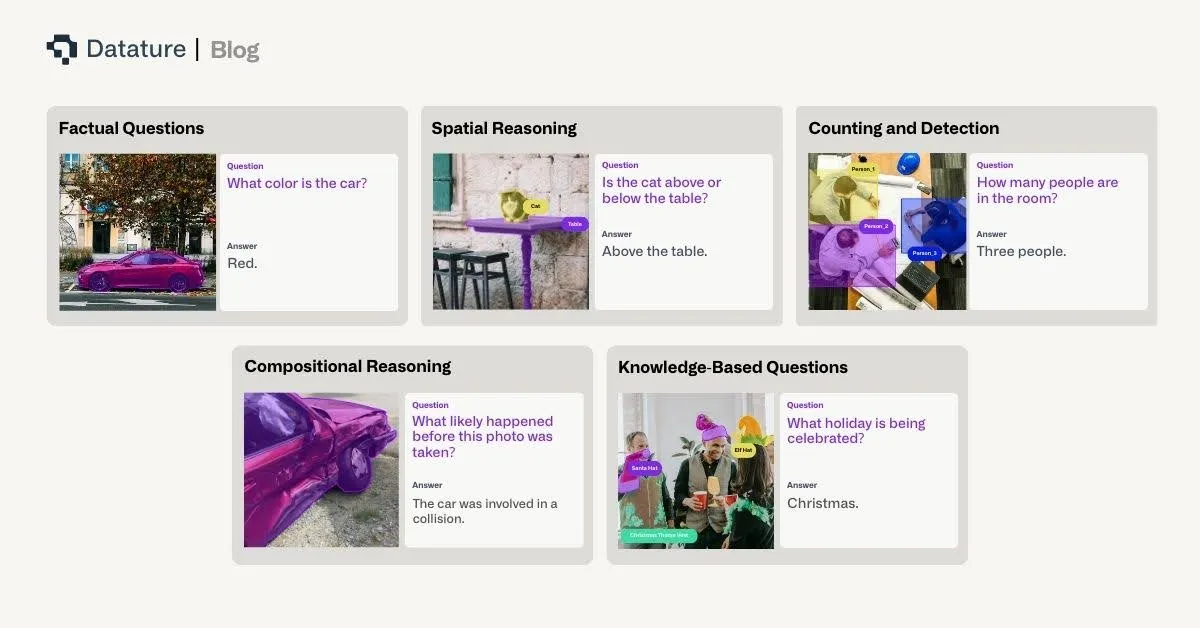
Visual Question Answering encompasses diverse question types, each requiring different cognitive capabilities from the model:
Factual Questions
These questions seek objective information directly observable in the image:
Object Recognition: "What animal is in the image?"
Attribute Identification: "What color is the car?"
Scene Understanding: "Is this photo taken indoors or outdoors?"
Factual questions form the foundation of VQA, requiring strong visual feature extraction and classification capabilities.
Counting and Detection
Questions requiring enumeration or localization:
Object Counting: "How many people are in the room?"
Presence Detection: "Is there a stop sign in the image?"
Comparative Counting: "Are there more cars than trucks?"
These questions demand robust object detection and the ability to maintain accurate counts across varying scales and occlusions.
Spatial Reasoning
Questions about relationships and positions:
Relative Position: "What is to the left of the lamp?"
Spatial Relationships: "Is the cat above or below the table?"
Distance Estimation: "Which object is closest to the camera?"
Spatial reasoning requires understanding 3D relationships from 2D projections and maintaining consistent spatial representations.
Compositional Reasoning
Complex questions requiring multiple steps:
Multi-hop Reasoning: "What is the color of the shirt worn by the tallest person?"
Logical Inference: "Can the vehicle in the image legally park here?"
Temporal Reasoning: "What likely happened before this photo was taken?"
These questions test the model's ability to combine multiple pieces of information and apply logical reasoning.
Knowledge-Based Questions
Questions requiring external knowledge beyond the image:
Common Sense: "Is this meal suitable for vegetarians?"
Domain Expertise: "What medical condition might this X-ray indicate?"
Cultural Context: "What holiday is being celebrated?"
Knowledge-based VQA challenges models to integrate visual understanding with broader world knowledge.
Fine-tuning VLMs for VQA Tasks
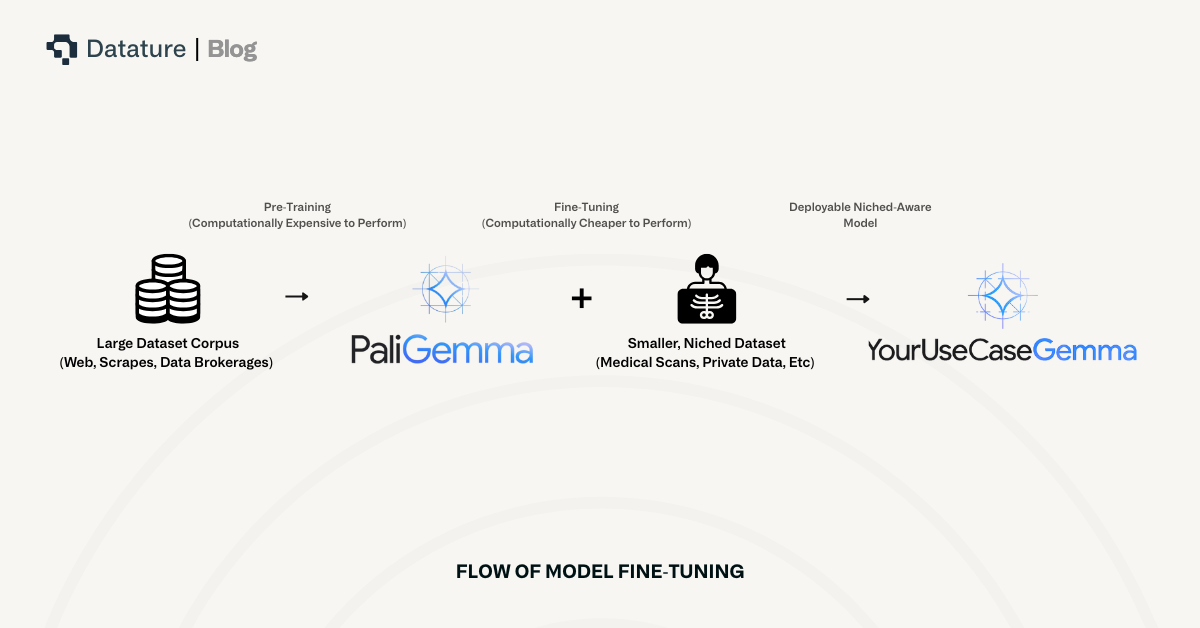
Typically, VLMs are trained on large corpuses of data that include hundreds of thousands to upwards of a billion images, each associated with one more more input text queries, and each of those associated with one or more textual outputs. These VLMs are what you called “pre-trained” since they are trained on large amounts of data, which are highly generalized to provide a VLM with an abstract understanding of the world through images and text.
However, since this information is general, pre-trained VLMs tend to perform well on tasks that don’t require deep domain knowledge. For example, asking a pre-trained VLM to describe a scene of a beach with the sun setting over the horizon is an easy task because there isn’t much domain knowledge required. Additionally, with many of the other examples above, such as object counting, presence detection, spatial relationships, etc., a pre-trained VLM will perform well since domain knowledge is not likely to be required.
When considering tasks that may require domain knowledge, such as logical inference, domain expertise, or cultural context, VLMs tend to require extra information to inform themselves of these tasks. For example, asking a VLM “What medical condition might this X-ray indicate” would require the VLM to be trained on X-Ray diagnostic data, which does not frequently occur in the training datasets of these large vision language models available to us.
Subsequently, in order to train a VLM for specific VQA applications, we must “fine-tune” existing pre-trained VLMs to help augment their knowledge. Fine-tuning is a term that describes the process of training an AI model to perform better at a specific task. During fine-tuning, a model sees and learns domain-specific knowledge so that it is better informed to answer questions within that domain.
An aside: there are other ways to augment the knowledge of VLMs. The two main ways to augment the knowledge are fine-tuning and retrieval augmented generation (RAG), but each solves separate issues and can be used in tandem. In this article, we talk about fine-tuning, but note that RAG, or RAG plus fine-tuning, are useful methods for augmenting the knowledge of VLMs.
When fine-tuning pre-trained VLMs for specific VQA applications, there are several crucial considerations involved.
Data Preparation
Before you can begin fine-tuning a VLM, you must first aggregate and prepare the data that you intend to fine-tune it with. There are three main portions of the Data Preparation phase for fine-tuning VLMs for a specific VQA application: Dataset Curation, Annotation Guidelines, and Data Augmentation.
Dataset Curation:
Successful VQA fine-tuning requires carefully curated datasets that reflect your target domain. As such, the following guidelines should be followed to ensure successful model fine-tuning:
Collect diverse images representing real-world scenarios,
Generate questions that cover various difficulty levels and types,
Ensure answer distribution isn't heavily skewed,
Include negative examples and edge cases.
An important note here is that while many people believe the most important part of developing an AI model is the model itself, when in reality, it is data preparation.
Annotation Guidelines:
Annotations are example outputs that allow the VLM to understand what an output should look like.
Define acceptable answer formats (single word, phrase, sentence)
Specify how to handle ambiguous questions
Create quality control mechanisms to ensure consistency
Data Augmentation: Enhance training data through:
Visual Augmentations: Cropping, rotation, color jittering to improve robustness
Question Paraphrasing: Generate alternative phrasings of existing questions
Answer Variations: Include synonyms and alternative correct answers
Training Strategies
Learning Rate Scheduling: Use warmup followed by cosine decay to ensure a balance between finetuning for context specificity vs. losing broad model capabilities and other catastrophic forgetting consequences
Gradient Accumulation: Simulate larger batch sizes for stable training
Mixed Precision Training: Accelerate training while maintaining accuracy
Parameter-Efficient Fine-tuning: Use LoRA or adapter layers for resource-constrained settings
Evaluation Metrics
Accuracy Metrics:
Exact Match: Percentage of exactly correct answers
Soft Accuracy: Accounts for synonyms and paraphrases
Per-Question-Type Accuracy: Separate evaluation for different question categories
Generation Quality:
BLEU/METEOR: For evaluating generated answers against references
BERTScore: Semantic similarity between predicted and ground truth answers
Human Evaluation: Essential for assessing real-world performance
Fine-tuning VLMs for VQA with Datature
This portion onwards includes clinical datasets and images used for medical AI research. Some visuals may be graphic or unsettling to non-clinical audiences.
Use Case: Medical VQA for Gastrointestinal Endoscopy
Let's walk through building a VQA dataset for medical visual question answering in the gastrointestinal endoscopy with the Datature Vi platform. For this demonstration, we will be using this dataset.
Each image in the dataset is accompanied by a list of question and answer pairs, where stylistically, the answers are designed to be as factual and to the point as possible, so often replying in short phrases or single word responses.
Unlike traditional computer vision projects in which fixed requests and responses are required, visual question answering enables a broader flexibility in question prompts as well as a more expressive capability for the model to answer questions.
Creating and Populating Your Dataset
To get started on the Vi homepage, click Create Dataset and select Visual Question Answering as your dataset type. This ensures the platform configures the appropriate annotation tools for that experience. Once your dataset is created, navigate to the Datasets page where you can upload the gastrointestinal endoscopy images in bulk. Vi supports various image formats, and allows you to upload assets directly from your device. Vi will also support syncing them from external cloud storage buckets like AWS S3 Bucket and Azure Blob Storage for seamless integration with your existing data infrastructure.
Once uploaded, you can view your assets in a few different ways. One focuses more on the visual view, allowing you to see your images in a gallery style.
The other is tabular, which allows you to see the data rows in which the image and its list of question and answer pairs are associated with each other.
Annotating Your Images
After uploading your assets, it's time to begin labeling. If you have preexisting annotations, like visual question answering prompt and response pairs, all you have to do is convert this annotated data into a Vi compatible JSONL format and you will be able to upload the images easily. Otherwise, you can use Vi’s built-in annotator. When you first enter the annotator and select an asset, you will see two panels, with the left panel containing the asset, and the right panel containing a prompt and response form.
You can then simply input your prompt and desired response from the model. Even if you only have one primary question about the image, we would recommend adding more auxiliary questions and answers to improve the model’s robustness and ensure it maintains an understanding of fundamental concepts to reduce any hallucination.
If annotation at scale becomes time-consuming, Datature also offers intelligent tools to speed up your labelling process, and external labeling services with experienced annotators who can handle your visual question answering projects efficiently and accurately.
Creating Your Training Workflow
Once you've successfully annotated your dataset, it's time to create your training workflow. Navigate to the Trainings page and then create a new workflow, where you can configure your model architecture and training parameters. For this example, we'll be using Qwen 2.5 VL 7B, a relatively lightweight yet powerful architecture that's well-suited for a variety of vision language tasks.
There are a couple of ways to configure your workflow. The main configuration would be the System Prompt, and the Model Selection. The System Prompt defines what the model is allowed to do with rules, output formats, and reasoning style. In an upcoming article, we will dive deeper into how to design effective system prompts for VLMs.
System Prompt - If you are unsure about what to put, you can leave the pre-generated system prompt that you see below as is. Otherwise, we suggest you tailor the system prompt carefully to best support the outputs you are looking for. Specificity and certainty is key when designing such prompts, small differences can have large downstream effects on your model outputs.
Add a Dataset Block - This connects your annotated images to the training pipeline. You can choose which dataset you'd like to use as well as select other dataset specific hyperparameters.
Select the Model Block - We chose Qwen 2.5 VL 7B, which balances accuracy and inference speed for potential on-premise real time applications. As you can see from the screenshot below, the platform contains a very extensive list of hyperparameters and other configurable options, with the three main categories being Model Options, Compute Hyperparameters, and Evaluation. Model Options generally covers what type of model you'd like to use, what method you'd like to train it with like LoRA or general finetuning, and whether you would like to introduce quantization. Hyperparameters generally cover traditional machine learning hyperparameters like number of epochs, batch size, learning rate, etc. Evaluation is primarily concerned with how the model performs inference, which is critical for consistently observing model behavior during evaluation steps. Temperature, Top K, and Top P are the most common ones that users might be familiar with when controlling language model outputs.
For our training configuration, we'll use the following and leave all others as default:
Batch size: 10 images per training step
Training duration: 10 epochs
Quantisation: LoRA
These parameters provide sufficient iterations for the model to learn the various intricacies of gastrointestinal endoscopy without overfitting and inducing catastrophic forgetting from the initial model weights.
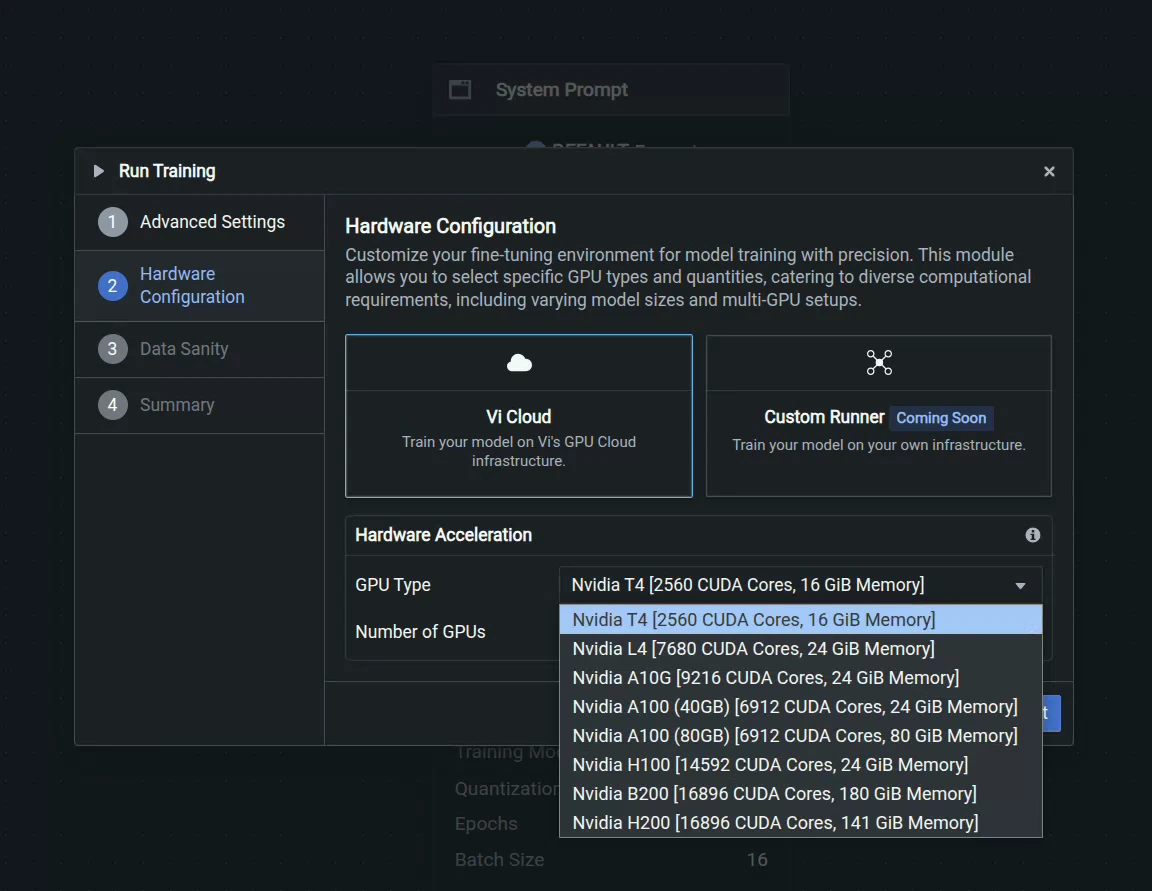
We can then go through the options once we select Start Training at the bottom right to select advanced evaluation options for checkpoint saving as well as what hardware want to use, as shown above. We have an extensive range of GPUs, from T4 to H200s. For this training, we will use 2 L4's for greater VRAM while balancing cost.
Observing The Training
Once you click Start Training, you'll be redirected to the Training Run page where you can monitor live progress as your model learns. This is where the benefits of Nexus's real-time monitoring become apparent.
For our gastrointestinal endoscopy, we can observe that the model converges around step 500, as indicated by the stabilization of the loss curves. The loss (total loss) decreases steadily across both dimensions, showing that the model is successfully learning to make independent predictions for each label category. The validation scores have a big jump at the first checkpoint at the first epoch, and seem to level off after that.
Key metrics to watch:
Training Loss - Should decrease steadily and stabilize
Validation Loss - Should follow a similar pattern without diverging (which would indicate overfitting)
ROUGE - Tracks how well the model’s predicted response covers the essential information in the ground truth
Advanced Evaluation
For deeper insights into your model's performance, navigate to the Advanced Evaluation tab. Here you can examine predictions at specific checkpoints throughout training.
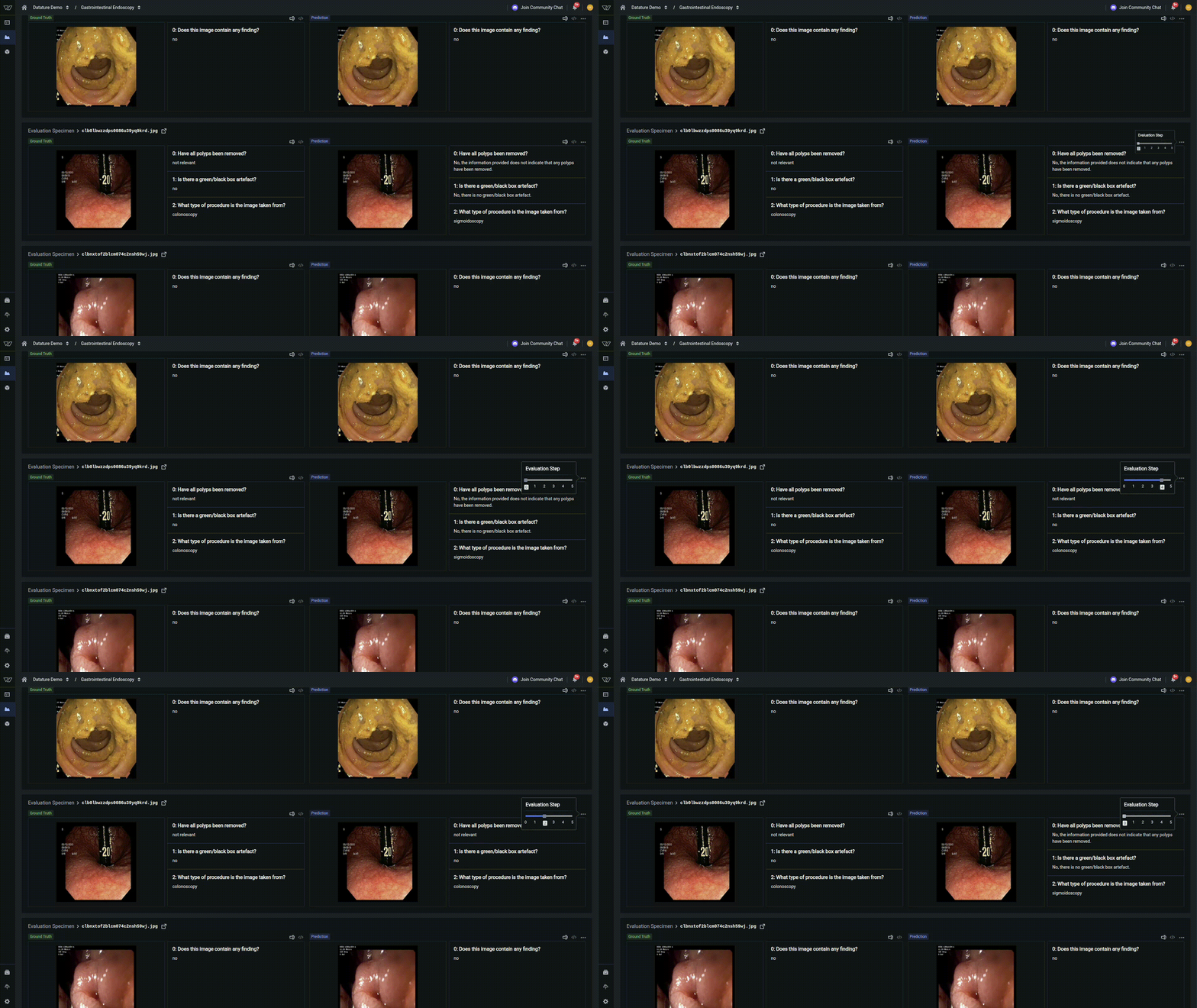
In our example, at early training steps, demonstrates a finetuning towards medical vocabulary but still lacks specificity. By the second epoch and beyond, the model converges to the correct response, indicating strong learned representations, but as indicated by the metrics, is not perfect across all examples.
This progressive improvement demonstrates how vision language models have a tremendous capacity for learning, and with the right hyperparameters, can be tuned to a very specific use case.
What's Next?
Datature's platform provides comprehensive tools for developing and deploying VQA systems tailored to your specific needs. Our no-code interface combined with advanced fine-tuning capabilities enables both rapid prototyping and production-ready deployments.
Our Developer's Roadmap
Datature is committed to advancing VLMs and MLLMs through ongoing research and development. Our roadmap includes chain of thought reasoning, VLMs focused on robotics, and many others.
Contact Us
Join our vibrant community of developers and researchers pushing the boundaries of visual question answering. For technical questions, visit our Community Slack. To learn more about implementing VQA models on Datature Nexus, schedule a consultation with our engineering team here.
For comprehensive documentation on VQA architectures, training best practices, and API references, explore our Developer Portal. Stay updated with the latest VQA research and platform updates by subscribing to our technical newsletter.
Visual Question Answering represents the future of human-computer interaction with visual data. As VLMs continue to evolve, the ability to naturally query images will become as fundamental as web search is today. At Datature, we're committed to making this technology accessible, reliable, and transformative for organizations worldwide.
Introduction to Visual Question Answering
Visual Question Answering (VQA) represents a groundbreaking intersection of computer vision and natural language processing, enabling AI systems to answer natural language questions about images. This multimodal task requires models to not only understand visual content but also comprehend linguistic queries and reason about the relationship between them. As Vision Language Models (VLMs) continue to evolve, VQA has emerged as a critical fine-tunable task that bridges the gap between seeing and understanding, transforming how machines interpret visual information in context.
At its core, VQA involves three fundamental components: an input image, a natural language question about that image, and generating an accurate textual answer. This seemingly simple task demands sophisticated reasoning capabilities, from identifying objects and their attributes to understanding spatial relationships, counting, reading text, and even inferring abstract concepts. This blog explores how modern VLMs can be fine-tuned for VQA tasks, the architectural innovations that make this possible, and how Datature's platform enables organizations to harness this technology for their specific use cases.
Where is Visual Question Answering Applied?
The applications of VQA extend far beyond academic research, revolutionizing industries where visual understanding combined with natural language interaction creates tangible value. Consider these transformative applications:
In healthcare and medical imaging, VQA systems assist radiologists by answering specific queries about medical scans: "Is there evidence of consolidation in the right lower lobe?" or "What is the approximate size of the lesion?" These systems can provide second opinions, help with training junior doctors, and ensure critical findings aren't overlooked during high-volume screening programs.
For retail and e-commerce, VQA powers intelligent product search and customer service. Customers can upload images and ask questions like "Do you have this dress in blue?" or"What material is this furniture made from?" This natural interaction reduces friction in the buying process and improves customer satisfaction through instant, accurate responses.
In accessibility technology, VQA serves as a crucial tool for visually impaired users, answering questions about their surroundings: "What's the expiration date on this milk carton?" or "Is there a crosswalk signal ahead?" These applications transform smartphones into intelligent visual assistants that provide independence and safety.
Industrial inspection and quality control benefit from VQA systems that can answer specific queries about manufactured products or infrastructure: "Are there any visible cracks in this weld?" or "What is the reading on gauge number 3?" This targeted questioning approach reduces the need for exhaustive manual inspection while maintaining high quality standards.
For educational technology, VQA creates interactive learning experiences where students can ask questions about diagrams, historical photographs, or scientific illustrations: "What process is shown in step 3 of this diagram?" or "Which architectural style does this building represent?" This transforms static educational materials into dynamic, queryable resources.
VQA Task Categories
Visual Question Answering encompasses diverse question types, each requiring different cognitive capabilities from the model:
Factual Questions
These questions seek objective information directly observable in the image:
Object Recognition: "What animal is in the image?"
Attribute Identification: "What color is the car?"
Scene Understanding: "Is this photo taken indoors or outdoors?"
Factual questions form the foundation of VQA, requiring strong visual feature extraction and classification capabilities.
Counting and Detection
Questions requiring enumeration or localization:
Object Counting: "How many people are in the room?"
Presence Detection: "Is there a stop sign in the image?"
Comparative Counting: "Are there more cars than trucks?"
These questions demand robust object detection and the ability to maintain accurate counts across varying scales and occlusions.
Spatial Reasoning
Questions about relationships and positions:
Relative Position: "What is to the left of the lamp?"
Spatial Relationships: "Is the cat above or below the table?"
Distance Estimation: "Which object is closest to the camera?"
Spatial reasoning requires understanding 3D relationships from 2D projections and maintaining consistent spatial representations.
Compositional Reasoning
Complex questions requiring multiple steps:
Multi-hop Reasoning: "What is the color of the shirt worn by the tallest person?"
Logical Inference: "Can the vehicle in the image legally park here?"
Temporal Reasoning: "What likely happened before this photo was taken?"
These questions test the model's ability to combine multiple pieces of information and apply logical reasoning.
Knowledge-Based Questions
Questions requiring external knowledge beyond the image:
Common Sense: "Is this meal suitable for vegetarians?"
Domain Expertise: "What medical condition might this X-ray indicate?"
Cultural Context: "What holiday is being celebrated?"
Knowledge-based VQA challenges models to integrate visual understanding with broader world knowledge.
Fine-tuning VLMs for VQA Tasks
Typically, VLMs are trained on large corpuses of data that include hundreds of thousands to upwards of a billion images, each associated with one more more input text queries, and each of those associated with one or more textual outputs. These VLMs are what you called “pre-trained” since they are trained on large amounts of data, which are highly generalized to provide a VLM with an abstract understanding of the world through images and text.
However, since this information is general, pre-trained VLMs tend to perform well on tasks that don’t require deep domain knowledge. For example, asking a pre-trained VLM to describe a scene of a beach with the sun setting over the horizon is an easy task because there isn’t much domain knowledge required. Additionally, with many of the other examples above, such as object counting, presence detection, spatial relationships, etc., a pre-trained VLM will perform well since domain knowledge is not likely to be required.
When considering tasks that may require domain knowledge, such as logical inference, domain expertise, or cultural context, VLMs tend to require extra information to inform themselves of these tasks. For example, asking a VLM “What medical condition might this X-ray indicate” would require the VLM to be trained on X-Ray diagnostic data, which does not frequently occur in the training datasets of these large vision language models available to us.
Subsequently, in order to train a VLM for specific VQA applications, we must “fine-tune” existing pre-trained VLMs to help augment their knowledge. Fine-tuning is a term that describes the process of training an AI model to perform better at a specific task. During fine-tuning, a model sees and learns domain-specific knowledge so that it is better informed to answer questions within that domain.
An aside: there are other ways to augment the knowledge of VLMs. The two main ways to augment the knowledge are fine-tuning and retrieval augmented generation (RAG), but each solves separate issues and can be used in tandem. In this article, we talk about fine-tuning, but note that RAG, or RAG plus fine-tuning, are useful methods for augmenting the knowledge of VLMs.
When fine-tuning pre-trained VLMs for specific VQA applications, there are several crucial considerations involved.
Data Preparation
Before you can begin fine-tuning a VLM, you must first aggregate and prepare the data that you intend to fine-tune it with. There are three main portions of the Data Preparation phase for fine-tuning VLMs for a specific VQA application: Dataset Curation, Annotation Guidelines, and Data Augmentation.
Dataset Curation:
Successful VQA fine-tuning requires carefully curated datasets that reflect your target domain. As such, the following guidelines should be followed to ensure successful model fine-tuning:
Collect diverse images representing real-world scenarios,
Generate questions that cover various difficulty levels and types,
Ensure answer distribution isn't heavily skewed,
Include negative examples and edge cases.
An important note here is that while many people believe the most important part of developing an AI model is the model itself, when in reality, it is data preparation.
Annotation Guidelines:
Annotations are example outputs that allow the VLM to understand what an output should look like.
Define acceptable answer formats (single word, phrase, sentence)
Specify how to handle ambiguous questions
Create quality control mechanisms to ensure consistency
Data Augmentation: Enhance training data through:
Visual Augmentations: Cropping, rotation, color jittering to improve robustness
Question Paraphrasing: Generate alternative phrasings of existing questions
Answer Variations: Include synonyms and alternative correct answers
Training Strategies
Learning Rate Scheduling: Use warmup followed by cosine decay to ensure a balance between finetuning for context specificity vs. losing broad model capabilities and other catastrophic forgetting consequences
Gradient Accumulation: Simulate larger batch sizes for stable training
Mixed Precision Training: Accelerate training while maintaining accuracy
Parameter-Efficient Fine-tuning: Use LoRA or adapter layers for resource-constrained settings
Evaluation Metrics
Accuracy Metrics:
Exact Match: Percentage of exactly correct answers
Soft Accuracy: Accounts for synonyms and paraphrases
Per-Question-Type Accuracy: Separate evaluation for different question categories
Generation Quality:
BLEU/METEOR: For evaluating generated answers against references
BERTScore: Semantic similarity between predicted and ground truth answers
Human Evaluation: Essential for assessing real-world performance
Fine-tuning VLMs for VQA with Datature
This portion onwards includes clinical datasets and images used for medical AI research. Some visuals may be graphic or unsettling to non-clinical audiences.
Use Case: Medical VQA for Gastrointestinal Endoscopy
Let's walk through building a VQA dataset for medical visual question answering in the gastrointestinal endoscopy with the Datature Vi platform. For this demonstration, we will be using this dataset.
Each image in the dataset is accompanied by a list of question and answer pairs, where stylistically, the answers are designed to be as factual and to the point as possible, so often replying in short phrases or single word responses.
Unlike traditional computer vision projects in which fixed requests and responses are required, visual question answering enables a broader flexibility in question prompts as well as a more expressive capability for the model to answer questions.
Creating and Populating Your Dataset
To get started on the Vi homepage, click Create Dataset and select Visual Question Answering as your dataset type. This ensures the platform configures the appropriate annotation tools for that experience. Once your dataset is created, navigate to the Datasets page where you can upload the gastrointestinal endoscopy images in bulk. Vi supports various image formats, and allows you to upload assets directly from your device. Vi will also support syncing them from external cloud storage buckets like AWS S3 Bucket and Azure Blob Storage for seamless integration with your existing data infrastructure.
Once uploaded, you can view your assets in a few different ways. One focuses more on the visual view, allowing you to see your images in a gallery style.
The other is tabular, which allows you to see the data rows in which the image and its list of question and answer pairs are associated with each other.
Annotating Your Images
After uploading your assets, it's time to begin labeling. If you have preexisting annotations, like visual question answering prompt and response pairs, all you have to do is convert this annotated data into a Vi compatible JSONL format and you will be able to upload the images easily. Otherwise, you can use Vi’s built-in annotator. When you first enter the annotator and select an asset, you will see two panels, with the left panel containing the asset, and the right panel containing a prompt and response form.
You can then simply input your prompt and desired response from the model. Even if you only have one primary question about the image, we would recommend adding more auxiliary questions and answers to improve the model’s robustness and ensure it maintains an understanding of fundamental concepts to reduce any hallucination.
If annotation at scale becomes time-consuming, Datature also offers intelligent tools to speed up your labelling process, and external labeling services with experienced annotators who can handle your visual question answering projects efficiently and accurately.
Creating Your Training Workflow
Once you've successfully annotated your dataset, it's time to create your training workflow. Navigate to the Trainings page and then create a new workflow, where you can configure your model architecture and training parameters. For this example, we'll be using Qwen 2.5 VL 7B, a relatively lightweight yet powerful architecture that's well-suited for a variety of vision language tasks.
There are a couple of ways to configure your workflow. The main configuration would be the System Prompt, and the Model Selection. The System Prompt defines what the model is allowed to do with rules, output formats, and reasoning style. In an upcoming article, we will dive deeper into how to design effective system prompts for VLMs.
System Prompt - If you are unsure about what to put, you can leave the pre-generated system prompt that you see below as is. Otherwise, we suggest you tailor the system prompt carefully to best support the outputs you are looking for. Specificity and certainty is key when designing such prompts, small differences can have large downstream effects on your model outputs.
Add a Dataset Block - This connects your annotated images to the training pipeline. You can choose which dataset you'd like to use as well as select other dataset specific hyperparameters.
Select the Model Block - We chose Qwen 2.5 VL 7B, which balances accuracy and inference speed for potential on-premise real time applications. As you can see from the screenshot below, the platform contains a very extensive list of hyperparameters and other configurable options, with the three main categories being Model Options, Compute Hyperparameters, and Evaluation. Model Options generally covers what type of model you'd like to use, what method you'd like to train it with like LoRA or general finetuning, and whether you would like to introduce quantization. Hyperparameters generally cover traditional machine learning hyperparameters like number of epochs, batch size, learning rate, etc. Evaluation is primarily concerned with how the model performs inference, which is critical for consistently observing model behavior during evaluation steps. Temperature, Top K, and Top P are the most common ones that users might be familiar with when controlling language model outputs.
For our training configuration, we'll use the following and leave all others as default:
Batch size: 10 images per training step
Training duration: 10 epochs
Quantisation: LoRA
These parameters provide sufficient iterations for the model to learn the various intricacies of gastrointestinal endoscopy without overfitting and inducing catastrophic forgetting from the initial model weights.
We can then go through the options once we select Start Training at the bottom right to select advanced evaluation options for checkpoint saving as well as what hardware want to use, as shown above. We have an extensive range of GPUs, from T4 to H200s. For this training, we will use 2 L4's for greater VRAM while balancing cost.
Observing The Training
Once you click Start Training, you'll be redirected to the Training Run page where you can monitor live progress as your model learns. This is where the benefits of Nexus's real-time monitoring become apparent.
For our gastrointestinal endoscopy, we can observe that the model converges around step 500, as indicated by the stabilization of the loss curves. The loss (total loss) decreases steadily across both dimensions, showing that the model is successfully learning to make independent predictions for each label category. The validation scores have a big jump at the first checkpoint at the first epoch, and seem to level off after that.
Key metrics to watch:
Training Loss - Should decrease steadily and stabilize
Validation Loss - Should follow a similar pattern without diverging (which would indicate overfitting)
ROUGE - Tracks how well the model’s predicted response covers the essential information in the ground truth
Advanced Evaluation
For deeper insights into your model's performance, navigate to the Advanced Evaluation tab. Here you can examine predictions at specific checkpoints throughout training.
In our example, at early training steps, demonstrates a finetuning towards medical vocabulary but still lacks specificity. By the second epoch and beyond, the model converges to the correct response, indicating strong learned representations, but as indicated by the metrics, is not perfect across all examples.
This progressive improvement demonstrates how vision language models have a tremendous capacity for learning, and with the right hyperparameters, can be tuned to a very specific use case.
What's Next?
Datature's platform provides comprehensive tools for developing and deploying VQA systems tailored to your specific needs. Our no-code interface combined with advanced fine-tuning capabilities enables both rapid prototyping and production-ready deployments.
Our Developer's Roadmap
Datature is committed to advancing VLMs and MLLMs through ongoing research and development. Our roadmap includes chain of thought reasoning, VLMs focused on robotics, and many others.
Contact Us
Join our vibrant community of developers and researchers pushing the boundaries of visual question answering. For technical questions, visit our Community Slack. To learn more about implementing VQA models on Datature Nexus, schedule a consultation with our engineering team here.
For comprehensive documentation on VQA architectures, training best practices, and API references, explore our Developer Portal. Stay updated with the latest VQA research and platform updates by subscribing to our technical newsletter.
Visual Question Answering represents the future of human-computer interaction with visual data. As VLMs continue to evolve, the ability to naturally query images will become as fundamental as web search is today. At Datature, we're committed to making this technology accessible, reliable, and transformative for organizations worldwide.
Introduction to Visual Question Answering
Visual Question Answering (VQA) represents a groundbreaking intersection of computer vision and natural language processing, enabling AI systems to answer natural language questions about images. This multimodal task requires models to not only understand visual content but also comprehend linguistic queries and reason about the relationship between them. As Vision Language Models (VLMs) continue to evolve, VQA has emerged as a critical fine-tunable task that bridges the gap between seeing and understanding, transforming how machines interpret visual information in context.
At its core, VQA involves three fundamental components: an input image, a natural language question about that image, and generating an accurate textual answer. This seemingly simple task demands sophisticated reasoning capabilities, from identifying objects and their attributes to understanding spatial relationships, counting, reading text, and even inferring abstract concepts. This blog explores how modern VLMs can be fine-tuned for VQA tasks, the architectural innovations that make this possible, and how Datature's platform enables organizations to harness this technology for their specific use cases.
Where is Visual Question Answering Applied?
The applications of VQA extend far beyond academic research, revolutionizing industries where visual understanding combined with natural language interaction creates tangible value. Consider these transformative applications:
In healthcare and medical imaging, VQA systems assist radiologists by answering specific queries about medical scans: "Is there evidence of consolidation in the right lower lobe?" or "What is the approximate size of the lesion?" These systems can provide second opinions, help with training junior doctors, and ensure critical findings aren't overlooked during high-volume screening programs.
For retail and e-commerce, VQA powers intelligent product search and customer service. Customers can upload images and ask questions like "Do you have this dress in blue?" or"What material is this furniture made from?" This natural interaction reduces friction in the buying process and improves customer satisfaction through instant, accurate responses.
In accessibility technology, VQA serves as a crucial tool for visually impaired users, answering questions about their surroundings: "What's the expiration date on this milk carton?" or "Is there a crosswalk signal ahead?" These applications transform smartphones into intelligent visual assistants that provide independence and safety.
Industrial inspection and quality control benefit from VQA systems that can answer specific queries about manufactured products or infrastructure: "Are there any visible cracks in this weld?" or "What is the reading on gauge number 3?" This targeted questioning approach reduces the need for exhaustive manual inspection while maintaining high quality standards.
For educational technology, VQA creates interactive learning experiences where students can ask questions about diagrams, historical photographs, or scientific illustrations: "What process is shown in step 3 of this diagram?" or "Which architectural style does this building represent?" This transforms static educational materials into dynamic, queryable resources.
VQA Task Categories
Visual Question Answering encompasses diverse question types, each requiring different cognitive capabilities from the model:
Factual Questions
These questions seek objective information directly observable in the image:
Object Recognition: "What animal is in the image?"
Attribute Identification: "What color is the car?"
Scene Understanding: "Is this photo taken indoors or outdoors?"
Factual questions form the foundation of VQA, requiring strong visual feature extraction and classification capabilities.
Counting and Detection
Questions requiring enumeration or localization:
Object Counting: "How many people are in the room?"
Presence Detection: "Is there a stop sign in the image?"
Comparative Counting: "Are there more cars than trucks?"
These questions demand robust object detection and the ability to maintain accurate counts across varying scales and occlusions.
Spatial Reasoning
Questions about relationships and positions:
Relative Position: "What is to the left of the lamp?"
Spatial Relationships: "Is the cat above or below the table?"
Distance Estimation: "Which object is closest to the camera?"
Spatial reasoning requires understanding 3D relationships from 2D projections and maintaining consistent spatial representations.
Compositional Reasoning
Complex questions requiring multiple steps:
Multi-hop Reasoning: "What is the color of the shirt worn by the tallest person?"
Logical Inference: "Can the vehicle in the image legally park here?"
Temporal Reasoning: "What likely happened before this photo was taken?"
These questions test the model's ability to combine multiple pieces of information and apply logical reasoning.
Knowledge-Based Questions
Questions requiring external knowledge beyond the image:
Common Sense: "Is this meal suitable for vegetarians?"
Domain Expertise: "What medical condition might this X-ray indicate?"
Cultural Context: "What holiday is being celebrated?"
Knowledge-based VQA challenges models to integrate visual understanding with broader world knowledge.
Fine-tuning VLMs for VQA Tasks
Typically, VLMs are trained on large corpuses of data that include hundreds of thousands to upwards of a billion images, each associated with one more more input text queries, and each of those associated with one or more textual outputs. These VLMs are what you called “pre-trained” since they are trained on large amounts of data, which are highly generalized to provide a VLM with an abstract understanding of the world through images and text.
However, since this information is general, pre-trained VLMs tend to perform well on tasks that don’t require deep domain knowledge. For example, asking a pre-trained VLM to describe a scene of a beach with the sun setting over the horizon is an easy task because there isn’t much domain knowledge required. Additionally, with many of the other examples above, such as object counting, presence detection, spatial relationships, etc., a pre-trained VLM will perform well since domain knowledge is not likely to be required.
When considering tasks that may require domain knowledge, such as logical inference, domain expertise, or cultural context, VLMs tend to require extra information to inform themselves of these tasks. For example, asking a VLM “What medical condition might this X-ray indicate” would require the VLM to be trained on X-Ray diagnostic data, which does not frequently occur in the training datasets of these large vision language models available to us.
Subsequently, in order to train a VLM for specific VQA applications, we must “fine-tune” existing pre-trained VLMs to help augment their knowledge. Fine-tuning is a term that describes the process of training an AI model to perform better at a specific task. During fine-tuning, a model sees and learns domain-specific knowledge so that it is better informed to answer questions within that domain.
An aside: there are other ways to augment the knowledge of VLMs. The two main ways to augment the knowledge are fine-tuning and retrieval augmented generation (RAG), but each solves separate issues and can be used in tandem. In this article, we talk about fine-tuning, but note that RAG, or RAG plus fine-tuning, are useful methods for augmenting the knowledge of VLMs.
When fine-tuning pre-trained VLMs for specific VQA applications, there are several crucial considerations involved.
Data Preparation
Before you can begin fine-tuning a VLM, you must first aggregate and prepare the data that you intend to fine-tune it with. There are three main portions of the Data Preparation phase for fine-tuning VLMs for a specific VQA application: Dataset Curation, Annotation Guidelines, and Data Augmentation.
Dataset Curation:
Successful VQA fine-tuning requires carefully curated datasets that reflect your target domain. As such, the following guidelines should be followed to ensure successful model fine-tuning:
Collect diverse images representing real-world scenarios,
Generate questions that cover various difficulty levels and types,
Ensure answer distribution isn't heavily skewed,
Include negative examples and edge cases.
An important note here is that while many people believe the most important part of developing an AI model is the model itself, when in reality, it is data preparation.
Annotation Guidelines:
Annotations are example outputs that allow the VLM to understand what an output should look like.
Define acceptable answer formats (single word, phrase, sentence)
Specify how to handle ambiguous questions
Create quality control mechanisms to ensure consistency
Data Augmentation: Enhance training data through:
Visual Augmentations: Cropping, rotation, color jittering to improve robustness
Question Paraphrasing: Generate alternative phrasings of existing questions
Answer Variations: Include synonyms and alternative correct answers
Training Strategies
Learning Rate Scheduling: Use warmup followed by cosine decay to ensure a balance between finetuning for context specificity vs. losing broad model capabilities and other catastrophic forgetting consequences
Gradient Accumulation: Simulate larger batch sizes for stable training
Mixed Precision Training: Accelerate training while maintaining accuracy
Parameter-Efficient Fine-tuning: Use LoRA or adapter layers for resource-constrained settings
Evaluation Metrics
Accuracy Metrics:
Exact Match: Percentage of exactly correct answers
Soft Accuracy: Accounts for synonyms and paraphrases
Per-Question-Type Accuracy: Separate evaluation for different question categories
Generation Quality:
BLEU/METEOR: For evaluating generated answers against references
BERTScore: Semantic similarity between predicted and ground truth answers
Human Evaluation: Essential for assessing real-world performance
Fine-tuning VLMs for VQA with Datature
This portion onwards includes clinical datasets and images used for medical AI research. Some visuals may be graphic or unsettling to non-clinical audiences.
Use Case: Medical VQA for Gastrointestinal Endoscopy
Let's walk through building a VQA dataset for medical visual question answering in the gastrointestinal endoscopy with the Datature Vi platform. For this demonstration, we will be using this dataset.
Each image in the dataset is accompanied by a list of question and answer pairs, where stylistically, the answers are designed to be as factual and to the point as possible, so often replying in short phrases or single word responses.
Unlike traditional computer vision projects in which fixed requests and responses are required, visual question answering enables a broader flexibility in question prompts as well as a more expressive capability for the model to answer questions.
Creating and Populating Your Dataset
To get started on the Vi homepage, click Create Dataset and select Visual Question Answering as your dataset type. This ensures the platform configures the appropriate annotation tools for that experience. Once your dataset is created, navigate to the Datasets page where you can upload the gastrointestinal endoscopy images in bulk. Vi supports various image formats, and allows you to upload assets directly from your device. Vi will also support syncing them from external cloud storage buckets like AWS S3 Bucket and Azure Blob Storage for seamless integration with your existing data infrastructure.
Once uploaded, you can view your assets in a few different ways. One focuses more on the visual view, allowing you to see your images in a gallery style.
The other is tabular, which allows you to see the data rows in which the image and its list of question and answer pairs are associated with each other.
Annotating Your Images
After uploading your assets, it's time to begin labeling. If you have preexisting annotations, like visual question answering prompt and response pairs, all you have to do is convert this annotated data into a Vi compatible JSONL format and you will be able to upload the images easily. Otherwise, you can use Vi’s built-in annotator. When you first enter the annotator and select an asset, you will see two panels, with the left panel containing the asset, and the right panel containing a prompt and response form.
You can then simply input your prompt and desired response from the model. Even if you only have one primary question about the image, we would recommend adding more auxiliary questions and answers to improve the model’s robustness and ensure it maintains an understanding of fundamental concepts to reduce any hallucination.
If annotation at scale becomes time-consuming, Datature also offers intelligent tools to speed up your labelling process, and external labeling services with experienced annotators who can handle your visual question answering projects efficiently and accurately.
Creating Your Training Workflow
Once you've successfully annotated your dataset, it's time to create your training workflow. Navigate to the Trainings page and then create a new workflow, where you can configure your model architecture and training parameters. For this example, we'll be using Qwen 2.5 VL 7B, a relatively lightweight yet powerful architecture that's well-suited for a variety of vision language tasks.
There are a couple of ways to configure your workflow. The main configuration would be the System Prompt, and the Model Selection. The System Prompt defines what the model is allowed to do with rules, output formats, and reasoning style. In an upcoming article, we will dive deeper into how to design effective system prompts for VLMs.
System Prompt - If you are unsure about what to put, you can leave the pre-generated system prompt that you see below as is. Otherwise, we suggest you tailor the system prompt carefully to best support the outputs you are looking for. Specificity and certainty is key when designing such prompts, small differences can have large downstream effects on your model outputs.
Add a Dataset Block - This connects your annotated images to the training pipeline. You can choose which dataset you'd like to use as well as select other dataset specific hyperparameters.
Select the Model Block - We chose Qwen 2.5 VL 7B, which balances accuracy and inference speed for potential on-premise real time applications. As you can see from the screenshot below, the platform contains a very extensive list of hyperparameters and other configurable options, with the three main categories being Model Options, Compute Hyperparameters, and Evaluation. Model Options generally covers what type of model you'd like to use, what method you'd like to train it with like LoRA or general finetuning, and whether you would like to introduce quantization. Hyperparameters generally cover traditional machine learning hyperparameters like number of epochs, batch size, learning rate, etc. Evaluation is primarily concerned with how the model performs inference, which is critical for consistently observing model behavior during evaluation steps. Temperature, Top K, and Top P are the most common ones that users might be familiar with when controlling language model outputs.
For our training configuration, we'll use the following and leave all others as default:
Batch size: 10 images per training step
Training duration: 10 epochs
Quantisation: LoRA
These parameters provide sufficient iterations for the model to learn the various intricacies of gastrointestinal endoscopy without overfitting and inducing catastrophic forgetting from the initial model weights.
We can then go through the options once we select Start Training at the bottom right to select advanced evaluation options for checkpoint saving as well as what hardware want to use, as shown above. We have an extensive range of GPUs, from T4 to H200s. For this training, we will use 2 L4's for greater VRAM while balancing cost.
Observing The Training
Once you click Start Training, you'll be redirected to the Training Run page where you can monitor live progress as your model learns. This is where the benefits of Nexus's real-time monitoring become apparent.
For our gastrointestinal endoscopy, we can observe that the model converges around step 500, as indicated by the stabilization of the loss curves. The loss (total loss) decreases steadily across both dimensions, showing that the model is successfully learning to make independent predictions for each label category. The validation scores have a big jump at the first checkpoint at the first epoch, and seem to level off after that.
Key metrics to watch:
Training Loss - Should decrease steadily and stabilize
Validation Loss - Should follow a similar pattern without diverging (which would indicate overfitting)
ROUGE - Tracks how well the model’s predicted response covers the essential information in the ground truth
Advanced Evaluation
For deeper insights into your model's performance, navigate to the Advanced Evaluation tab. Here you can examine predictions at specific checkpoints throughout training.
In our example, at early training steps, demonstrates a finetuning towards medical vocabulary but still lacks specificity. By the second epoch and beyond, the model converges to the correct response, indicating strong learned representations, but as indicated by the metrics, is not perfect across all examples.
This progressive improvement demonstrates how vision language models have a tremendous capacity for learning, and with the right hyperparameters, can be tuned to a very specific use case.
What's Next?
Datature's platform provides comprehensive tools for developing and deploying VQA systems tailored to your specific needs. Our no-code interface combined with advanced fine-tuning capabilities enables both rapid prototyping and production-ready deployments.
Our Developer's Roadmap
Datature is committed to advancing VLMs and MLLMs through ongoing research and development. Our roadmap includes chain of thought reasoning, VLMs focused on robotics, and many others.
Contact Us
Join our vibrant community of developers and researchers pushing the boundaries of visual question answering. For technical questions, visit our Community Slack. To learn more about implementing VQA models on Datature Nexus, schedule a consultation with our engineering team here.
For comprehensive documentation on VQA architectures, training best practices, and API references, explore our Developer Portal. Stay updated with the latest VQA research and platform updates by subscribing to our technical newsletter.
Visual Question Answering represents the future of human-computer interaction with visual data. As VLMs continue to evolve, the ability to naturally query images will become as fundamental as web search is today. At Datature, we're committed to making this technology accessible, reliable, and transformative for organizations worldwide.
Introducing t-SNE Embedding Visualization on Datature: Discover Image Similarity and Patterns
5
MIN READ
August 25, 2025
This is some text inside of a div block.
Datature is excited to launch t-SNE Embedding Visualization, an intuitive way to explore image embeddings and reveal patterns in your datasets. By projecting high-dimensional vectors into an interactive 2D map, you can quickly spot duplicates, detect anomalies, understand distribution, and speed up labeling. With lasso selection, hover previews, and tunable parameters, the Projector turns raw embeddings into clear, interpretable clusters—helping teams across industries manage large-scale image data with ease.
This article introduces D-FINE, an advanced object detection model addressing the limitations of traditional methods. It uses Fine-grained Distribution Refinement (FDR) for precise bounding box adjustments and Global Optimal Localization Self-Distillation (GO-LSD) for efficient learning. The article also demonstrates fine-tuning D-FINE on custom datasets with Datature Nexus for real-world applications.
How to Use LiteRT for Real-Time Inferencing on Android
8
MIN READ
November 6, 2024
This is some text inside of a div block.
This article introduces LiteRT, Google’s rebranded tool for on-device AI, with a step-by-step guide to deploying models on Android. It covers model export, integration, and optimization, showcasing how developers can leverage LiteRT for efficient real-time performance in mobile applications.