.jpeg)

Introduction
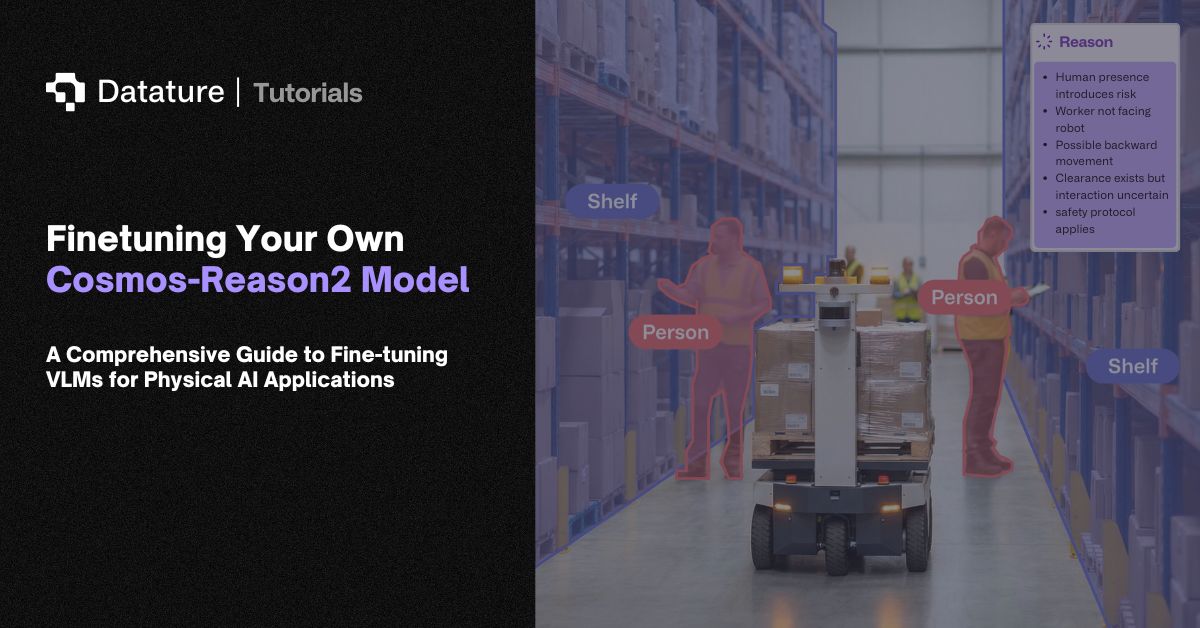
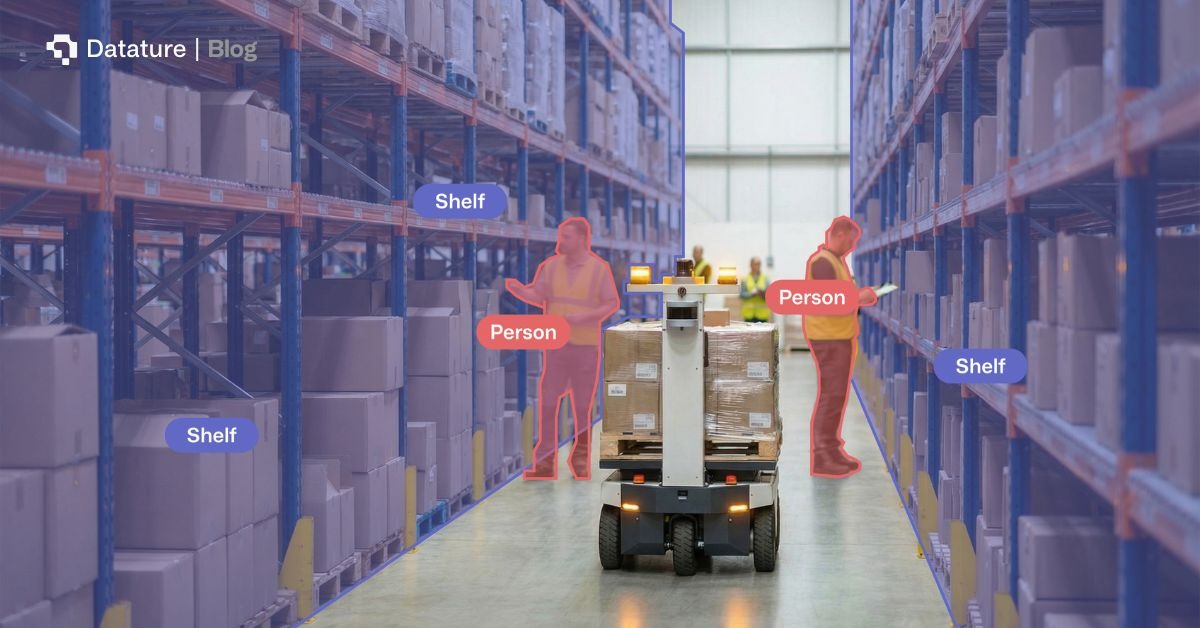
Physical AI systems operating in warehouses, factories, and on roads face a fundamental challenge: they need to understand not just what they see, but why things happen and what might happen next. A robot navigating a busy warehouse doesn't just need to detect objects. It needs to reason about whether a pathway is safe, whether a shelf is stable enough to approach, or whether moving a particular box might cause others to fall.
Traditional approaches to solving this problem come with significant trade-offs. For example, rule-based systems require manual engineering for each scenario. You might spend weeks encoding safety rules for one warehouse layout, only to start from scratch when the environment changes. Standard vision models lack the reasoning capabilities needed for complex decision-making. Building custom training pipelines for vision-language models is time-intensive, requiring deep ML expertise and infrastructure that many robotics teams don't have in-house.
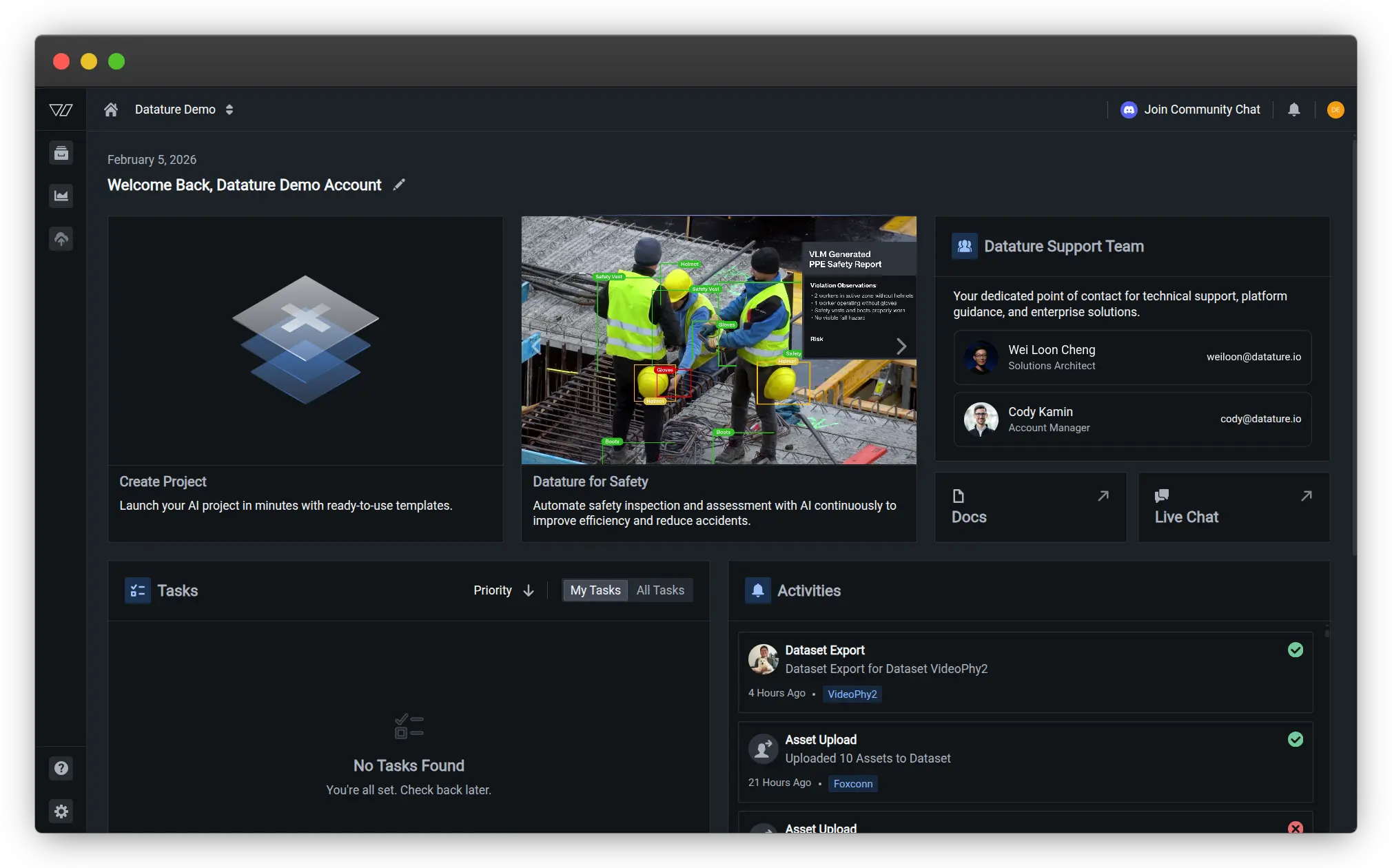
Datature Vi provides an end-to-end workflow from annotation through training to deployment. This is specifically optimized for vision-language models like Cosmos-Reason2. This integrated approach reduces time-to-production from weeks to days, making advanced spatial reasoning accessible to robotics teams without requiring specialized ML infrastructure or extensive model training expertise.
NVIDIA's Cosmos-Reason2 bridges this gap by bringing chain-of-thought reasoning to physical AI. Released in December 2025, Cosmos-Reason2 is an open, customizable vision language model that thinks through problems step by step, generating explicit reasoning traces before arriving at conclusions. The model understands space, time, and fundamental physics, making it particularly valuable for robotics, autonomous systems, and any application where understanding physical cause and effect is critical.
In this article, we'll explore what makes Cosmos-Reason2 special and walk through the complete process of finetuning your own version for custom warehouse automation tasks using a real-world dataset of 100 warehouse scenes.
What is Cosmos-Reason2?
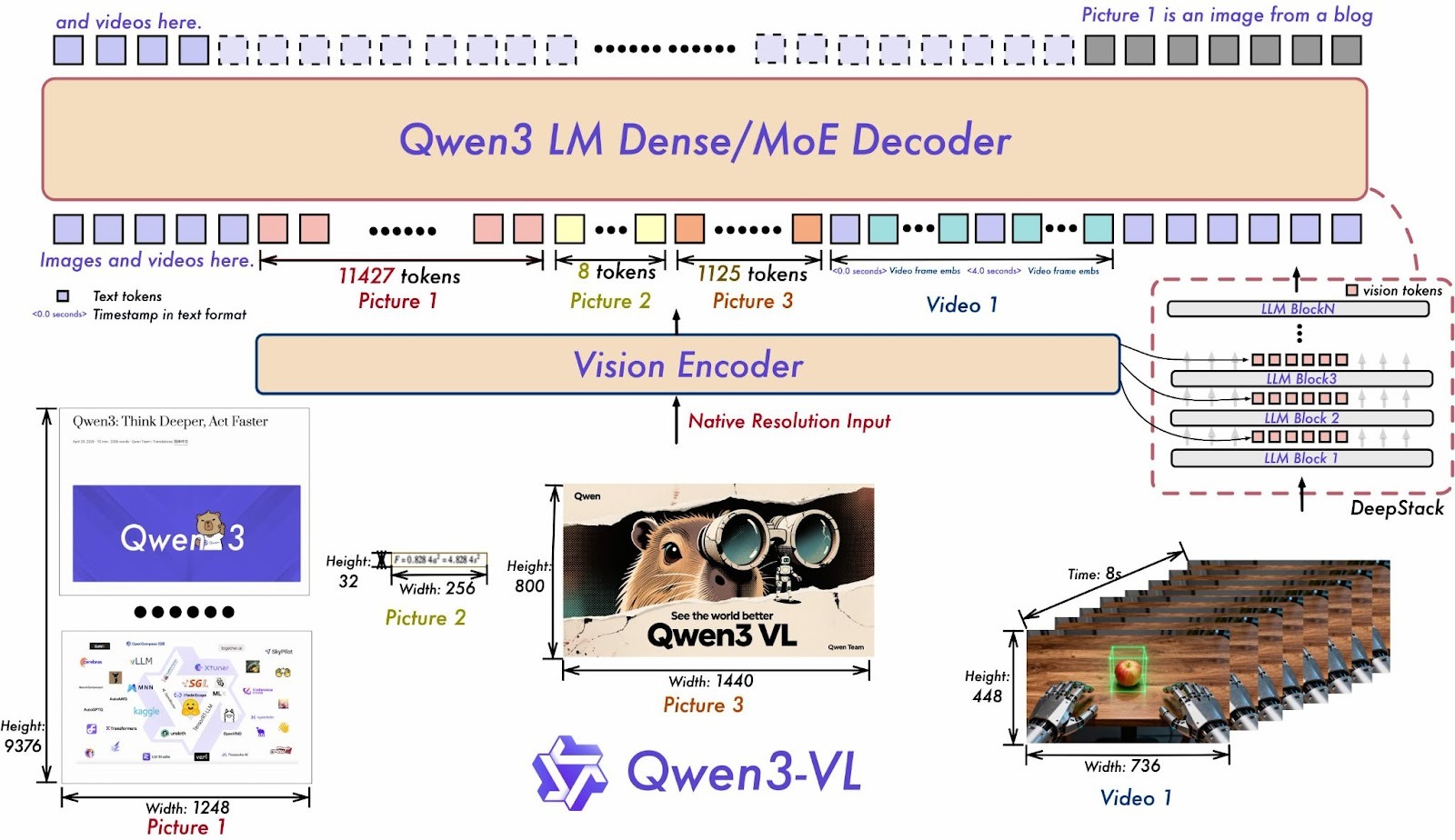
Cosmos-Reason2 represents NVIDIA's second-generation reasoning vision language model purpose-built for physical AI applications. The model family includes two variants: Cosmos-Reason2-2B (2 billion parameters) and Cosmos-Reason2-8B (8 billion parameters), both based on the Qwen3-VL-Instruct architecture.
What sets Cosmos-Reason2 apart is its ability to generate detailed reasoning traces that explain its thought process before producing final answers. When a warehouse robot asks "Is this pathway clear?", Cosmos-Reason2 doesn't just respond with yes or no. Instead, it reasons through the scene:
<think>
Looking at the warehouse pathway, I can see:
- A forklift positioned approximately 3 meters ahead on the left side
- The forklift appears stationary with no operator visible
- The pathway width is approximately 2.5 meters
- There are storage racks on both sides creating the corridor
- No other moving objects or people are visible in the immediate path
- Lighting conditions are good with clear visibility
The forklift is close to the left edge, leaving approximately
1.5 meters of clearance on the right side, which is sufficient for safe passage.
</think>
<answer>
Yes, the pathway is clear.
There is sufficient clearance (approximately 1.5 meters) on the right side
of the stationary forklift to proceed safely.
</answer>
Cosmos-Reason2 brings several key improvements over its predecessor:
- Enhanced spatio-temporal understanding with improved timestamp precision for analyzing video sequences
- Object detection capabilities with 2D/3D point localization and bounding box coordinates, complete with reasoning explanations
- Expanded context window supporting up to 256K input tokens for processing longer videos or complex multi-scene scenarios
- More structured and coherent reasoning traces that are easier for both humans and downstream systems to interpret
The model has been post-trained with extensive datasets covering physical common sense and embodied reasoning scenarios. This training combines supervised fine-tuning with reinforcement learning, allowing Cosmos-Reason2 to learn from millions of physical interactions and develop an intuitive understanding of how the physical world works.
The Power of Chain-of-Thought in Physical AI
Chain-of-thought reasoning is fundamental to how Cosmos-Reason2 approaches problems. Rather than producing instant answers, the model articulates its reasoning process explicitly, working through observations, constraints, and logical inferences step by step.
For physical AI applications, this reasoning capability provides several critical benefits:
Transparency and Debuggability: When a robot makes a decision, developers can trace through the reasoning to understand exactly why. If a warehouse robot chooses a particular route, you can see what factors it considered, which objects it identified as obstacles, and how it weighed different options. This transparency is essential for debugging, improving performance, and building trust in AI systems.
Safety and Reliability: In safety-critical applications, being able to audit decisions is as important as making correct decisions. Cosmos-Reason2's reasoning traces create an automatic audit trail. When an autonomous forklift decides not to proceed, the reasoning explains whether it detected a person in the path, anticipated a collision, or identified an unstable load.
Handling Ambiguity: The physical world is messy. Lighting varies, objects get occluded, and situations are often genuinely ambiguous. By thinking through alternatives and articulating its reasoning, Cosmos-Reason2 can express appropriate uncertainty rather than confidently hallucinating answers.
.gif)
Cosmos-Reason2 is commonly prompted to write a reasoning trace inside <think>...</think>. For the final answer, there are two common patterns:
- Pattern A: Write the final answer immediately after </think> (no additional tags)
- Pattern B: Wrap the final answer in <answer>...</answer> tags
This tutorial uses Pattern B (with explicit <answer> tags) consistently. When using Datature Vi, the platform's special tags (<datature_think> and <datature_answer>) are automatically converted to the model's native format during training. This format is both machine-parsable and human-readable, enabling workflows where you might extract just the reasoning for analysis, show only the answer to end users, or train separate models to evaluate reasoning quality.
Even when finetuning on datasets that don't include explicit chain-of-thought annotations (like many existing warehouse and robotics datasets), Cosmos-Reason2's pre-trained reasoning capabilities often emerge naturally during inference. The model has learned strong priors for physical reasoning that it can apply to new domains with relatively modest amounts of task-specific data.
Finetuning on Datature Vi for Warehouse Spatial Intelligence
To demonstrate the finetuning process, we'll use 100 samples from NVIDIA's PhysicalAI Spatial Intelligence Warehouse dataset, a synthetic RGB-D dataset generated with NVIDIA Omniverse. Each data point includes RGB-D images, object masks, and natural-language QA pairs with normalized answers, making it a clean testbed for spatial reasoning.
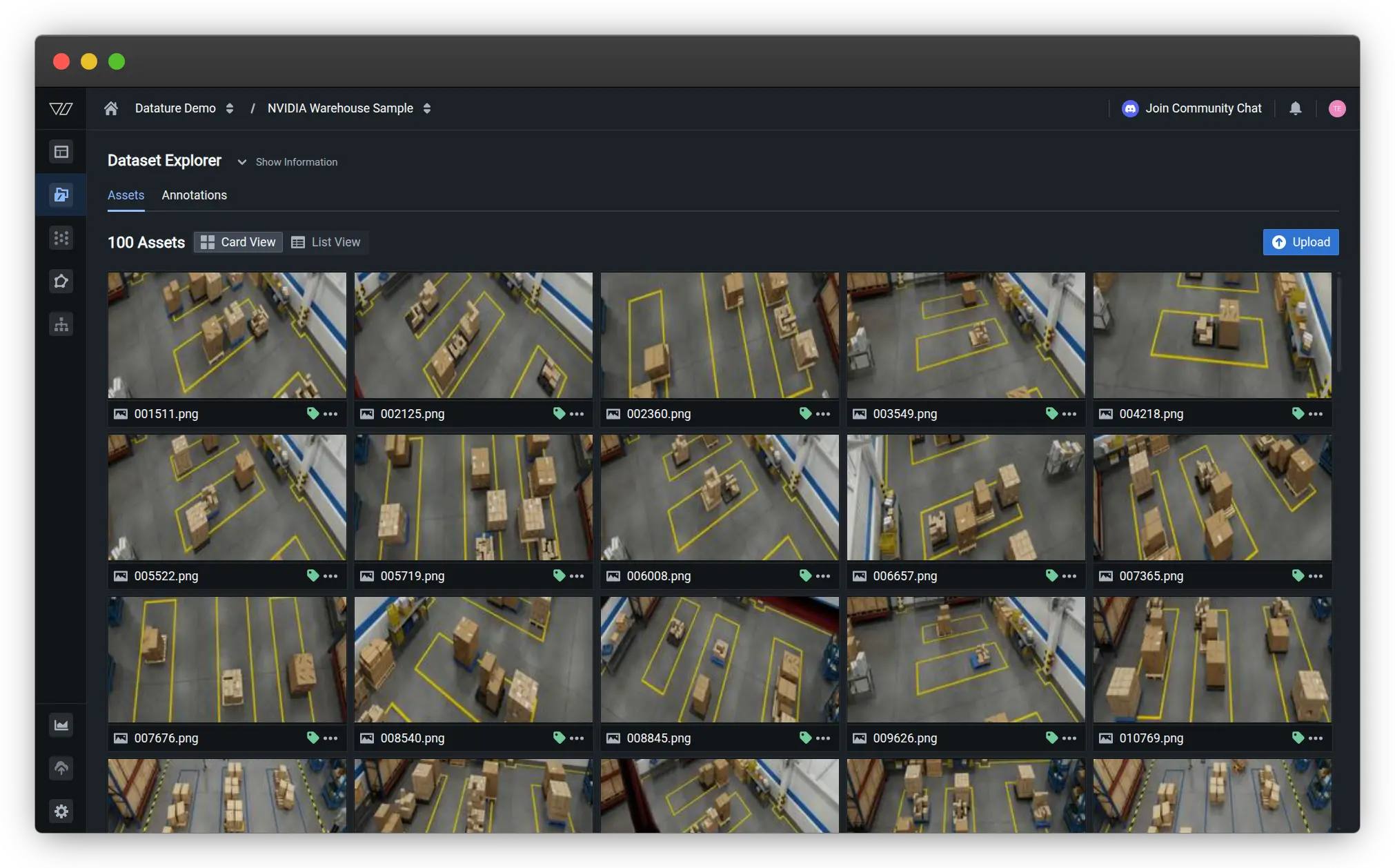
While the original dataset annotations focus on object detection and scene understanding without explicit chain-of-thought reasoning, Cosmos-Reason2's pre-trained reasoning abilities allow it to develop thoughtful responses when properly finetuned for the task.
Dataset Preparation and Annotation
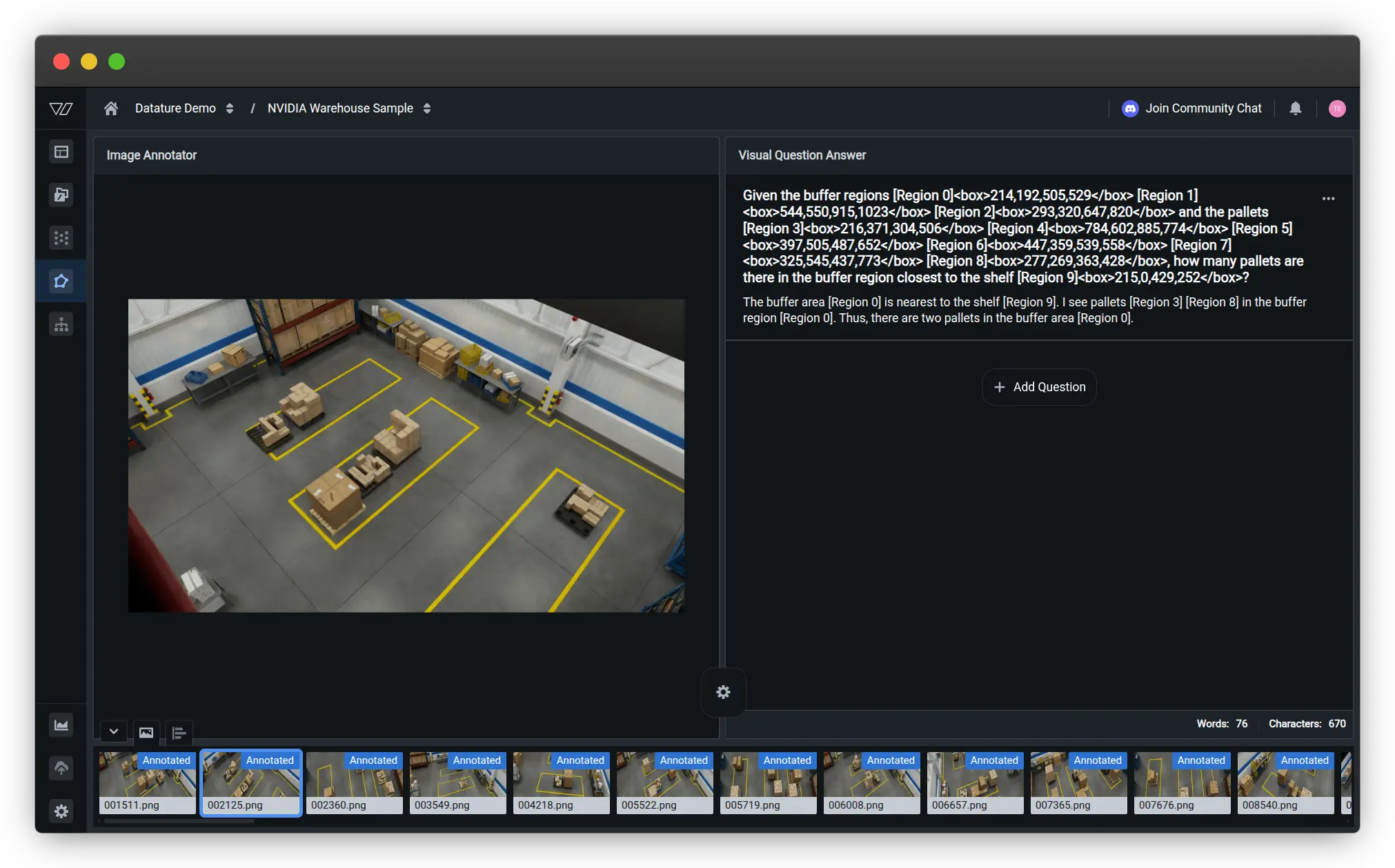
When finetuning on Datature Vi, you'll start by uploading your warehouse images and creating annotations that match your specific use case. For spatial intelligence tasks, this typically includes:
- Object detection labels for key entities (forklifts, workers, packages, racks, pathways)
- Spatial relationship annotations (distances, clearances, positions)
- Visual question-answer pairs that test physical reasoning
- Optional safety assessments or navigation recommendations
Working with Bounding Boxes in VQA Tasks
Why Use Bounding Boxes?
While Cosmos-Reason2 can perform visual reasoning without explicit coordinates, bounding boxes enable:
- Precise measurements: "How far apart are these two pallets?" requires exact localization
- Unambiguous references: Distinguish between multiple similar objects
- Robotics integration: Most robot systems already run object detection for navigation
In production, you don't manually annotate boxes. Instead, use an upstream detector such as YOLO. Learn how to finetune a lightweight object detection model on Datature Nexus.
Currently, Datature Vi doesn't natively support visual question answering with linked phrases to bounding boxes. If your task requires explicit spatial localization and coordinate-based reasoning (like the PhysicalAI Spatial Intelligence Warehouse dataset does), you'll need to manually convert your bounding box annotations into text tokens before uploading them as VQA pairs.
This preprocessing step involves formatting each object's bounding box coordinates as text tokens that can be referenced in your question-answer pairs. This tutorial uses [Region N] tokens plus a <box>x1,y1,x2,y2</box> field for grounding, where N is the region identifier and (x1, y1), (x2, y2) represent the top-left and bottom-right corners of the bounding box. Because Cosmos-Reason2 follows Qwen3-VL's architecture, many Qwen-family examples use normalized coordinates in the range 0-1024. If your annotations are in a different format, convert them before training and keep the convention consistent across training and inference.
# Convert pixel coordinates to normalized 0-1024 format (if needed)
def normalize_bbox(x1, y1, x2, y2, img_width, img_height):
    return (
        int(x1 / img_width * 1024),
        int(y1 / img_height * 1024),
        int(x2 / img_width * 1024),
        int(y2 / img_height * 1024)
    )
For example, if you have annotated buffer zones, pallets, and shelves in your warehouse image, you would convert those annotations into a question like this:
Question: "Given the buffer regions [Region 0]<box>214,192,505,529</box>
[Region 1]<box>544,550,915,1023</box> [Region 2]<box>293,320,647,820</box> and the
pallets [Region 3]<box>216,371,304,506</box> [Region 4]<box>784,602,885,774</box>
[Region 5]<box>397,505,487,652</box> [Region 6]<box>447,359,539,558</box>
[Region 7]<box>325,545,437,773</box> [Region 8]<box>277,269,363,428</box>,
how many pallets are there in the buffer region closest to the shelf
[Region 9]<box>215,0,429,252</box>?"
Answer: "The buffer area [Region 0] is nearest to the shelf [Region 9].
I see pallets [Region 3] [Region 8] in the buffer region [Region 0].
Thus, there are two pallets in the buffer area [Region 0]."
This tokenized format enables Cosmos-Reason2 to perform precise spatial reasoning by referencing specific coordinate regions. The model can learn to understand spatial relationships like containment (which pallets are inside which buffer regions), proximity (which buffer is closest to the shelf), and counting (how many objects satisfy certain spatial criteria).
While this manual conversion adds a preprocessing step to your workflow, it provides the flexibility to create sophisticated spatial reasoning tasks that leverage Cosmos-Reason2's advanced capabilities. You can write scripts to automate this conversion if you're working with large datasets that already have bounding box annotations in standard formats like COCO or YOLO.
For simpler visual question answering tasks that don't require explicit coordinate grounding, you can structure your annotations as standard question-answer pairs:
Question: "Is it safe for the forklift to proceed through this aisle?"

Answer: "No. There is a worker approximately 5 meters ahead on the right
side who appears to be reaching for items on the shelf. The worker has
not acknowledged the forklift's presence. Following standard warehouse
safety protocols, the forklift operator should sound the horn and wait
for the worker to move to a safe position before proceeding."
Even without explicit <think> tags in your training annotations, Cosmos-Reason2 can learn to generate appropriate reasoning traces during inference thanks to its pre-training. However, if you want to explicitly train the model to produce structured reasoning, you can format your answers with Datature's special tags:
<datature_think>
Looking at the warehouse aisle, I observe:
- One forklift at the aisle entrance, approximately 8 meters from my viewpoint
- One worker visible on the right side, about 5 meters ahead of the forklift
- The worker is facing the storage rack, reaching upward, appears focused on the shelf
- Standard aisle width appears to be approximately 3 meters
- The worker has not turned to acknowledge the approaching forklift
Based on standard warehouse safety protocols, proceeding without worker
acknowledgment creates a collision risk.
The worker might step backward or move items into the pathway.
</datature_think>
<datature_answer>
No. There is a worker approximately 5 meters ahead on the right side
who appears to be reaching for items on the shelf.
The worker has not acknowledged the forklift's presence.
Following standard warehouse safety protocols, the forklift operator should sound
the horn and wait for the worker to move to a safe position before proceeding.
</datature_answer>
During the finetuning process, Datature Vi automatically converts these platform-specific tags into the model's native <think> and <answer> format, ensuring compatibility with Cosmos-Reason2's expected structure.
Building Your Training Workflow
Once your data is annotated, setting up a training workflow on Datature Vi is straightforward. Navigate to the Workflows section and create a new workflow that connects your annotated dataset to the Cosmos-Reason2 model architecture of your choice (2B or 8B variant).
The workflow setup involves several configuration steps:
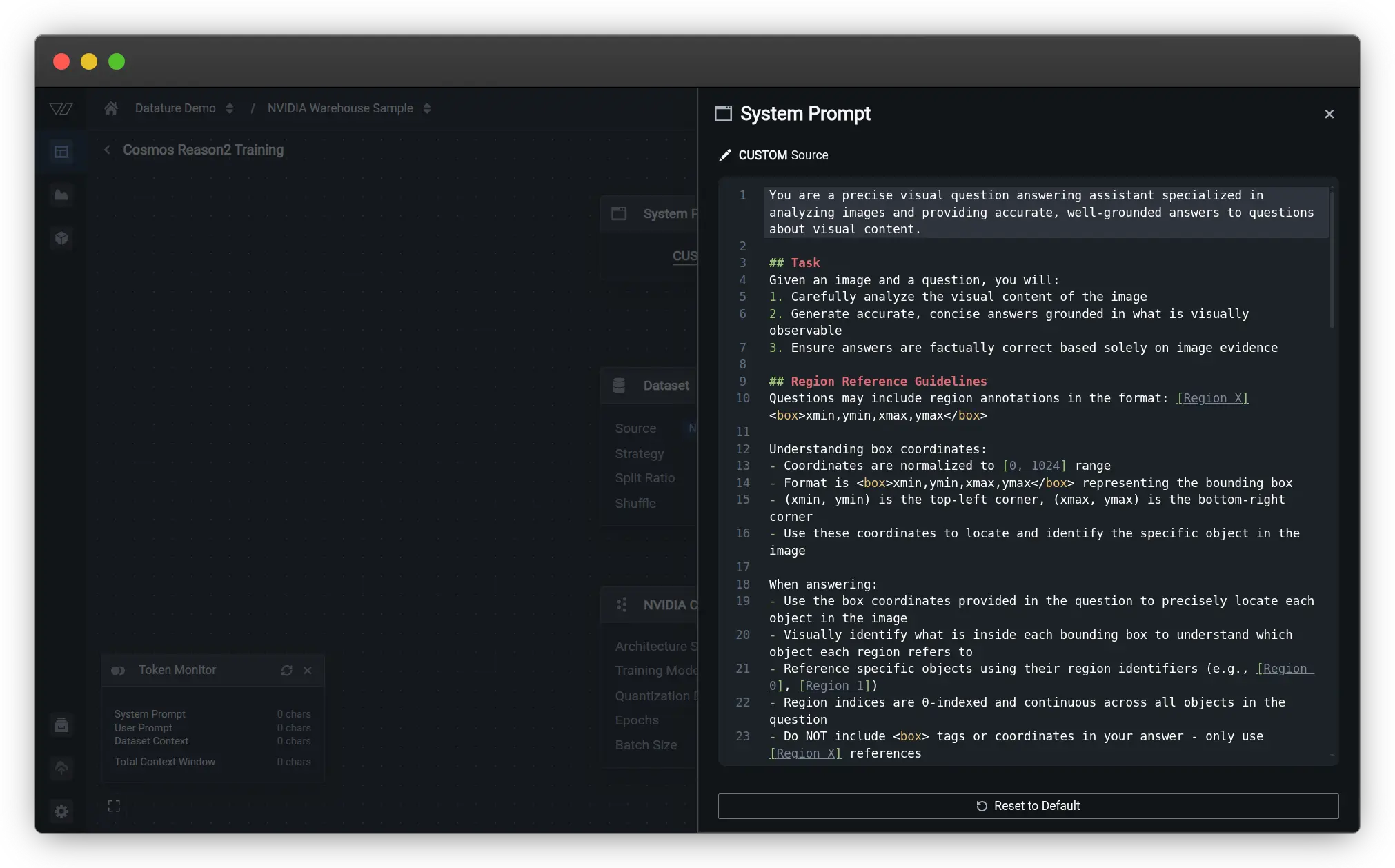
System Prompt Configuration
This is where you define how the model should interpret and respond to spatial reasoning queries. The system prompt includes detailed instructions on:
- The model's role as a visual question answering assistant
- How to analyze visual content and provide grounded answers
- Guidelines for handling region annotations in the format [Region X]<box>xmin,ymin,xmax,ymax</box>
- Instructions to use box coordinates for precise object localization
- How to reference specific objects using region identifiers in answers
Dataset Configuration
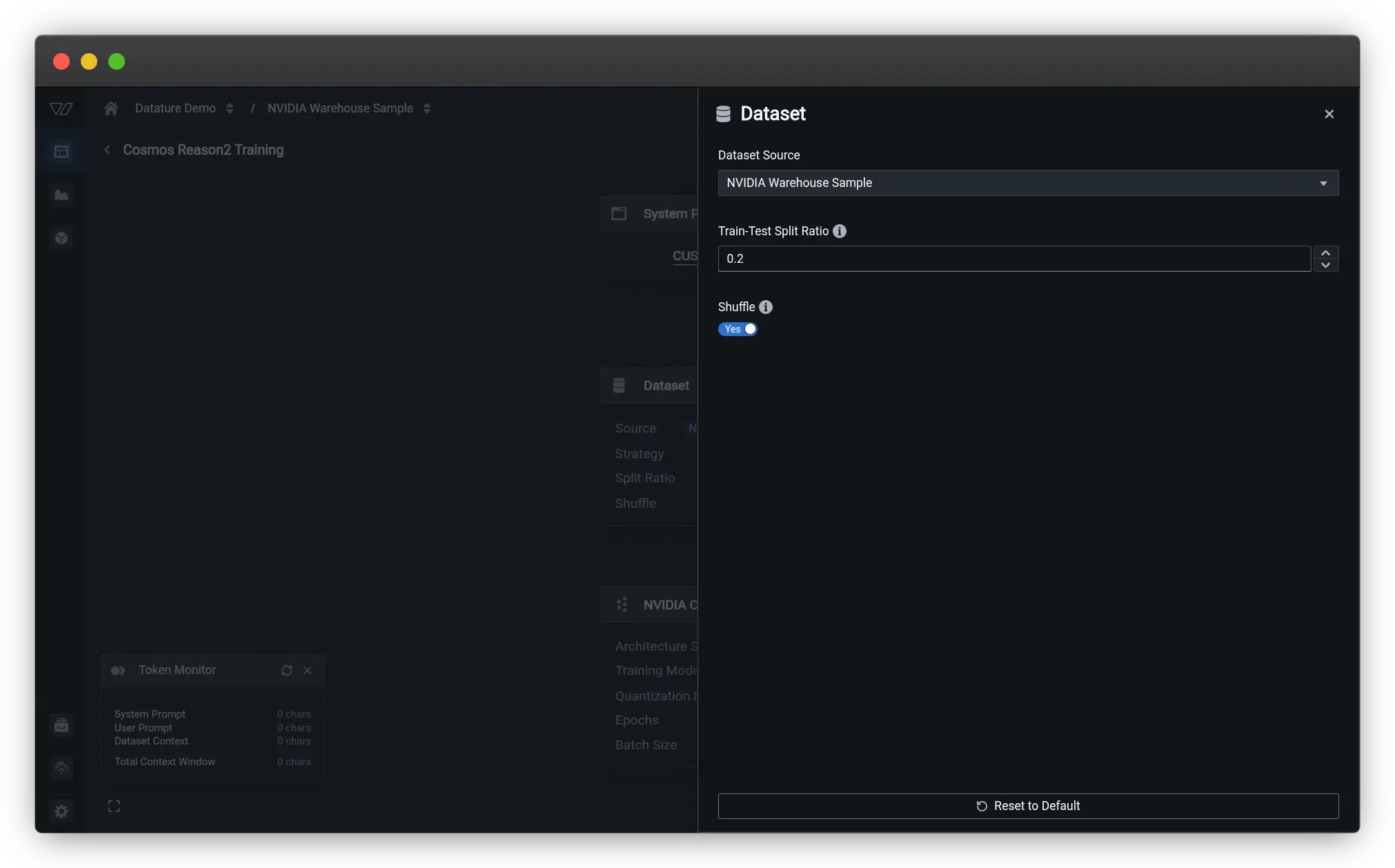
This is where you customize dataset settings. Select your annotated warehouse dataset as the source. You can configure the train-test split ratio (typically 80/20 or 70/30) and enable shuffling to ensure the model sees a diverse mix of examples during training.
Model Selection
Choose the Cosmos-Reason2 architecture and specify key model options. For the 8B model, you'll configure:
- Model architecture size (8B parameters)
- Training mode (LoRA for efficient finetuning)
- Quantization settings (NF4 quantization to reduce memory requirements)
- Precision type (BFloat16 for optimal performance)
Hyperparameters
Configure training settings based on your dataset and computational resources:
- Learning rate: Start with the recommended rate from the base model (typically around 1e-5 to 5e-5 for finetuning)
- Batch size: Adjust based on your GPU memory, typically 2-8 for the 8B model
- Number of epochs: Usually 3-10 epochs is sufficient for smaller datasets
- Evaluation frequency: Set how often to run validation checks during training
For our 100-sample warehouse dataset, we used:
- Learning rate: 0.00005 (5e-5)
- Batch size: 4
- Epochs: 100
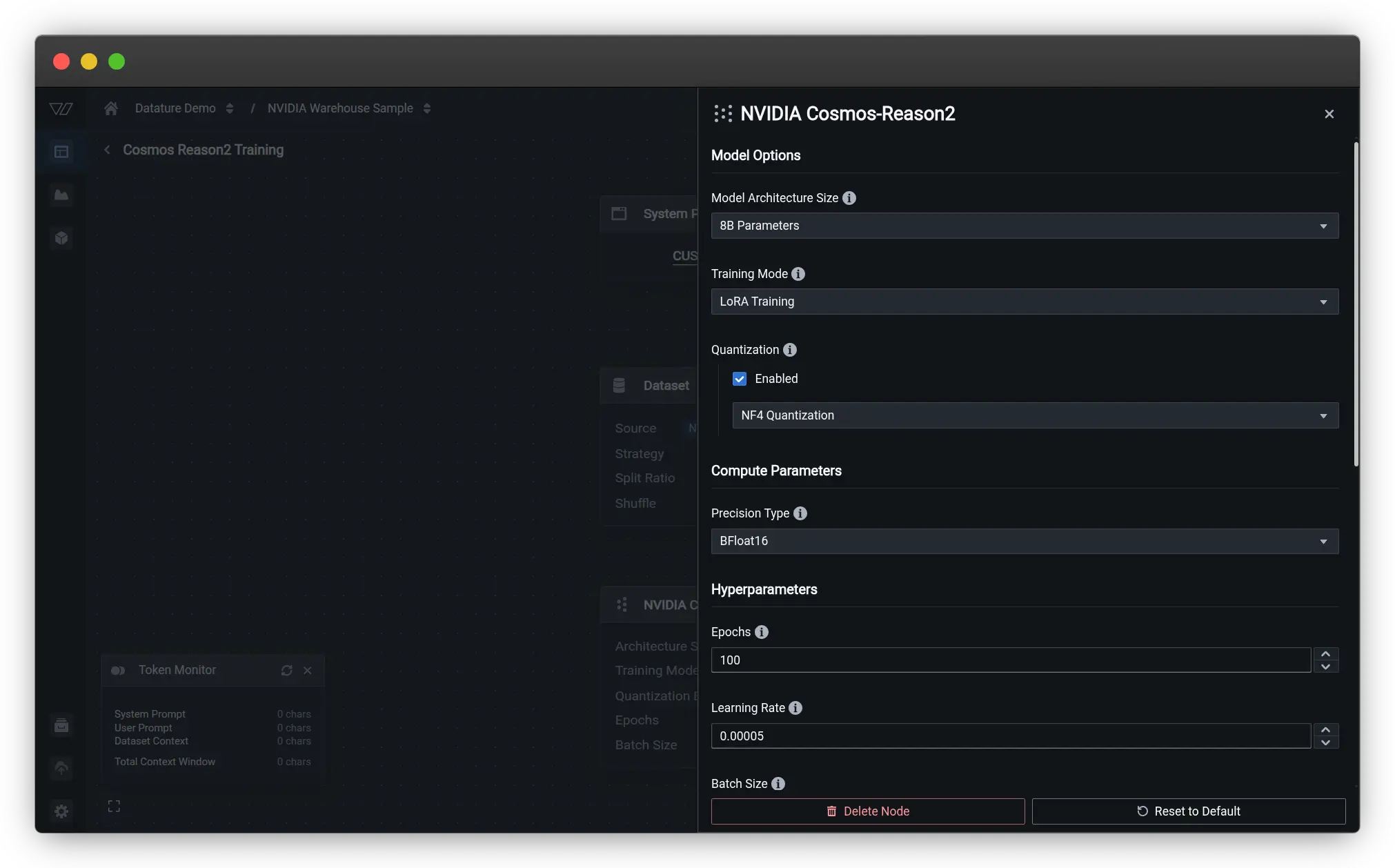
Once done, click on the Run Training button to set up the training settings.
Hardware Configuration
Select your GPU type and quantity. For the warehouse dataset with 100 samples, we used 4x NVIDIA A10G GPUs (each with 24 GiB memory). The 8B model requires at least 32GB of GPU memory for training, so you'll need either multiple smaller GPUs or a single larger GPU like an H100.
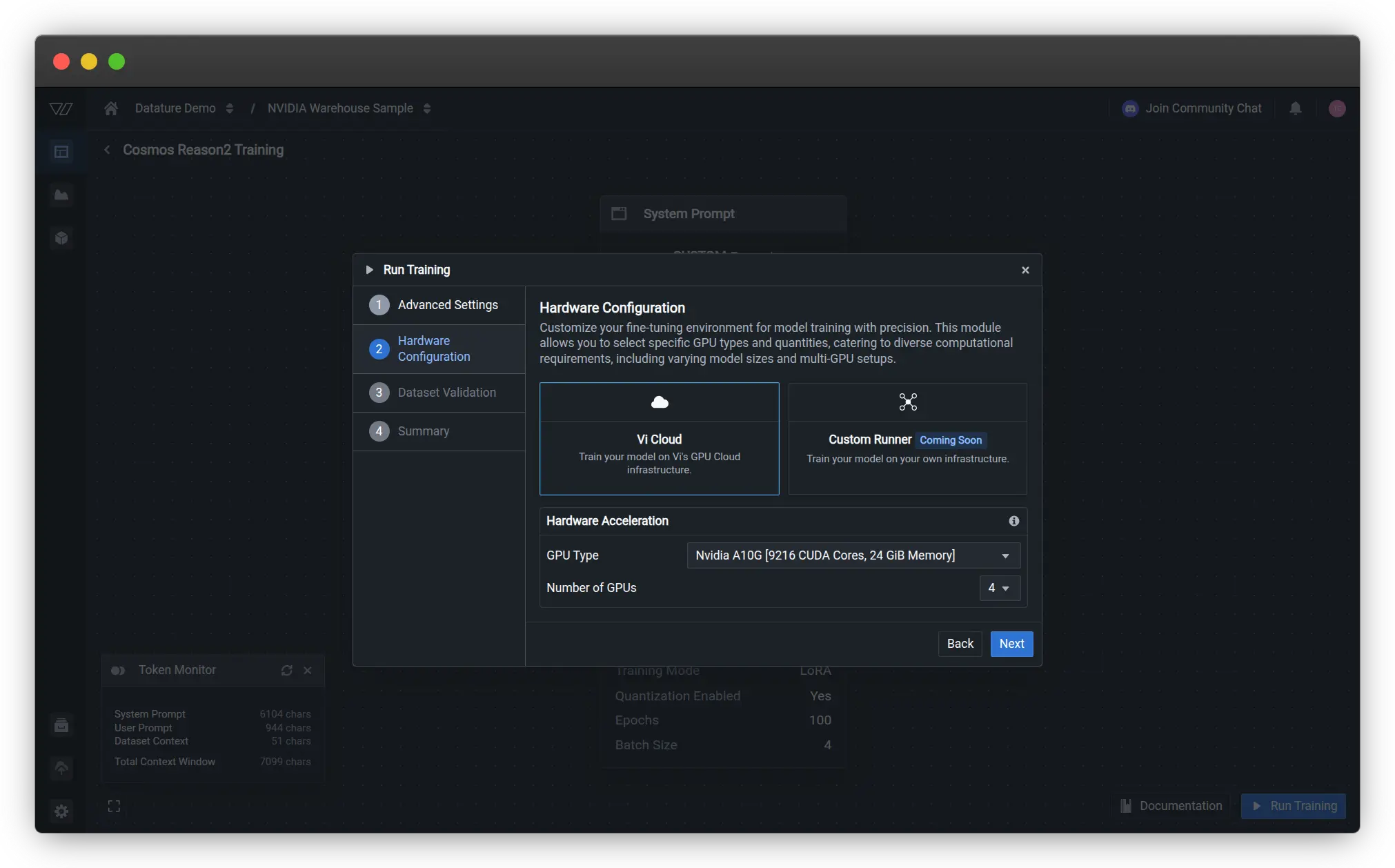
The training process takes advantage of Datature Vi's optimized infrastructure, typically completing in about 3 hours for this dataset size given the chosen hardware. During training, you can monitor loss curves, view sample predictions, and track how well the model is learning to reason about your specific warehouse scenarios.
Training Results and Model Behavior
Once training begins, Datature Vi provides real-time visualization of model performance through evaluation checkpoints. You can see how the model's predictions evolve across training iterations, with the final answers displayed for representative validation samples.
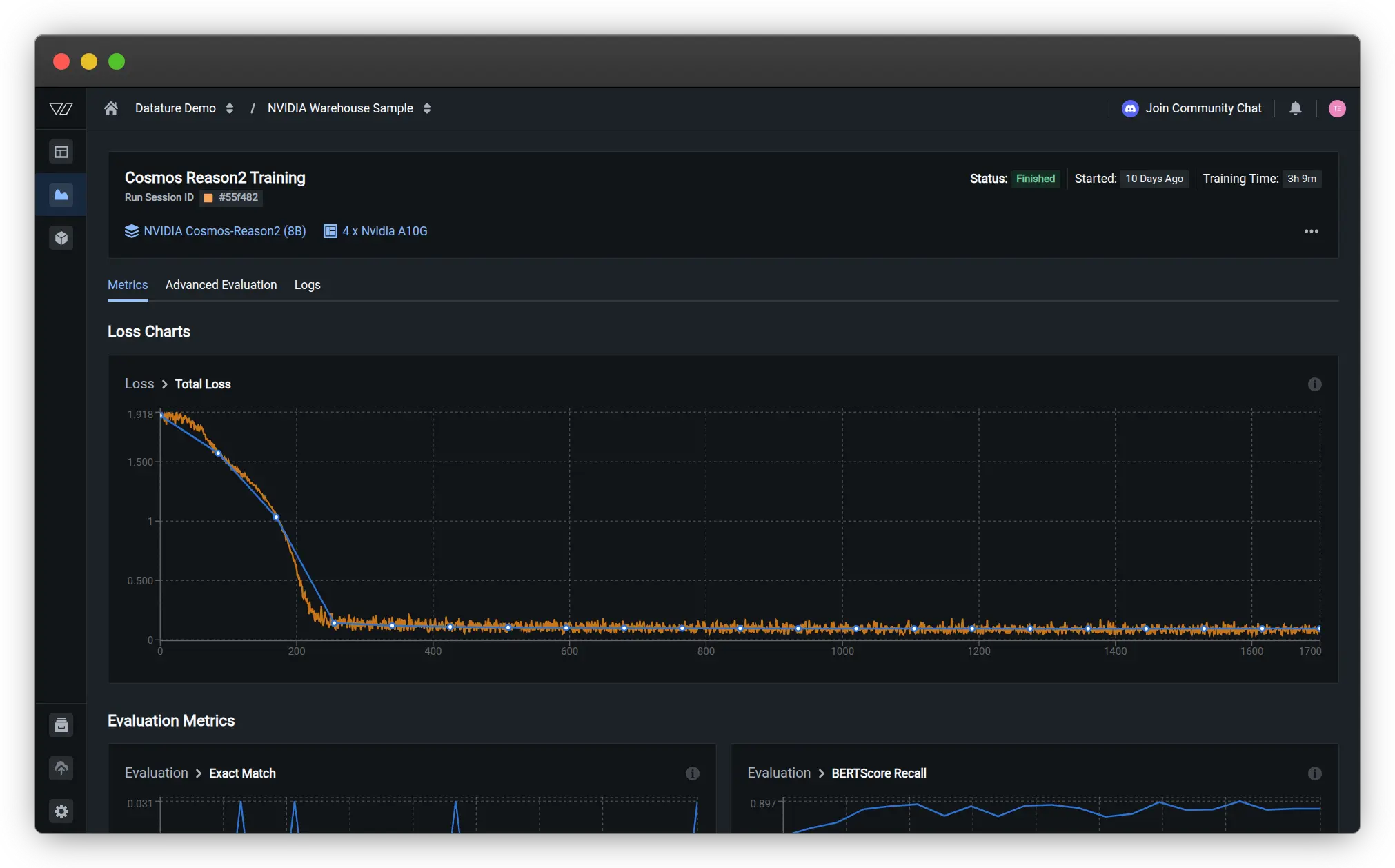
Loss Curves and Training Progress
The training dashboard displays the total loss curve, which shows how well the model is learning from your data. For our warehouse spatial intelligence task, the loss decreased rapidly in the first 200 steps, then gradually stabilized as the model converged. The smooth descent indicates healthy training without overfitting or instability.
Evaluation Metrics
During training, Datature Vi tracks multiple evaluation metrics to assess different aspects of model performance:
Primary Metric: Exact-Match Accuracy
Since the dataset includes normalized single-word answers for many queries, exact-match accuracy on these normalized answers serves as the primary evaluation metric. This provides a clear signal of whether the model is producing correctly grounded responses.
Secondary Metrics for Free-Form Explanations
- BERTScore Precision: Measures how precisely the model's outputs match the reference answers, with scores around 0.92 indicating strong alignment
- METEOR: Evaluates the quality of generated text by considering synonyms and word order, showing steady improvement to ~0.6
- ROUGE: Assesses overlap between generated and reference answers, reaching ~0.55 for our spatial reasoning task
- BERTScore F1: Balances precision and recall, stabilizing around 0.91
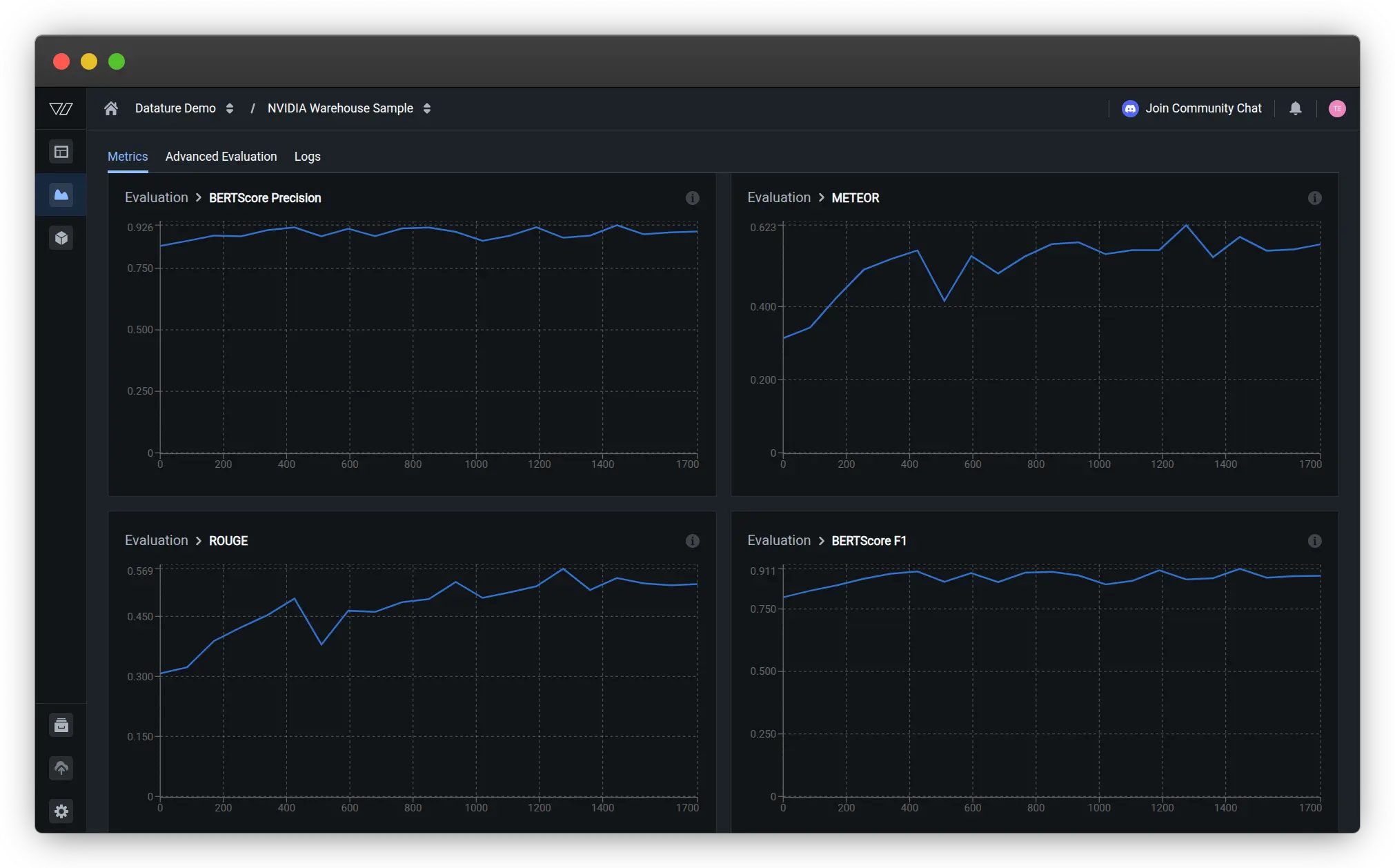
These metrics provide complementary views of model quality. High BERTScore indicates the model generates semantically similar answers to the ground truth, while ROUGE and METEOR scores reflect lexical similarity and fluency.
Advanced Evaluation with Spatial Reasoning
The advanced evaluation tab shows actual model predictions on validation samples, making it easy to assess qualitative performance. For spatial reasoning tasks with bounding box coordinates, you can see both the ground truth and predicted answers side by side.
For example, on a validation scene asking "How distant is the pallet [Region 0]<box>199,429,307,599</box> from the pallet [Region 1]<box>276,297,364,453</box>?", the model demonstrates its spatial understanding:
Ground Truth: "The pallet [Region 0] and the pallet [Region 1]
are 2.07 meters apart from each other."

Prediction: "The buffer distance from the pallet [Region 0] is 1.83 meters."
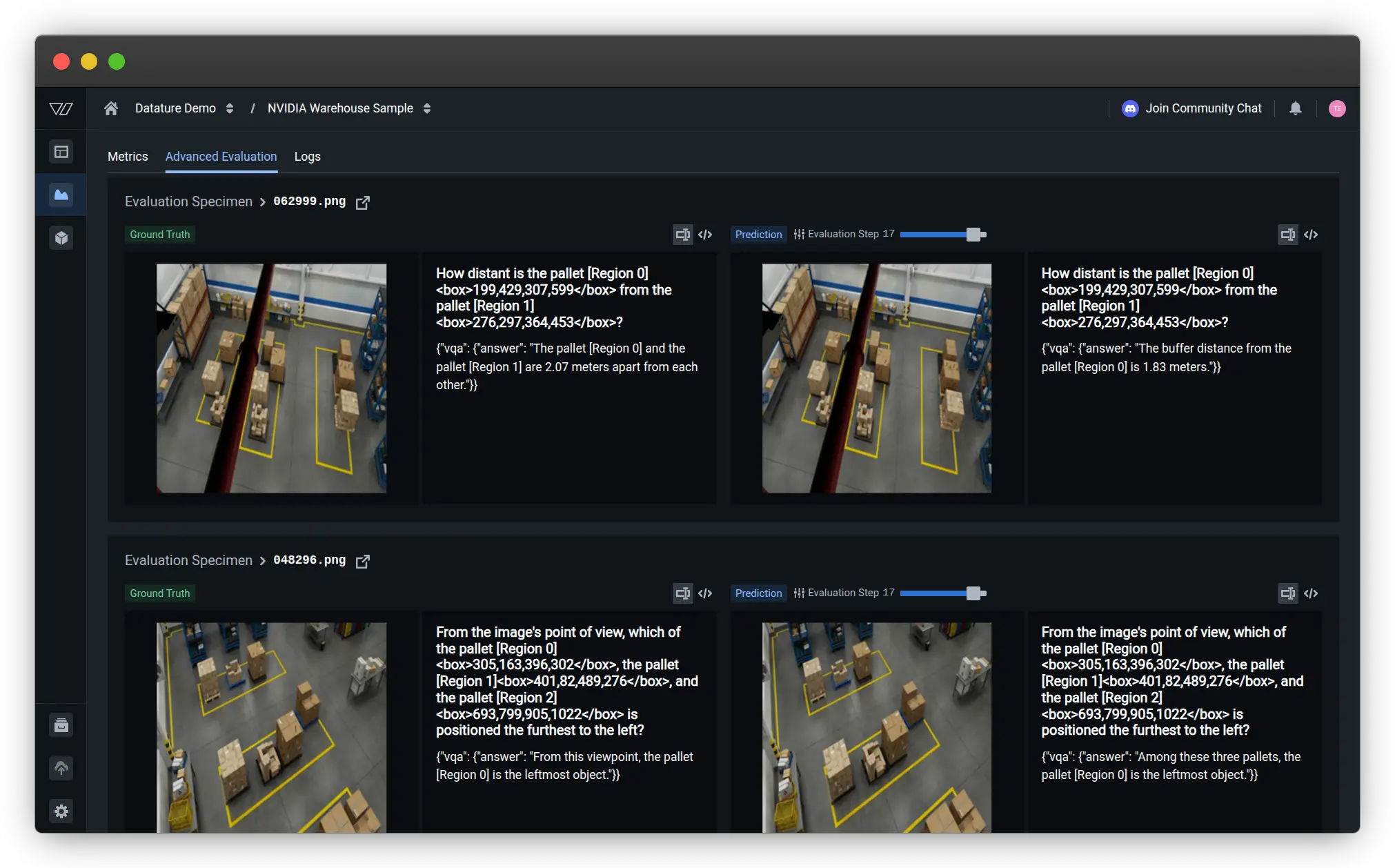
While there's some variation in the exact distance estimate (2.07m vs 1.83m), the model demonstrates it understands the task structure, correctly references the region identifiers, and provides a reasonable distance estimate. This shows the model learned to:
- Parse questions containing region tokens and bounding box coordinates
- Understand what spatial relationship is being queried (distance in this case)
- Reference specific regions in its answer using the correct format
- Generate quantitative spatial estimates
Another evaluation sample asks: "From the image's point of view, which of the pallet [Region 0]<box>305,163,396,302</box>, the pallet [Region 1]<box>401,82,489,276</box>, and the pallet [Region 2]<box>693,799,905,1022</box> is positioned the furthest to the left?"
Ground Truth: "From this viewpoint, the pallet [Region 0] is the leftmost object."

Prediction: "Among these three pallets, the pallet [Region 0] is the leftmost object."
Here the model produces nearly identical output to the ground truth, demonstrating strong understanding of relative positioning and viewpoint-dependent spatial reasoning.
One interesting observation from finetuning Cosmos-Reason2 on warehouse data is how the model's reasoning capabilities transfer across scenarios. Even though our 100 training samples covered a limited set of warehouse configurations, the finetuned model generalized well to variations in lighting, object positions, and scene complexity. This demonstrates the strength of the model's pre-trained physical reasoning foundation.
Model Generalization
The evaluation results demonstrate that even with 100 training samples, the finetuned Cosmos-Reason2 model develops strong spatial reasoning capabilities for warehouse scenarios. The model learns to:
- Parse complex questions with embedded bounding box coordinates
- Understand spatial relationships like distance, relative position, and containment
- Generate quantitative estimates (distances in meters)
- Reference specific objects using region identifiers correctly
- Provide answers grounded in the visual evidence
The smooth training curves and high evaluation scores (BERTScore F1 ~0.91) indicate the model successfully adapted to the warehouse domain while retaining its pre-trained reasoning abilities.
Deployment and Inference
After training completes, deploying your finetuned Cosmos-Reason2 model for inference is straightforward. Datature Vi provides multiple deployment options depending on your needs.
Local Inference with Vi SDK
For development and testing, you can run inference directly on your own hardware using the Vi SDK:
from vi.inference import ViModel
secret_key = "YOUR_DATATURE_VI_SECRET_KEY"
organization_id = "YOUR_DATATURE_VI_ORGANIZATION_ID"
run_id = "YOUR_TRAINED_MODEL_RUN_ID"
# Initialize the model
model = ViModel(
secret_key=secret_key,
organization_id=organization_id,
run_id=run_id
)
# Run inference with reasoning enabled
result = model(
source="path/to/warehouse/image.jpg",
user_prompt="How far are the two boxes away from each other?",
cot=True, # Enable chain-of-thought reasoning
stream=False
)
# Access reasoning and answer separately
print("Reasoning:", result['thinking'])
print("Answer:", result['answer'])
Setting the cot=True flag tells the model to generate explicit reasoning traces. If you want just the final answer without the reasoning process (for example, in production systems where latency is critical), you can set cot=False.
NVIDIA NIM Deployment
For production deployments requiring high throughput and optimized performance, you can use NVIDIA NIM (NVIDIA Inference Microservices) to containerize and serve your finetuned Cosmos-Reason2 model. NIM provides automatic optimization, batching, and scaling capabilities that make it easy to deploy VLMs at scale.
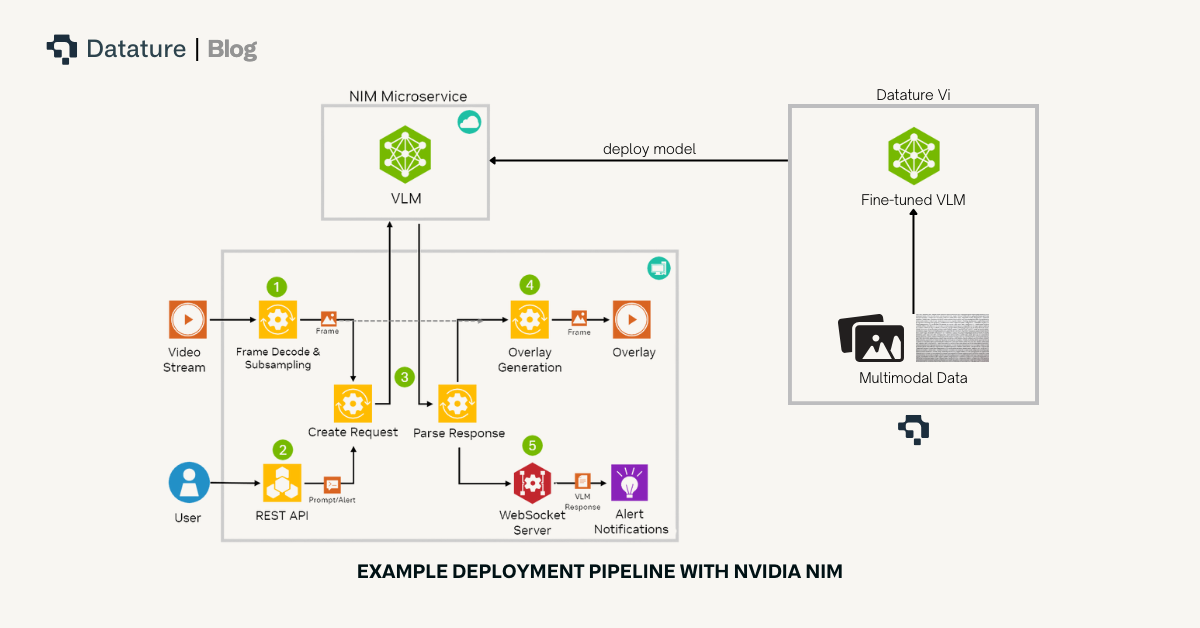
NIM containers package the entire inference stack including the model, runtime dependencies, and optimized inference engine. This makes deployment consistent across different environments, whether you're running on on-premise servers, cloud infrastructure, or edge devices.
You can deploy Cosmos-Reason2 NIM using Vi SDK.
Reproducibility and Verification
To ensure your results are reproducible, here are the key configuration details:
Dataset Configuration
- PhysicalAI Spatial Intelligence Warehouse (100 samples)
- Train/Validation Split: 0.2 (80 training, 20 validation samples)
- Random Seed: 42 (for consistent splits)
Model Configuration
- Architecture: Cosmos-Reason2-8B
- Training Mode: LoRA (Low-Rank Adaptation)
- Quantization: NF4
- Precision: BFloat16
Training Hyperparameters
- Learning Rate: 5e-5
- Batch Size: 4
- Gradient Accumulation Steps: 1
- Weight Decay: 0.01
- Warmup Steps: 10
Inference Setup
- Datature Vi SDK: 0.1.0b6 or later
- Transformers: 4.57.6 or later
Verification with Local Transformers
For those who want to verify results independently, here's a local inference example using Transformers:
from transformers import Qwen2VLForConditionalGeneration, AutoProcessor
import torch

model_id = "nvidia/Cosmos-Reason2-8B"
model = Qwen2VLForConditionalGeneration.from_pretrained(
    model_id,
    torch_dtype=torch.bfloat16,
    device_map="auto"
)
processor = AutoProcessor.from_pretrained(model_id)

# Prepare inputs
messages = [{
  "role": "user",
  "content": [
    {
      "type": "image",
      "image": "path/to/warehouse/image.jpg"
    },
    {
      "type": "text",
      "text": "How far are the two boxes away from each other?"
    }
  ]
}]

text = processor.apply_chat_template(
  messages,
  tokenize=False,
  add_generation_prompt=True
)
inputs = processor(
  text=[text],
  images=[image],
  return_tensors="pt"
).to("cuda")

# Generate with reasoning
output = model.generate(
  **inputs,
  max_new_tokens=4096,
  do_sample=False
)
response = processor.decode(
  output[0],
  skip_special_tokens=True
)
print(response)
Practical Tips and Best Practices
Based on our experience finetuning Cosmos-Reason2 for warehouse applications, here are some practical recommendations:
- Start with Quality Over Quantity: Even with just 100 well-annotated samples, Cosmos-Reason2 can learn effectively thanks to its strong pre-training. Focus on covering diverse scenarios (different lighting conditions, various object configurations, range of safety situations) rather than collecting thousands of similar images.
- Leverage the Model's Reasoning Capabilities: Even if your training data doesn't include explicit reasoning annotations, Cosmos-Reason2 will often generate helpful reasoning traces during inference. You can use these generated traces to improve your training data by reviewing the model's reasoning, correcting it where needed, and incorporating those corrections into additional training iterations.
- Set Appropriate Context Length: Cosmos-Reason2 supports up to 256K input tokens, but for single-image tasks, you won't need nearly that much. However, if you're processing video sequences or want the model to reason across multiple views of the same scene, take advantage of this long context capability.
- Monitor Reasoning Quality: During evaluation, don't just check if the final answers are correct. Review the reasoning traces to ensure the model's logic is sound. Sometimes models arrive at correct answers through faulty reasoning, which can lead to failures on slightly different inputs.
- Use Appropriate Hardware: The 8B model requires at least 32GB of GPU memory for inference. For finetuning, having 40-80GB is recommended for efficient batch processing. The 2B model can run on smaller GPUs (24GB) and provides a good balance of capability and accessibility for many applications.
Troubleshooting Common Issues
Coordinate Mismatch Symptoms
- Model predicts regions outside image bounds
- Grounding appears completely wrong despite correct question structure
- Solution: Verify your coordinate convention (pixels vs 0-1024 normalized) matches the model's expected format
Truncated Reasoning Traces
- Chain-of-thought reasoning cuts off mid-sentence
- Model produces correct answers but incomplete reasoning
- Solution: Increase max_tokens parameter to 4096+ for inference
Reasoning Format Parsing Failures
- Cannot extract reasoning and answer separately
- Unexpected output structure
- Solution: Verify your prompt template matches the training format (Pattern A vs Pattern B) and check for invisible characters in code blocks
Video Processing Issues
- Poor performance on video sequences
- Inconsistent temporal reasoning
- Solution: Ensure FPS=4 for video input and that max tokens accommodate longer responses
Try It On Your Own Data
Ready to finetune Cosmos-Reason2 for your own physical AI applications? Head over to Datature Vi and create a free account. The platform provides access to Cosmos-Reason2 along with an intuitive interface for data annotation, model training, and deployment.
Beyond Static Images: Video Data Support
While this tutorial focused on static warehouse images, Cosmos-Reason2's spatio-temporal reasoning capabilities truly shine with video data. Datature Vi supports video annotation and finetuning, allowing you to train models that understand motion, temporal sequences, and dynamic interactions in physical environments.You can annotate video data with:
- Temporal bounding boxes tracking objects across frames
- Time-stamped visual question-answer pairs for specific moments or sequences
- Multi-frame reasoning tasks that require understanding causality and motion patterns
- Safety assessments that consider object trajectories and predicted movements
.webp)
This is particularly valuable for applications like:
- Autonomous vehicle navigation analyzing traffic flow and pedestrian behavior
- Robotic manipulation understanding object dynamics during pick-and-place operations
- Warehouse safety monitoring detecting potential collision risks from moving forklifts
- Quality control inspection tracking defects or anomalies across production sequences
Video Configuration Best Practices
When working with video data, Cosmos-Reason2 has specific requirements for optimal performance:
- Frame Rate: Use FPS=4 for video input to match the model's training configuration
- Output Tokens: Set max output tokens to 4096 or higher to avoid truncating chain-of-thought reasoning traces
- Context Window: The model supports up to 256K input tokens, enabling analysis of extended video sequences
Example video inference configuration with Vi SDK:
result = model(
    source="warehouse_video.mp4",
    user_prompt="Analyze the safety of this forklift maneuver",
    cot=True,
    fps=4,  # Match training configuration
    max_tokens=4096  # Allow full reasoning traces
)
Whether you're working on warehouse automation, robotics, autonomous vehicles, or any other physical AI application, Cosmos-Reason2's reasoning capabilities can help your systems understand and navigate the complexity of the real world. The model's open nature means you can customize it extensively, adapt it to your specific scenarios, and deploy it wherever you need it.
For more detailed documentation on training configurations, deployment options, and advanced features, check out the Datature Vi Developer Documentation. The team has also created several example workflows and tutorials that demonstrate different use cases and training strategies.
Our Developer's Roadmap
At Datature, we're committed to making physical AI development more accessible and powerful. Our integration of Cosmos-Reason2 is just the beginning. Here's what we're working on:
- Expanded Model Support: While Cosmos-Reason2 currently takes center stage, we're evaluating other reasoning-capable VLMs and preparing to support multiple model families. This will give developers flexibility to choose the model that best fits their use case, whether optimizing for speed, accuracy, model size, or domain-specific performance.
- Multi-Modal Reasoning: Cosmos-Reason2 works with images and video, but many physical AI applications involve additional sensor modalities like LiDAR, radar, or depth cameras. We're exploring how to extend chain-of-thought reasoning across multiple sensor types, allowing models to reason about information from diverse sources.
The future of physical AI depends on systems that don't just perceive but genuinely understand the physical world. Chain-of-thought reasoning is a crucial step toward that goal, and tools like Cosmos-Reason2 make it accessible to developers everywhere.
References
- NVIDIA (2025). "Cosmos-Reason2: Physical AI Common Sense and Embodied Reasoning Models." GitHub Repository: https://github.com/nvidia-cosmos/cosmos-reason2
- NVIDIA (2025). "Cosmos-Reason2 Documentation." NVIDIA Cosmos Documentation: https://docs.nvidia.com/cosmos/latest/reason2/index.html
- NVIDIA (2025). "Cosmos-Reason2 Model Collection." Hugging Face: https://huggingface.co/collections/nvidia/cosmos-reason2
- NVIDIA (2025). "PhysicalAI Spatial Intelligence Warehouse Dataset." Hugging Face Datasets: https://huggingface.co/datasets/nvidia/PhysicalAI-Spatial-Intelligence-Warehouse
- Wei, J., et al. (2022). "Chain-of-Thought Prompting Elicits Reasoning in Large Language Models." NeurIPS 2022. arXiv:2201.11903
.png)
.png)