.png)

Introduction to YOLO26
YOLO26 is the latest release of the YOLO series. Unlike previous iterations, YOLO26 takes a deployment-first approach by streamlining the detection pipeline to deliver exceptional performance on edge devices, mobile platforms, and resource-constrained environments. This edge-optimized philosophy manifests through several innovations: the removal of Distribution Focal Loss (DFL), native end-to-end NMS-free inference, and the introduction of Progressive Loss Balancing (ProgLoss) combined with Small-Target-Aware Label Assignment (STAL). Powered by the novel MuSGD optimizer, YOLO26 achieves faster convergence during training while maintaining the accuracy and speed that have made the YOLO family the gold standard for real-time detection.
Performance benchmarks reveal YOLO26's compelling advantages: up to 43% faster CPU inference compared to previous YOLO versions, competitive accuracy across multiple tasks, and seamless deployment across diverse hardware platforms. As a multi-task framework supporting object detection, instance segmentation, pose estimation, oriented detection, and classification, YOLO26 delivers versatility without sacrificing the simplicity and efficiency that edge AI applications demand.
YOLO's Evolution: From YOLOv1 to YOLO26
The YOLO (You Only Look Once) family has dominated real-time object detection since its introduction in 2016. The original YOLOv1 revolutionized the field by reframing detection as a single-stage regression problem, enabling real-time speeds that two-stage detectors like R-CNN couldn't match. Subsequent versions like YOLO2, YOLO3, and YOLO4 progressively improved accuracy through techniques like anchor boxes, multi-scale feature fusion, and Cross-Stage Partial Networks (CSPNet). For a full walkthrough of each generation, see our historical breakdown of YOLO.
The PyTorch-based Ultralytics releases (YOLOv5, YOLOv8, YOLO11) brought enhanced modularity and deployment flexibility, making YOLO accessible across platforms from cloud servers to mobile devices. YOLOv8 introduced decoupled detection heads and anchor-free predictions, while YOLO11 added CSP bottlenecks and attention modules for improved efficiency. More recent variants like YOLOv12 and YOLOv13 explored attention-centric architectures and hypergraph-based refinements, pushing accuracy benchmarks higher.
However, these models retained reliance on Non-Maximum Suppression (NMS) for post-processing and Distribution Focal Loss (DFL) for bounding box regression, which created latency overhead and export challenges, especially for low-power devices. YOLO26 directly addresses these limitations, marking the first YOLO release to eliminate both NMS and DFL while maintaining the family's signature balance of speed and accuracy.
What Makes YOLO26 Better?
Removing Distribution Focal Loss (DFL)
One of YOLO26's most impactful changes is eliminating the Distribution Focal Loss (DFL) module used in YOLOv8, YOLO11, and related versions. DFL improved bounding box localization by predicting probability distributions for box coordinates rather than single values. While this enhanced precision, it introduced computational overhead and complicated model export to formats like ONNX, TensorRT, CoreML, and TFLite.
By removing DFL, YOLO26 simplifies bounding box regression to a straightforward prediction task. This architectural streamlining provides a few main benefits:
- Reduces Inference Latency: As dimensionality of the predicted coordinates is significantly reduced and no processing of predicted coordinates is required, inference latency is improved
- Export Compatibility: Removing DFL allows for removal of custom operations that were designed to allow for export compatibility across various formats, allowing for simplified export and deployment as well as ease of development in future works
This decision reflects YOLO26's core philosophy: achieving production-ready performance through architectural simplicity rather than added complexity.
NMS-Free Inference
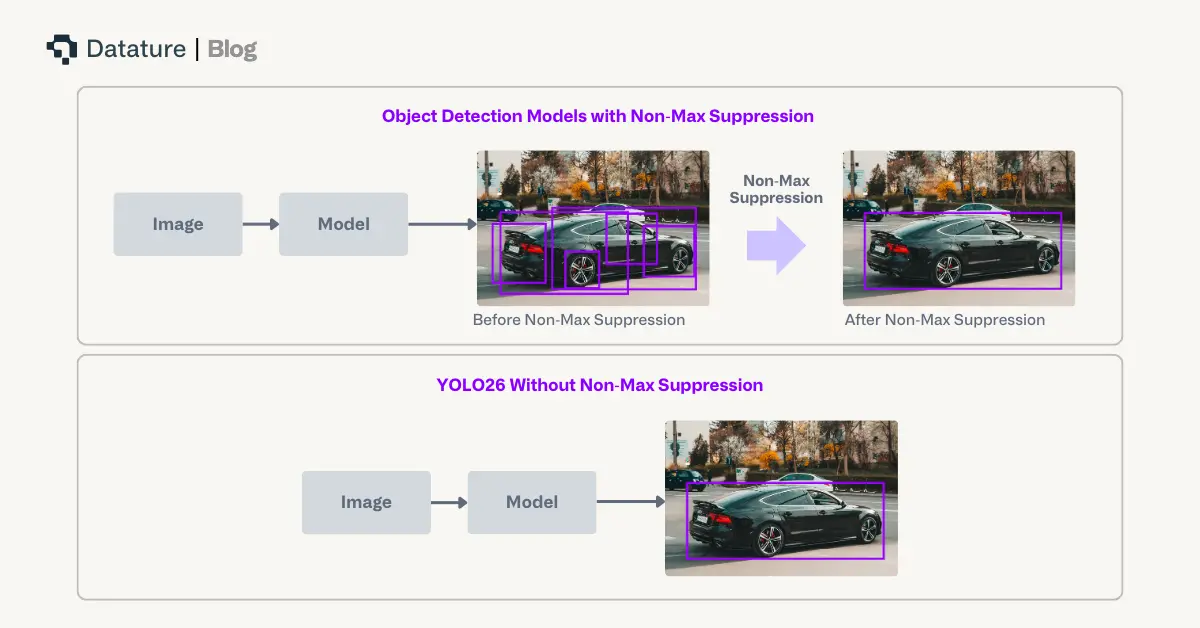
Traditional object detection models rely on Non-Maximum Suppression (NMS) as a post-processing step to filter duplicate predictions. While effective, NMS adds latency and requires manual threshold tuning which complicates deployment pipelines. For latency-sensitive applications like autonomous vehicles or robotics, even milliseconds of post-processing delay can have significant operational impact.
YOLO26 fundamentally redesigns the prediction head to produce direct, non-redundant bounding box predictions without NMS. This end-to-end architecture:
- Eliminates Post-Processing Bottlenecks: Reduces overall pipeline latency by avoiding computationally inefficient calculations like IoU, thus improving CPU inference by up to 43%
- Removes Manual Threshold Dependencies: This simplifies deployment, as data drift can sometimes require changes in manual thresholds to maintain overall performance.
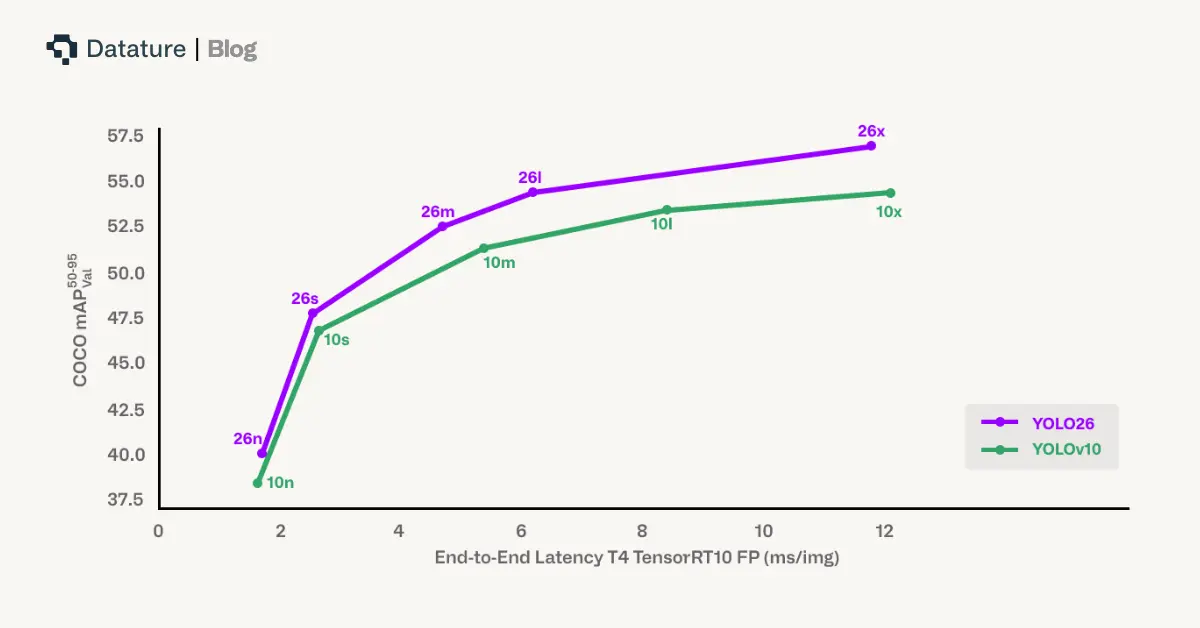
Benchmark comparisons show YOLO26 achieving faster end-to-end latency than YOLOv10 and RT-DETR variants like D-FINE while maintaining competitive accuracy. This makes YOLO26 particularly advantageous for mobile devices, UAVs, and embedded robotics where every millisecond counts.
Progressive Loss Balancing (ProgLoss) and Small-Target-Aware Label Assignment (STAL)
Training stability and small-object detection remain persi stent challenges in object detection. Additionally, removal of NMS creates risk of missing out on small targets, which have traditionally been balanced by NMS to help unique model predictions and mitigating small overlapping predictions, for which IoU computations can be volatile.
ProgLoss (Progressive Loss Balancing) dynamically adjusts the weighting of different loss components during training. Rather than using fixed weights throughout training, ProgLoss ensures the model doesn't overfit to dominant object categories while underperforming on rare or small classes. This adaptive reweighting improves generalization and prevents instability during later training epochs.
STAL (Small-Target-Aware Label Assignment) explicitly prioritizes label assignments for small objects, which are notoriously difficult to detect due to limited pixel representation and susceptibility to occlusion. Techniques like SAHI and sliding window inference have previously addressed small-object challenges at inference time, but STAL tackles the problem at the training level by ensuring small targets receive appropriate attention during training. This significantly improves recall under challenging conditions such as cluttered scenes, foliage occlusion, or motion blur.
Together, ProgLoss and STAL provide substantial accuracy gains on benchmarks like COCO and UAV datasets, particularly for small and occluded objects.
MuSGD Optimizer: Stable and Fast Convergence
Previous YOLO versions relied on standard SGD or AdamW variants, which sometimes exhibited unstable convergence on high-variability datasets. YOLO26 introduces the MuSGD optimizer, a hybrid combining the robustness of Stochastic Gradient Descent (SGD) with adaptive properties from the recently proposed Muon optimizer, inspired by optimization strategies from large language model (LLM) training.
Muon uses Newton Schultz at each gradient update to increase the orthogonality, which has been empirically shown in other contexts to improve convergence, thus improving training stability and shortening training times.
Multi-Task Capabilities
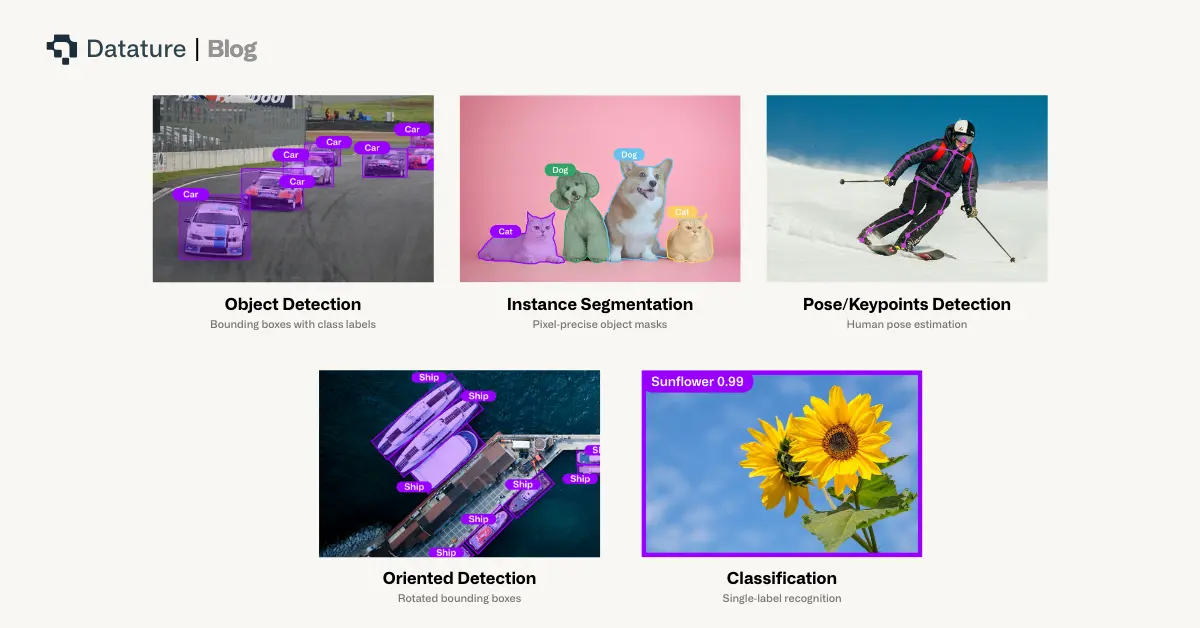
YOLO26's unified architecture supports five key vision tasks through shared backbone and neck components with task-specific heads:
- Object Detection: Anchor-free, NMS-free bounding boxes and class predictions
- Instance Segmentation: Lightweight mask branches for pixel-precise object delineation
- Pose/Keypoints Detection: Compact keypoint heads for human pose estimation
- Oriented Detection: Rotated bounding boxes for aerial imagery and oblique objects
- Classification: Single-label recognition for pure categorization tasks
This consolidated design allows multi-task training or task-specific fine-tuning without architectural rework, while simplified exports preserve portability across accelerators. Whether you need to detect vehicles, segment objects, estimate human poses, or recognize image categories, YOLO26 provides a single, flexible framework.
Deployment Excellence: From Cloud to Edge
Flexible Export Options
YOLO26 natively supports comprehensive export formats:
- TensorRT: Maximum GPU acceleration on NVIDIA hardware
- ONNX: Broad cross-platform compatibility
- CoreML: Native iOS integration for Apple devices
- TFLite: Android and edge device deployment (see our guide on using LiteRT for real-time inferencing on Android)
- OpenVINO: Optimized performance on Intel hardware
Unlike earlier YOLO versions which contained some manual module conversions, YOLO26's streamlined architecture (without DFL or NMS) ensures clean exports across all formats. This deployment-ready design eliminates compatibility bottlenecks that plagued transformer-based detectors like DETR when targeting specialized inference engines.
Quantization and Resource Efficiency
YOLO26's simplified architecture enables robust quantization with minimal accuracy degradation:
- FP16 (Half-Precision): Leverages native GPU support for mixed-precision arithmetic, enabling faster inference with reduced memory footprint
- INT8 (8-bit Integer): Delivers dramatic model size and energy consumption reductions while maintaining competitive accuracy. For a deeper understanding of how this works, read our guide on post-training quantization
Benchmark experiments confirm YOLO26 maintains stability across quantization levels, outperforming YOLO11 and YOLOv12 under identical conditions. This makes YOLO26 exceptionally well-suited for compact hardware like NVIDIA Jetson devices, Qualcomm Snapdragon AI accelerators, or ARM-based CPUs in smart cameras. For a hands-on example, our tutorial on loading vision models on Raspberry Pi demonstrates edge deployment workflows that pair well with YOLO26's optimized exports.
In contrast, transformer-based detectors like RT-DETR show sharp performance drops under INT8 quantization due to attention mechanism sensitivity to reduced precision. YOLO26 establishes a new benchmark for quantization-aware design in object detection.
Getting Started with YOLO26 on Datature Nexus
Dataset Preparation and Annotation
We will be applying YOLO26 to a forklift object detection dataset, with the goal of tracking forklifts on surveillance cameras. With this in mind, we’ll use an open source forklift dataset with provided images and annotations.
To onboard this data, one can simply just drag and drop the images in the Upload Assets tab on the Datasets page once they’ve been downloaded locally. To import the annotations, navigate to the Upload / Export Annotations and upload the annotations aligned with the format. To understand other alternatives for onboarding data, use this link.
.webp)
Once that’s completed, you should see your dataset loaded on the Datasets page which should look like the above.
.webp)
If you prefer annotating on platform, you can utilize the Rectangle tool or the range of intelligent tools to annotate bounding boxes for the forklifts in the images.
Building Your Training Workflow
Once you’re happy with the dataset, you can go to the Workflow page to create your own custom workflow. To work with YOLO26, you can right click on the canvas, and you will see the options below.
As shown above, we provide YOLO26 Nano, Small, Medium, Large, and Xtra at a wide variety of resolutions, from 320x320 to 2560x2560 for object detection, instance segmentation, classification, and keypoint detection as well. This should enable support of any applications that users would like to use YOLO26 for. To see the full list of available models, you can select this link.
.webp)
For more granular control of hyperparameters, users can click on each of the different blocks for the full options. Once satisfied with the workflow, users can select the Run Training button on the bottom right corner, select through the hardware and training specific options, and then start the training.
To learn more about the various types of customizations one can make in each of the blocks, click on the link here.
Training Results and Model Behavior
While the training is ongoing and after it is complete, you’ll be able to monitor the training dashboard on the Trainings page. The first page shows the general training metrics to help understand quantitative aspects. For guidance on reading these charts effectively, see our article on how to interpret training graphs.
.webp)
We also provide an Advanced Evaluation page to provide visual, qualitative checks on the quality of the model training as it progresses.
.webp)
As we can see, YOLO26 does demonstrate rapid convergence and lines up with its strong metrics. We can see influence of some inconsistency in the annotations which means the model has generalized well, but has also tuned itself to the training data.
Deployment and Inference
The goal of our model training is to be able to track forklifts through surveillance cameras. Datature natively provides quantization and pruning with our Advanced Model Export functionality as shown here.
.webp)
With that in mind, we show an example of the inference video along with the FPS across various settings and models.
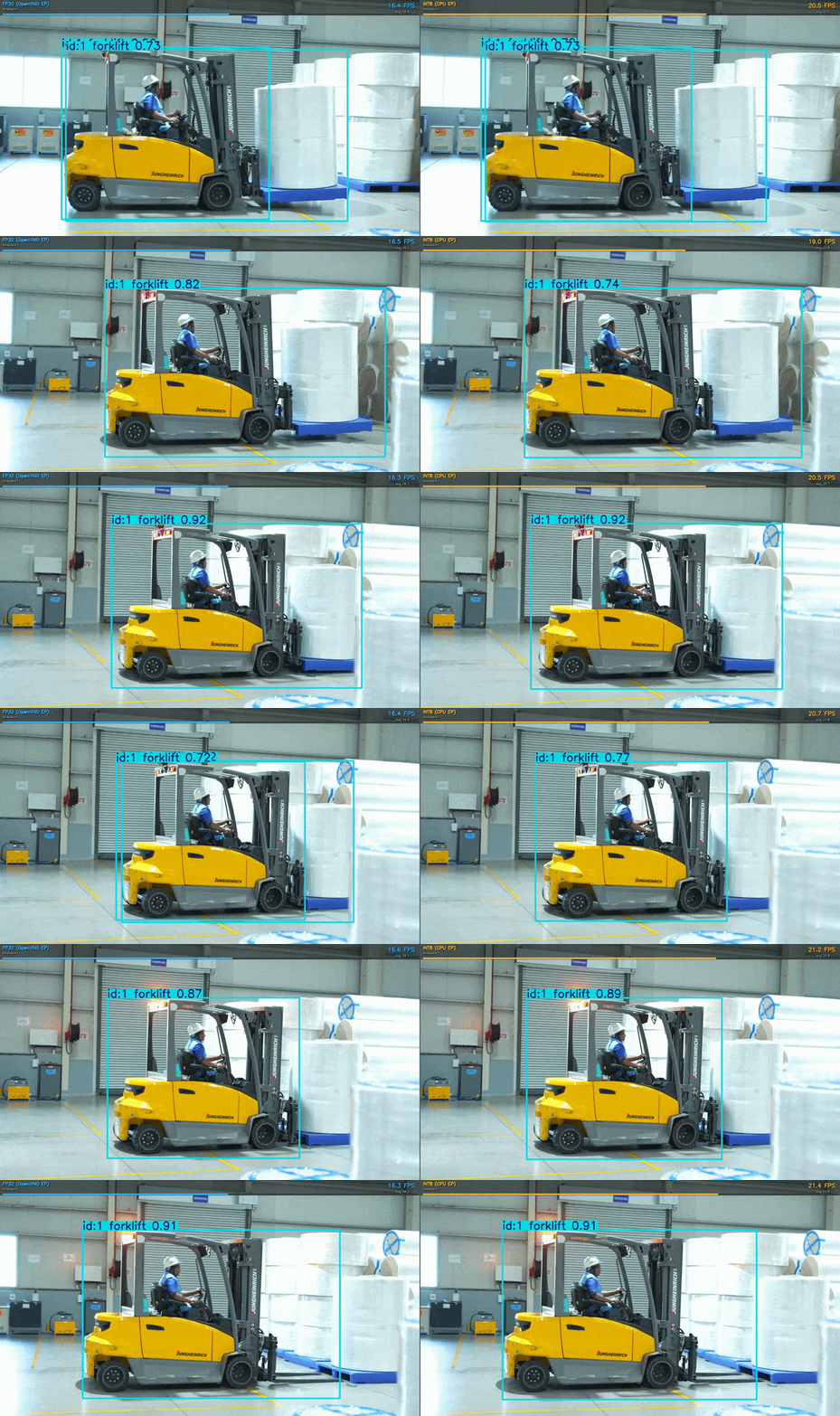
As you can see, the INT8 quantization provides approximately 30% improvement in latency over the original model, on a single thread process on a 12th Gen Intel(R) Core(TM) i7-12700H, with other edge devices certain to see similar performance increases. YOLO26 is certainly well optimized for edge processing and we would encourage its usage in minimal or edge compute use cases.
Try It On Your Own Data
Ready to finetune YOLO26 for your own physical AI applications? Head over to Datature and create a free account. The platform provides access to YOLO26 along with an intuitive interface for data annotation, model training, and deployment.
Whether you're working on warehouse automation, robotics, autonomous vehicles, or any other physical AI application, YOLO26 can help your systems understand and navigate the complexity of the real world in real-time.
For more detailed documentation on training configurations, deployment options, and advanced features, check out the Datature Nexus Developer Documentation. The team has also created several example workflows and tutorials that demonstrate different use cases and training strategies.
Our Developer's Roadmap
At Datature, we're committed to making physical AI development more accessible and powerful. Our integration of YOLO26 is just the beginning. While currently, Datature is supporting bounding box, segmentation, classification, and pose model annotation and training, oriented bounding box support is on our road map. We want to leverage our learnings from YOLO26 and provide more options for older model architectures to allow users to experiment with a combination of older, more traditional architectures with the latest innovations.
The future of physical AI depends on systems that don't just perceive but genuinely understand the physical world. Simpler and rapid object detection models remain crucial, and tools like YOLO26 make it accessible to developers everywhere.
.png)
.png)