Articles

Containerized VLM Deployment: A Practical Guide to NVIDIA NIM

Video Description Lorem Ipsum

Lorem ipsum dolor sit amet, consectetur adipiscing elit, sed do eiusmod tempor incididunt ut labore et dolore magna aliqua. Lorem ipsum dolor sit amet, consectetur adipiscing elit, sed do eiusmod tempor incididunt ut labore et dolore magna aliqua.Lorem ipsum dolor sit amet, consectetur adipiscing elit, sed do eiusmod tempor incididunt ut labore et dolore magna aliqua.

Introduction

Vision-Language Models (VLMs) represent a breakthrough in AI, enabling machines to understand and reason about images in natural language. From automated quality inspection to document understanding, these models are transforming how businesses process visual information. But there's a catch: deploying these models to production remains a significant engineering challenge.

Training a high-performing VLM is only half the battle. The real challenge begins when you need to serve predictions at scale. Managing dependencies, optimizing GPU utilization, handling concurrent requests, and ensuring consistent performance across environments can form frustrating roadblocks. For many teams, the gap between a trained model and a production-ready API can take weeks to bridge.

This is where NIM (NVIDIA Inference Microservices) changes the game. By containerizing the entire inference stack, NIM transforms VLM deployment from a complex engineering project into a simple container orchestration task. In this article, we'll show you how to deploy your Datature Vi-trained VLMs using NVIDIA NIM, reducing deployment time from weeks to minutes.

Why Deploying VLMs Can Be Challenging

Deploying VLMs in production environments presents unique challenges that go beyond traditional ML model deployment:

Dependency Hell: VLMs require specific versions of PyTorch, CUDA, transformers libraries, and dozens of other dependencies. A version mismatch in any component can break inference or degrade performance silently.

GPU Optimization: Unlike smaller models, VLMs demand careful GPU memory management, efficient batching, and optimized inference engines. Getting these right requires deep expertise in GPU programming and model optimization.

Inconsistent APIs: Different VLM architectures often require different input formats, preprocessing steps, and output parsing logic. This inconsistency makes it difficult to swap models or maintain multiple versions.

Traditional deployment approaches force ML engineers to become DevOps experts, spending more time on infrastructure than on improving model performance. NVIDIA NIM aims to solve these problems with a standardized, containerized approach.

NVIDIA NIM: Containerized Inference Made Simple

NVIDIA NIM is a containerized inference microservice that packages everything needed to run VLMs in production. It provides:

Pre-optimized Inference Engines: Apart from supporting common runtimes like vLLM and SGLang, NVIDIA also includes their highly optimized inference runtime with TensorRT-LLM acceleration, kernel fusion, and efficient memory management. These optimizations are tuned specifically for the model architecture and GPU hardware. While some containers already contain TensorRT-LLM runtimes for certain supported architectures, it is also possible to leverage NVIDIA’s conversion tools to convert your own model to be TensorRT-LLM-compatible. Note that not all model architectures currently support TensorRT-LLM.

Standardized OpenAI-Compatible API: All NIM containers expose a consistent REST API that follows the OpenAI specification. This means you can deploy multiple VLMs and switch between them by just pointing to a different endpoint.

Production-Ready Features: Built-in batching, request queuing, health checks, and monitoring come out of the box. No need to build these capabilities yourself.

Reproducible Environments: The entire inference stack, including CUDA drivers, model weights and optimization libraries, is packaged in a single container, thanks to the beauty of Docker. What works on your development machine works identically in production.

For ML teams, deploying a VLM becomes as simple as pulling a Docker image, running a container with a VLM loaded, then calling the API endpoint to make prediction requests.

Training and Fine-Tuning VLMs (Qwen, DeepSeek OCR, InternVL) on Datature Vi

Recently, Datature has launched Datature Vi, a new platform in Beta Testing that allows users to annotate, train, and deploy VLMs. This specifically helps developers who wishes to fine-tune VQA (Visual Question Answering), Dense Captioning, or Free-Text response from image data. We will make another tutorial on how you can build your own VLMs based off other foundational models in a separate post. In any case, developers can join the beta → here.

Deploying Your Datature-Trained VLM with NIM

Datature’s Vi SDK provides a seamless interface for deploying your trained VLMs to NVIDIA NIM. Here's how to get your model running in production.

Prerequisites

Before deploying, you'll need:

  • NVIDIA NGC API Key: Get this from NGC API Keys
  • Datature Vi Credentials: Your secret key and organization ID from Datature Vi
  • Docker with GPU Support: NVIDIA Container Toolkit installed on your deployment machine (we recommend at least an NVIDIA L4 GPU)
  • Trained Model: The run ID of a VLM trained on Datature Vi

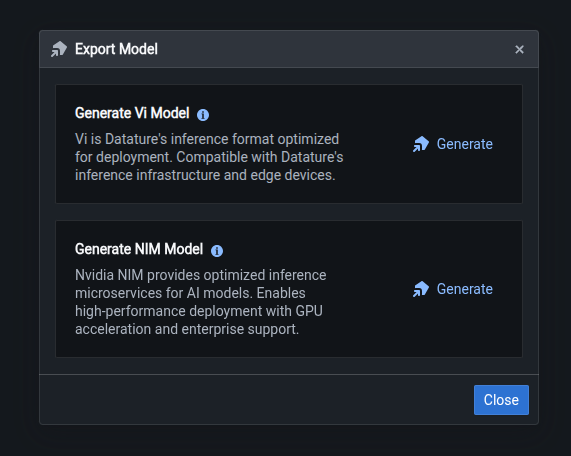
Currently for our VLMs, only Cosmos Reason1 7B is supported. To check whether your Vi-trained model is compatible, you can click on the Export Model button in the Models page. You should see an option for NIM that displays code snippets when you click the Generate button.
Installing Vi SDK

Datature’s Vi SDK is provided as a Python package. You can use a package manager like pip to install inside a recommended virtual environment like venv or virtualenvwrapper.

pip3 install vi-sdk

Deploying the Container

You’ll first need to set up the configuration using the various credentials obtained in previous steps.

from vi.deployment.nim import NIMDeployer, NIMConfig

config = NIMConfig(
    nvidia_api_key="YOUR_NGC_API_KEY",
    secret_key="YOUR_DATATURE_VI_SECRET_KEY",
    organization_id="YOUR_DATATURE_VI_ORGANIZATION_ID",
    image_name="cosmos-reason1-7b",   # Base NIM container
    run_id="your_training_run_id",    # Run ID of the model you want to deploy
    port=8000,                        # Service port
    max_model_len=8192,               # Maximum sequence length
)

Once the configuration is set, deployment is just a single method call:

deployer = NIMDeployer(config)
deployment_result = deployer.deploy()

print(f"✓ Model deployed successfully")
print(f"  Container ID: {deployment_result.container_id}")
print(f"  Model Name: {deployment_result.served_model_name}")
print(f"  Port: {deployment_result.port}")

What happens under the hood:

  1. Container Authentication: The deployer authenticates with NVIDIA's container registry using your NGC API key
  2. Image Pull: Downloads the NIM container image (this may take several minutes for the first pull)
  3. Model Download: Fetches your custom-trained weights from Datature's model registry
  4. Container Launch: Starts the NIM container with optimized GPU settings and mounts your model weights
  5. Model Loading: NIM loads your model weights into GPU memory and initializes the inference engine

The entire process typically can take up to 20 minutes for the initial deployment. However, we cache both the deployment image and model weights by default, speeding up subsequent deployments.

Running Inference at Scale

Once deployed, your VLM is accessible through a clean Python interface that handles all the complexity of request formatting and response parsing.

from vi.deployment.nim import NIMPredictor

# Initialize predictor
predictor = NIMPredictor(
    model_name="cosmos-reason1-7b",
    task_type="phrase-grounding",  # or "vqa" for question answering
)

# Run inference
result = predictor(
    source="path/to/image.jpg",
    stream=False,
)

Since NIM follows the OpenAI specification for predictions, you can also enable streaming to receive tokens as they’re generated:

# Enable streaming for real-time output
result_generator = predictor(
    source="path/to/image.jpg",
    stream=True,
)

# Process tokens as they arrive
for token in result_generator:
    print(token, end="", flush=True)

Try It Yourself

If you want to try out deploying a VLM with NVIDIA NIM, head over to Datature Vi and create a free account. You can upload some images and train your own VLM, or you can also utilize one of the available demo projects.

If you want to learn more about customizing the NIM deployment configuration, inference parameters, or how you can add custom structured guidance to model outputs, check out our Developer’s Documentation.

What's Next?

The current integration only supports the Cosmos Reason1 architecture, which excels at phrase grounding and visual question answering (VQA) tasks. Looking ahead, we are actively working to support additional state-of-the-art VLM architectures such as Qwen2.5-VL Instruct variants, as well as a larger myriad of task types such as video understanding for temporal reasoning and scene understanding.

On Datature Vi, you can accelerate and optimize the fine-tuning of your VLM using Parameter-Efficient Fine-tuning Techniques (PEFT) like Low-Rank Adaptation (LoRA). While the current state of NIM only supports deployment of full weights, we are working closely with NVIDIA to support the deployment of the LoRA adapters.

Introduction

Vision-Language Models (VLMs) represent a breakthrough in AI, enabling machines to understand and reason about images in natural language. From automated quality inspection to document understanding, these models are transforming how businesses process visual information. But there's a catch: deploying these models to production remains a significant engineering challenge.

Training a high-performing VLM is only half the battle. The real challenge begins when you need to serve predictions at scale. Managing dependencies, optimizing GPU utilization, handling concurrent requests, and ensuring consistent performance across environments can form frustrating roadblocks. For many teams, the gap between a trained model and a production-ready API can take weeks to bridge.

This is where NIM (NVIDIA Inference Microservices) changes the game. By containerizing the entire inference stack, NIM transforms VLM deployment from a complex engineering project into a simple container orchestration task. In this article, we'll show you how to deploy your Datature Vi-trained VLMs using NVIDIA NIM, reducing deployment time from weeks to minutes.

Why Deploying VLMs Can Be Challenging

Deploying VLMs in production environments presents unique challenges that go beyond traditional ML model deployment:

Dependency Hell: VLMs require specific versions of PyTorch, CUDA, transformers libraries, and dozens of other dependencies. A version mismatch in any component can break inference or degrade performance silently.

GPU Optimization: Unlike smaller models, VLMs demand careful GPU memory management, efficient batching, and optimized inference engines. Getting these right requires deep expertise in GPU programming and model optimization.

Inconsistent APIs: Different VLM architectures often require different input formats, preprocessing steps, and output parsing logic. This inconsistency makes it difficult to swap models or maintain multiple versions.

Traditional deployment approaches force ML engineers to become DevOps experts, spending more time on infrastructure than on improving model performance. NVIDIA NIM aims to solve these problems with a standardized, containerized approach.

NVIDIA NIM: Containerized Inference Made Simple

NVIDIA NIM is a containerized inference microservice that packages everything needed to run VLMs in production. It provides:

Pre-optimized Inference Engines: Apart from supporting common runtimes like vLLM and SGLang, NVIDIA also includes their highly optimized inference runtime with TensorRT-LLM acceleration, kernel fusion, and efficient memory management. These optimizations are tuned specifically for the model architecture and GPU hardware. While some containers already contain TensorRT-LLM runtimes for certain supported architectures, it is also possible to leverage NVIDIA’s conversion tools to convert your own model to be TensorRT-LLM-compatible. Note that not all model architectures currently support TensorRT-LLM.

Standardized OpenAI-Compatible API: All NIM containers expose a consistent REST API that follows the OpenAI specification. This means you can deploy multiple VLMs and switch between them by just pointing to a different endpoint.

Production-Ready Features: Built-in batching, request queuing, health checks, and monitoring come out of the box. No need to build these capabilities yourself.

Reproducible Environments: The entire inference stack, including CUDA drivers, model weights and optimization libraries, is packaged in a single container, thanks to the beauty of Docker. What works on your development machine works identically in production.

For ML teams, deploying a VLM becomes as simple as pulling a Docker image, running a container with a VLM loaded, then calling the API endpoint to make prediction requests.

Training and Fine-Tuning VLMs (Qwen, DeepSeek OCR, InternVL) on Datature Vi

Recently, Datature has launched Datature Vi, a new platform in Beta Testing that allows users to annotate, train, and deploy VLMs. This specifically helps developers who wishes to fine-tune VQA (Visual Question Answering), Dense Captioning, or Free-Text response from image data. We will make another tutorial on how you can build your own VLMs based off other foundational models in a separate post. In any case, developers can join the beta → here.

Deploying Your Datature-Trained VLM with NIM

Datature’s Vi SDK provides a seamless interface for deploying your trained VLMs to NVIDIA NIM. Here's how to get your model running in production.

Prerequisites

Before deploying, you'll need:

  • NVIDIA NGC API Key: Get this from NGC API Keys
  • Datature Vi Credentials: Your secret key and organization ID from Datature Vi
  • Docker with GPU Support: NVIDIA Container Toolkit installed on your deployment machine (we recommend at least an NVIDIA L4 GPU)
  • Trained Model: The run ID of a VLM trained on Datature Vi

Currently for our VLMs, only Cosmos Reason1 7B is supported. To check whether your Vi-trained model is compatible, you can click on the Export Model button in the Models page. You should see an option for NIM that displays code snippets when you click the Generate button.

Installing Vi SDK

Datature’s Vi SDK is provided as a Python package. You can use a package manager like pip to install inside a recommended virtual environment like venv or virtualenvwrapper.

pip3 install vi-sdk

Deploying the Container

You’ll first need to set up the configuration using the various credentials obtained in previous steps.

from vi.deployment.nim import NIMDeployer, NIMConfig

config = NIMConfig(
    nvidia_api_key="YOUR_NGC_API_KEY",
    secret_key="YOUR_DATATURE_VI_SECRET_KEY",
    organization_id="YOUR_DATATURE_VI_ORGANIZATION_ID",
    image_name="cosmos-reason1-7b",   # Base NIM container
    run_id="your_training_run_id",    # Run ID of the model you want to deploy
    port=8000,                        # Service port
    max_model_len=8192,               # Maximum sequence length
)

Once the configuration is set, deployment is just a single method call:

deployer = NIMDeployer(config)
deployment_result = deployer.deploy()

print(f"✓ Model deployed successfully")
print(f"  Container ID: {deployment_result.container_id}")
print(f"  Model Name: {deployment_result.served_model_name}")
print(f"  Port: {deployment_result.port}")

What happens under the hood:

  1. Container Authentication: The deployer authenticates with NVIDIA's container registry using your NGC API key
  2. Image Pull: Downloads the NIM container image (this may take several minutes for the first pull)
  3. Model Download: Fetches your custom-trained weights from Datature's model registry
  4. Container Launch: Starts the NIM container with optimized GPU settings and mounts your model weights
  5. Model Loading: NIM loads your model weights into GPU memory and initializes the inference engine

The entire process typically can take up to 20 minutes for the initial deployment. However, we cache both the deployment image and model weights by default, speeding up subsequent deployments.

Running Inference at Scale

Once deployed, your VLM is accessible through a clean Python interface that handles all the complexity of request formatting and response parsing.

from vi.deployment.nim import NIMPredictor

# Initialize predictor
predictor = NIMPredictor(
    model_name="cosmos-reason1-7b",
    task_type="phrase-grounding",  # or "vqa" for question answering
)

# Run inference
result = predictor(
    source="path/to/image.jpg",
    stream=False,
)

Since NIM follows the OpenAI specification for predictions, you can also enable streaming to receive tokens as they’re generated:

# Enable streaming for real-time output
result_generator = predictor(
    source="path/to/image.jpg",
    stream=True,
)

# Process tokens as they arrive
for token in result_generator:
    print(token, end="", flush=True)

Try It Yourself

If you want to try out deploying a VLM with NVIDIA NIM, head over to Datature Vi and create a free account. You can upload some images and train your own VLM, or you can also utilize one of the available demo projects.

If you want to learn more about customizing the NIM deployment configuration, inference parameters, or how you can add custom structured guidance to model outputs, check out our Developer’s Documentation.

What's Next?

The current integration only supports the Cosmos Reason1 architecture, which excels at phrase grounding and visual question answering (VQA) tasks. Looking ahead, we are actively working to support additional state-of-the-art VLM architectures such as Qwen2.5-VL Instruct variants, as well as a larger myriad of task types such as video understanding for temporal reasoning and scene understanding.

On Datature Vi, you can accelerate and optimize the fine-tuning of your VLM using Parameter-Efficient Fine-tuning Techniques (PEFT) like Low-Rank Adaptation (LoRA). While the current state of NIM only supports deployment of full weights, we are working closely with NVIDIA to support the deployment of the LoRA adapters.

Introduction

Vision-Language Models (VLMs) represent a breakthrough in AI, enabling machines to understand and reason about images in natural language. From automated quality inspection to document understanding, these models are transforming how businesses process visual information. But there's a catch: deploying these models to production remains a significant engineering challenge.

Training a high-performing VLM is only half the battle. The real challenge begins when you need to serve predictions at scale. Managing dependencies, optimizing GPU utilization, handling concurrent requests, and ensuring consistent performance across environments can form frustrating roadblocks. For many teams, the gap between a trained model and a production-ready API can take weeks to bridge.

This is where NIM (NVIDIA Inference Microservices) changes the game. By containerizing the entire inference stack, NIM transforms VLM deployment from a complex engineering project into a simple container orchestration task. In this article, we'll show you how to deploy your Datature Vi-trained VLMs using NVIDIA NIM, reducing deployment time from weeks to minutes.

Why Deploying VLMs Can Be Challenging

Deploying VLMs in production environments presents unique challenges that go beyond traditional ML model deployment:

Dependency Hell: VLMs require specific versions of PyTorch, CUDA, transformers libraries, and dozens of other dependencies. A version mismatch in any component can break inference or degrade performance silently.

GPU Optimization: Unlike smaller models, VLMs demand careful GPU memory management, efficient batching, and optimized inference engines. Getting these right requires deep expertise in GPU programming and model optimization.

Inconsistent APIs: Different VLM architectures often require different input formats, preprocessing steps, and output parsing logic. This inconsistency makes it difficult to swap models or maintain multiple versions.

Traditional deployment approaches force ML engineers to become DevOps experts, spending more time on infrastructure than on improving model performance. NVIDIA NIM aims to solve these problems with a standardized, containerized approach.

NVIDIA NIM: Containerized Inference Made Simple

NVIDIA NIM is a containerized inference microservice that packages everything needed to run VLMs in production. It provides:

Pre-optimized Inference Engines: Apart from supporting common runtimes like vLLM and SGLang, NVIDIA also includes their highly optimized inference runtime with TensorRT-LLM acceleration, kernel fusion, and efficient memory management. These optimizations are tuned specifically for the model architecture and GPU hardware. While some containers already contain TensorRT-LLM runtimes for certain supported architectures, it is also possible to leverage NVIDIA’s conversion tools to convert your own model to be TensorRT-LLM-compatible. Note that not all model architectures currently support TensorRT-LLM.

Standardized OpenAI-Compatible API: All NIM containers expose a consistent REST API that follows the OpenAI specification. This means you can deploy multiple VLMs and switch between them by just pointing to a different endpoint.

Production-Ready Features: Built-in batching, request queuing, health checks, and monitoring come out of the box. No need to build these capabilities yourself.

Reproducible Environments: The entire inference stack, including CUDA drivers, model weights and optimization libraries, is packaged in a single container, thanks to the beauty of Docker. What works on your development machine works identically in production.

For ML teams, deploying a VLM becomes as simple as pulling a Docker image, running a container with a VLM loaded, then calling the API endpoint to make prediction requests.

Training and Fine-Tuning VLMs (Qwen, DeepSeek OCR, InternVL) on Datature Vi

Recently, Datature has launched Datature Vi, a new platform in Beta Testing that allows users to annotate, train, and deploy VLMs. This specifically helps developers who wishes to fine-tune VQA (Visual Question Answering), Dense Captioning, or Free-Text response from image data. We will make another tutorial on how you can build your own VLMs based off other foundational models in a separate post. In any case, developers can join the beta → here.

Deploying Your Datature-Trained VLM with NIM

Datature’s Vi SDK provides a seamless interface for deploying your trained VLMs to NVIDIA NIM. Here's how to get your model running in production.

Prerequisites

Before deploying, you'll need:

  • NVIDIA NGC API Key: Get this from NGC API Keys
  • Datature Vi Credentials: Your secret key and organization ID from Datature Vi
  • Docker with GPU Support: NVIDIA Container Toolkit installed on your deployment machine (we recommend at least an NVIDIA L4 GPU)
  • Trained Model: The run ID of a VLM trained on Datature Vi

Currently for our VLMs, only Cosmos Reason1 7B is supported. To check whether your Vi-trained model is compatible, you can click on the Export Model button in the Models page. You should see an option for NIM that displays code snippets when you click the Generate button.

Installing Vi SDK

Datature’s Vi SDK is provided as a Python package. You can use a package manager like pip to install inside a recommended virtual environment like venv or virtualenvwrapper.

pip3 install vi-sdk

Deploying the Container

You’ll first need to set up the configuration using the various credentials obtained in previous steps.

from vi.deployment.nim import NIMDeployer, NIMConfig

config = NIMConfig(
    nvidia_api_key="YOUR_NGC_API_KEY",
    secret_key="YOUR_DATATURE_VI_SECRET_KEY",
    organization_id="YOUR_DATATURE_VI_ORGANIZATION_ID",
    image_name="cosmos-reason1-7b",   # Base NIM container
    run_id="your_training_run_id",    # Run ID of the model you want to deploy
    port=8000,                        # Service port
    max_model_len=8192,               # Maximum sequence length
)

Once the configuration is set, deployment is just a single method call:

deployer = NIMDeployer(config)
deployment_result = deployer.deploy()

print(f"✓ Model deployed successfully")
print(f"  Container ID: {deployment_result.container_id}")
print(f"  Model Name: {deployment_result.served_model_name}")
print(f"  Port: {deployment_result.port}")

What happens under the hood:

  1. Container Authentication: The deployer authenticates with NVIDIA's container registry using your NGC API key
  2. Image Pull: Downloads the NIM container image (this may take several minutes for the first pull)
  3. Model Download: Fetches your custom-trained weights from Datature's model registry
  4. Container Launch: Starts the NIM container with optimized GPU settings and mounts your model weights
  5. Model Loading: NIM loads your model weights into GPU memory and initializes the inference engine

The entire process typically can take up to 20 minutes for the initial deployment. However, we cache both the deployment image and model weights by default, speeding up subsequent deployments.

Running Inference at Scale

Once deployed, your VLM is accessible through a clean Python interface that handles all the complexity of request formatting and response parsing.

from vi.deployment.nim import NIMPredictor

# Initialize predictor
predictor = NIMPredictor(
    model_name="cosmos-reason1-7b",
    task_type="phrase-grounding",  # or "vqa" for question answering
)

# Run inference
result = predictor(
    source="path/to/image.jpg",
    stream=False,
)

Since NIM follows the OpenAI specification for predictions, you can also enable streaming to receive tokens as they’re generated:

# Enable streaming for real-time output
result_generator = predictor(
    source="path/to/image.jpg",
    stream=True,
)

# Process tokens as they arrive
for token in result_generator:
    print(token, end="", flush=True)

Try It Yourself

If you want to try out deploying a VLM with NVIDIA NIM, head over to Datature Vi and create a free account. You can upload some images and train your own VLM, or you can also utilize one of the available demo projects.

If you want to learn more about customizing the NIM deployment configuration, inference parameters, or how you can add custom structured guidance to model outputs, check out our Developer’s Documentation.

What's Next?

The current integration only supports the Cosmos Reason1 architecture, which excels at phrase grounding and visual question answering (VQA) tasks. Looking ahead, we are actively working to support additional state-of-the-art VLM architectures such as Qwen2.5-VL Instruct variants, as well as a larger myriad of task types such as video understanding for temporal reasoning and scene understanding.

On Datature Vi, you can accelerate and optimize the fine-tuning of your VLM using Parameter-Efficient Fine-tuning Techniques (PEFT) like Low-Rank Adaptation (LoRA). While the current state of NIM only supports deployment of full weights, we are working closely with NVIDIA to support the deployment of the LoRA adapters.

Resources

More reading...

A Comprehensive Guide to Object Tracking Algorithms in 2025
16
MIN READ
December 6, 2025
This is some text inside of a div block.

Comprehensive comparison of the latest advanced object tracking methods including ByteTrack, SAMBA-MOTR, CAMELTrack, Cutie, and DAM4SAM. Analysis covers tracking-by-detection vs detection-by-tracking paradigms, performance metrics, computational efficiency, and real-world applications in autonomous driving, surveillance, and video analytics.

Read
SAM 3: A Technical Deep Dive into Meta's Next-Generation Segmentation Model
8
MIN READ
November 27, 2025
This is some text inside of a div block.

SAM 3 is Meta’s next-generation segmentation model that shifts from geometric, prompt-based segmentation to concept-level understanding through Promptable Concept Segmentation, enabling open-vocabulary instance detection via text or visual exemplars.

Read
How to Fine-Tune Qwen2.5-VL
15
MIN READ
June 30, 2025
This is some text inside of a div block.

Learn how to train Qwen2.5-VL to automatically detect and describe objects in images. This guide covers dataset preparation, training on consumer GPUs, and real-world results with detailed examples and troubleshooting tips

Read
Get Started Now

Get Started using Datature’s platform now for free.