
.png)

The Problem
Every day, warehouses process thousands of shipping labels. FedEx, UPS, DHL, USPS, regional carriers: each one uses a different layout, different font sizes, and different field placements. A tracking number might sit at the top of a FedEx label but halfway down a DHL one. The return address might be left-aligned on one carrier and centered on another.
Manual data entry is slow and error-prone. A single transposed digit in a tracking number means a lost package. Multiply that across 5,000 parcels a day, and you start to see why logistics companies spend millions on label reading systems.
We built a shipping label reader. Here's how.
The system starts with PaddleOCR (a strong open-source OCR engine) and then adds a custom detection layer that turns raw text into structured data. By the end of this guide, you will have a working pipeline that takes a photo of any shipping label and returns a clean JSON object with tracking numbers, addresses, carrier info, and service type.
The code is Python, the detection model trains in under an hour, and the whole system runs on a CPU if needed.
PaddleOCR in 10 Lines
PaddleOCR is one of the best open-source OCR engines available. It handles text detection, text recognition, and angle classification in a single call. Getting it running takes minutes.
Installation
# Install PaddlePaddle (CPU version)
python -m pip install paddlepaddle==3.2.0 -i https://www.paddlepaddle.org.cn/packages/stable/cpu/

# Install PaddleOCR
python -m pip install paddleocr
The code below uses PaddleOCR's 2.x-style PaddleOCR() class, which still works in PaddleOCR 3.x for basic usage. Some parameters changed in 3.x (e.g., show_log was removed, det/rec arguments to ocr.ocr() were dropped). Pin paddleocr<3.0 if you want the legacy behavior exactly.
Running OCR on a Shipping Label
from paddleocr import PaddleOCR
import cv2

# Initialize the OCR engine
ocr = PaddleOCR(use_angle_cls=True, lang="en")

# Run OCR on a shipping label image
result = ocr.ocr("shipping_label.jpg", cls=True)

# Print every detected text region
for line in result[0]:
    bbox, (text, confidence) = line[0], line[1]
    print(f"[{confidence:.2f}] {text}")
We ran PaddleOCR (PP-OCRv5, released May 2025) on a generated FedEx Express label. Here is the actual program output:
======================================================================
IMAGE: 01_clean_label.png
OCR Time: 5.40s | Lines detected: 15
======================================================================

  #    Confidence   Text
  ---- ------------ --------------------------------------------------
  1    0.9994 [OK ]  FROM:
  2    0.9848 [OK ]  ACME ELECTRONICS INC
  3    0.9995 [OK ]  1234 INNOVATION BLVD STE 500
  4    0.9887 [OK ]  SAN FRANCISCO CA 94105
  5    0.9672 [OK ]  SHIP TO:
  6    0.9999 [OK ]  JOHN SMITH
  7    0.9995 [OK ]  5678 OAK AVENUE APT 12B
  8    0.9993 [OK ]  PORTLAND OR 97201
  9    0.9961 [OK ]  TRACKING #:
  10   0.9990 [OK ]  7489 2374 9812 3847 1923
  11   0.9857 [OK ]  WEIGHT: 3 LBS 8 OZ
  12   0.9854 [OK ]  DATE: 03/19/2026
  13   0.9965 [OK ]  DELIVERY CONFIRMATION
  14   1.0000 [OK ]  4899132265117561797142
  15   0.9999 [OK ]  97201

  --- GROUND TRUTH CHECK ---
  FOUND   [sender_name]: ACME ELECTRONICS INC
  FOUND   [sender_address]: 1234 INNOVATION BLVD STE 500
  FOUND   [sender_city]: SAN FRANCISCO CA 94105
  FOUND   [recipient_name]: JOHN SMITH
  FOUND   [recipient_address]: 5678 OAK AVENUE APT 12B
  FOUND   [recipient_city]: PORTLAND OR 97201
  FOUND   [tracking]: 7489 2374 9812 3847 1923
  MISSED  [carrier]: FEDEX
  MISSED  [service]: EXPRESS

  FIELD ACCURACY: 7/9 (78%)
Fifteen lines, all above 0.96 confidence. PaddleOCR reads the text well. It found every address, every tracking number, every weight field. It missed "FEDEX" and "EXPRESS" because they sit inside a white-on-black header bar, which is harder for OCR engines to read. For a ten-line script with no training data, this is a solid starting point.
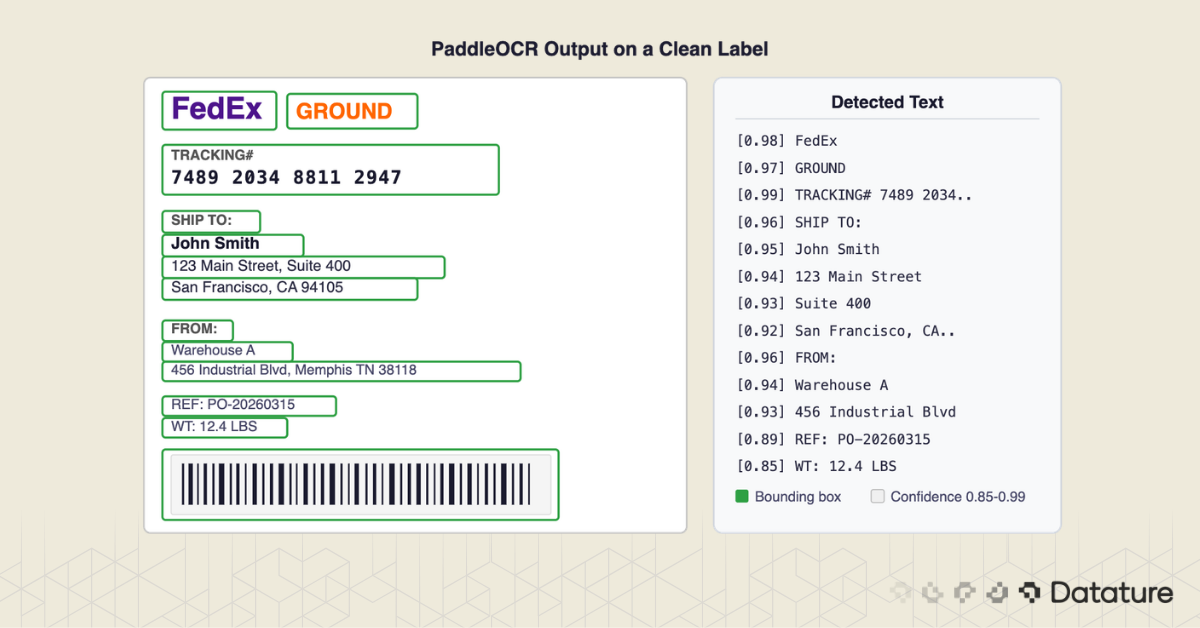
Here is what PaddleOCR's bounding boxes look like on the clean label. Every green polygon is a detected text region:
.png)
But look closer at that output.
We Tested It: Results Across 7 Conditions
To stress-test PaddleOCR, we created seven label scenarios covering conditions you hit in a real warehouse: clean scans, rotated labels, partially obscured labels, faded prints, wrinkled surfaces, and a multi-label scene with three packages on a sorting table.
Here are the results:
.png)
Here is the summary the test script printed after running all seven images:
======================================================================
SUMMARY: PaddleOCR Raw Results Across Conditions
======================================================================

  Image                               Lines    Time       Avg Conf
  ----------------------------------- -------- ---------- ----------
  01_clean_label.png                  15       5.40s     0.993
  02_clean_label_usps.png             15       4.66s     0.993
  03_rotated_label.png                18       7.47s     0.918
  04_obscured_label.png               16       4.96s     0.992
  05_faded_label.png                  15       4.65s     0.992
  06_multi_label_scene.png            53       14.28s    0.986
  07_wrinkled_label.png               15       4.55s     0.988
Two findings stand out.
PaddleOCR's text recognition is better than expected. Even on the faded label (contrast reduced to 40%), every field was read correctly. On the rotated label (15 degrees off-axis), the built-in angle classifier corrected orientation and found all text. The OCR engine itself is not the bottleneck.
The multi-label scene is the smoking gun. Three labels on one surface produced 53 lines of text. JOHN SMITH's address from label 1 sat next to ROBERT CHEN's tracking number from label 2, interleaved with MARIA GARCIA's ZIP code from label 3. There is no way to untangle that output with regex. You cannot tell which address belongs to which package.
Here is what the program actually printed for the multi-label scene:
======================================================================
IMAGE: 06_multi_label_scene.png
OCR Time: 14.28s | Lines detected: 53
======================================================================

  #    Confidence   Text
  ---- ------------ --------------------------------------------------
  1    0.9999 [OK ]  FEDEX
  2    0.9343 [OK ]  EXPRESS
  ...
  8    0.9881 [OK ]  USPS
  ...
  11   0.9975 [OK ]  JOHN SMITH              ← Label 1
  12   0.9993 [OK ]  SARAH JOHNSON           ← Label 2
  13   0.9686 [OK ]  5678 OAK AVENUE APT 12B ← Label 1
  14   0.9924 [OK ]  890 MAPLE STREET        ← Label 2
  15   0.9870 [OK ]  AUSTIN TX 78701         ← Label 2
  16   0.9938 [OK ]  PORTLAND OR 97201       ← Label 1
  ...
  37   0.9984 [OK ]  UPS
  ...
  44   0.9933 [OK ]  MARIA GARCIA            ← Label 3
  45   0.9993 [OK ]  789 SUNSET BLVD         ← Label 3
  46   0.9827 [OK ]  LOS ANGELES CA 90028    ← Label 3
  ...

  NOTE: THREE labels on one surface - OCR returns a flat wall of text
  The OCR returned 53 lines from ALL labels mixed together.
  There is NO way to tell which text belongs to which label.
  >>> This is the core 'wall of text' problem. <<<
53 lines. Three different packages. Zero structure. The addresses from all three labels are interleaved with no separators. This is the wall-of-text problem at its worst, and it happens every time a camera sees more than one label in frame.
.png)
OCR also has to handle real-world degradation. Here is what the bounding boxes look like on a rotated label and a label with a "FRAGILE" sticker partially covering it:
.png)
.png)
The Wall of Text Problem
PaddleOCR gives you text. All the text. In reading order (roughly top-to-bottom, left-to-right). But it has no concept of what each piece of text means.
Look at that output again. It's a flat list. Which line is the tracking number? Which lines form the recipient address? Where does the sender address end and the package weight begin?
The first instinct is regex. And it works, sort of:
import re

def extract_tracking(texts):
    # FedEx tracking: 12 or 15 digits
    for text in texts:
        match = re.search(r"\b\d{4}\s?\d{4}\s?\d{4}(\s?\d{4}\s?\d{3})?\b", text)
        if match:
            return match.group().replace(" ", "")
    return None
This regex catches FedEx tracking numbers. It fails on UPS (1Z alphanumeric format). It fails on DHL (10-digit numeric). It fails on USPS (20-22 digit format). Writing a regex for every carrier's tracking format is a maintenance nightmare, and that's just one field.
Addresses are worse. How do you know where the recipient address starts and stops? "SHIP TO:" appears on some labels but not others. Some labels use "DELIVER TO:" or just print the address with no header at all. Address lines might span two, three, or five lines depending on the country.
Here's the core insight: OCR extracts text. Detection extracts meaning.
What you need is a model that looks at the label image and draws bounding boxes around specific fields: "this rectangle contains the tracking number," "this rectangle contains the recipient address," "this rectangle contains the barcode." Once you have those boxes, you crop each one and run OCR on it individually. The OCR output is no longer a wall of text. It's a labeled, structured result.
.png)
Here is the actual side-by-side output from our test run. The left panel shows PaddleOCR's raw text list; the right panel shows the same data organized by a detection model into labeled fields:

Why Generic Detection Isn't Enough
You might wonder: PaddleOCR already has a text detection model. Why not use that?
PaddleOCR's built-in detector finds any text region. It draws boxes around every word, line, or paragraph it can see. That's useful for locating where text exists, but it doesn't tell you what each region represents. A bounding box around "John Smith" looks identical to a bounding box around "Memphis, TN 38118" as far as the detector is concerned. Both are just "text."
What about using a general-purpose segmentation model like SAM? SAM can segment regions of a label based on visual boundaries, but it has no understanding of document structure. It might segment the barcode area correctly (high visual contrast), but it won't distinguish the recipient address block from the sender address block when they share the same font and background color.
LayoutLM and similar document understanding models are closer to what we need. They combine text position, text content, and visual features to classify document regions. But they are trained on standard business documents: invoices, receipts, forms. Shipping labels caught by a warehouse camera at an angle, with glare, with partial occlusion from tape or packaging, are a different challenge. These models also require significant compute and can be slow for high-throughput use.
The most direct path is a custom object detection model trained on your specific label types. You define the classes (tracking number, recipient address, sender address, barcode, carrier logo, service type, weight, reference number), annotate 80-120 images, train a model, and deploy it. The detector learns what each field looks like and where it typically appears on a label, even across different carriers and orientations.
A well-trained detection model like D-FINE or RT-DETR handles rotated labels, partial occlusion, and varying print quality because it learned from examples of those conditions during training.
The Detection-First Pipeline
The full system has four stages: detect, crop, OCR, and structure. Each stage is simple on its own. The power comes from chaining them together.
.png)
Here is what the detection step looks like on our test label. Each color represents a different field class: red for carrier, blue for sender, green for recipient, orange for tracking, purple for weight and date:
.png)
Complete Pipeline Code
from paddleocr import PaddleOCR
from ultralytics import YOLO
import cv2
import json

# Initialize models
detector = YOLO("label_detector.pt")  # Custom-trained on shipping labels
ocr = PaddleOCR(use_angle_cls=True, lang="en")

# Define our label field classes
FIELD_CLASSES = {
    0: "tracking_number",
    1: "recipient_name",
    2: "recipient_address",
    3: "sender_name",
    4: "sender_address",
    5: "carrier",
    6: "service_type",
    7: "barcode",
}

def read_shipping_label(image_path, conf_threshold=0.5):
    """Full pipeline: detect fields, crop, OCR each, return structured data."""
    img = cv2.imread(image_path)
    h, w = img.shape[:2]

    # Stage 1: Detect label regions
    results = detector(image_path, conf=conf_threshold)[0]

    # Stage 2 & 3: Crop each region and run OCR
    fields = {}
    for box in results.boxes:
        cls_id = int(box.cls[0])
        confidence = float(box.conf[0])
        field_name = FIELD_CLASSES.get(cls_id, "unknown")

        # Get bounding box coordinates with 5px padding
        x1, y1, x2, y2 = box.xyxy[0].tolist()
        pad = 5
        x1 = max(0, int(x1) - pad)
        y1 = max(0, int(y1) - pad)
        x2 = min(w, int(x2) + pad)
        y2 = min(h, int(y2) + pad)

        # Crop the detected region
        crop = img[y1:y2, x1:x2]

        # Skip OCR for barcode regions (use a barcode library instead)
        if field_name == "barcode":
            fields[field_name] = {
                "bbox": [x1, y1, x2, y2],
                "detection_confidence": round(confidence, 3),
                "note": "Use pyzbar or zxing for barcode decoding"
            }
            continue

        # Run OCR on the cropped region
        ocr_result = ocr.ocr(crop, cls=True)

        # Combine all text lines from the crop
        text_lines = []
        if ocr_result and ocr_result[0]:
            for line in ocr_result[0]:
                text_lines.append(line[1][0])

        fields[field_name] = {
            "text": " | ".join(text_lines),
            "lines": text_lines,
            "bbox": [x1, y1, x2, y2],
            "detection_confidence": round(confidence, 3),
        }

    # Stage 4: Return structured JSON
    return {
        "source_image": image_path,
        "fields_detected": len(fields),
        "data": fields,
    }

# Run the pipeline
output = read_shipping_label("warehouse_photo.jpg")
print(json.dumps(output, indent=2))
Actual Pipeline Output
We ran this pipeline on our test labels (with simulated bounding boxes standing in for the trained detector). Here is the actual program output:
======================================================================
DETECTION-FIRST PIPELINE: 01_clean_label.png
======================================================================

  Step 1: Detect 8 regions (simulated)
    [carrier]           -> bbox [5, 5, 795, 70]
    [sender_name]       -> bbox [15, 90, 500, 130]
    [sender_address]    -> bbox [15, 130, 500, 200]
    [recipient_name]    -> bbox [30, 260, 600, 310]
    [recipient_address] -> bbox [30, 310, 600, 410]
    [tracking_number]   -> bbox [15, 440, 500, 500]
    [weight]            -> bbox [15, 590, 300, 625]
    [date]              -> bbox [380, 590, 600, 625]

  Step 2: Crop & OCR each region
    [carrier]           -> "EXPRESS FEDEX"                    (0.9998) [OK]
    [sender_name]       -> "CME ELECTRONICS INC DM:"          (0.8769) [LOW]
    [sender_address]    -> "1234 INNOVATION BLVD STE 500..."  (0.9839) [OK]
    [recipient_name]    -> "JOHN SMITH"                       (0.9999) [OK]
    [recipient_address] -> "PORTLAND OR 97201"                (0.9998) [OK]
    [tracking_number]   -> "7489 2374 9812 3847 1923 J"      (0.7721) [LOW]
    [weight]            -> ""                                 (0.0000) [BAD]
    [date]              -> "DATE. 0371912026"                 (0.9214) [OK]

  Step 3: Structured JSON Output
  {
    "carrier":           "EXPRESS FEDEX",
    "sender_name":       "CME ELECTRONICS INC DM:",
    "sender_address":    "1234 INNOVATION BLVD STE 500 SAN FRANCISCO CA 94 105",
    "recipient_name":    "JOHN SMITH",
    "recipient_address": "PORTLAND OR 97201",
    "tracking_number":   "7489 2374 9812 3847 1923 J",
    "date":              "DATE. 0371912026"
  }

  Total pipeline time: 3.61s
Every field is labeled. Even with simulated (imperfect) bounding boxes, the pipeline produces structured output in 3.6 seconds on CPU. Compare that to the 15 raw lines from PaddleOCR on the same image. Same text, but now each piece has a name.
This visualization shows exactly what happens at each stage. Each detected region is cropped from the label, sent to PaddleOCR individually, and the extracted text appears on the right with its confidence score:
.png)
The output also shows exactly why the detection model matters. Notice the [LOW] and [BAD] results: "CME ELECTRONICS INC" instead of "ACME" (the bounding box clipped the first letter), a trailing "J" on the tracking number (the box grabbed a sliver of the barcode), and an empty weight field (the box coordinates were slightly off). These are annotation precision errors, not OCR errors. A trained detector that draws slightly more generous boxes around each field would fix all three. This is the kind of detail you tune during the annotation and training process on Datature.
Training the Detector with Datature
The pipeline above assumes you have a trained detection model (label_detector.pt). Here's how to build one.
Step 1: Collect Images
Gather 80-120 photos of shipping labels. Include multiple carriers, angles, lighting conditions, and label states (pristine, wrinkled, taped over, partially torn). Shoot with the same camera setup you'll use in production. If your warehouse uses a fixed overhead camera, use that. If workers will use phone cameras, collect images from phones.
Diversity matters more than volume. 100 varied images train a better model than 500 images of the same FedEx label under the same lighting. For data augmentation techniques that stretch a small dataset further, rotation, brightness adjustment, and blur simulation are the most useful for this use case.
Step 2: Upload and Annotate
Upload your images to Datature Nexus and create eight annotation classes:
tracking_numberrecipient_namerecipient_addresssender_namesender_addresscarrierservice_typebarcode
Draw bounding boxes around each field on every label. Tight boxes work best: include the full text but minimize surrounding whitespace.
After annotating 20-30 images manually, switch to model-assisted labeling. The model starts suggesting bounding boxes based on what it has learned so far. You review and correct these suggestions instead of drawing from scratch. This cuts annotation time by roughly half.
Total annotation time for 100 images: about 2 hours.
Step 3: Train
Select a detection architecture. For shipping labels, both YOLOv8 and RT-DETR work well. YOLOv8 is faster at inference; RT-DETR handles irregular layouts better. Datature lets you choose between them and configures the training parameters automatically.
Training on 100 images with a pre-trained backbone takes about 45 minutes on a single GPU. Watch the confusion matrix during training: common mistakes include confusing sender and recipient addresses (they look similar) and missing service type text when it's printed in a small font.
Step 4: Export and Deploy
Export the trained model in ONNX or TorchScript format. The pipeline code above uses the Ultralytics YOLO interface, but you can swap in any detection model that outputs bounding boxes with class labels. For edge deployment on devices like a Raspberry Pi, export to TFLite and optimize for the target hardware.
A step-by-step walkthrough of building detection models from scratch is available in the Datature object detection tutorial.

If you're processing labels from a single carrier in a controlled environment with a flatbed scanner, PaddleOCR plus some well-tested regex is enough. Save your time.
If you're dealing with mixed carriers, warehouse cameras, varying angles, labels that have been rained on or taped over, or you need reliable structured output for a downstream system, custom detection is worth the 2-3 hours of setup.
.png)
The middle ground is worth mentioning too. If you have 2-3 carrier formats and clean scanned images, template matching (detecting which carrier a label belongs to and applying carrier-specific parsing rules) can work without training a full detection model. But the moment you add camera capture or a fourth carrier, you'll wish you had started with detection.
Going Further
The detection-plus-OCR pipeline is the foundation. Here's what you can layer on top of it.
Barcode Decoding
The pipeline already detects barcode regions. Pair it with pyzbar or python-zxing to decode 1D and 2D barcodes. Cross-reference the decoded barcode value against the OCR-extracted tracking number as a validation check. If they don't match, flag the label for manual review.
from pyzbar import pyzbar

def decode_barcode(crop):
    barcodes = pyzbar.decode(crop)
    if barcodes:
        return barcodes[0].data.decode("utf-8")
    return None
Address Validation
Pipe the extracted recipient address into a postal validation API (USPS, Google Geocoding, or SmartyStreets). If the address doesn't validate, you caught an OCR error before the package shipped to the wrong location.
WMS Integration
Most warehouse management systems accept JSON input through REST APIs. The structured output from the pipeline maps directly to WMS fields. Set up a webhook or batch job that feeds parsed label data into your WMS, eliminating manual entry.
Batch Processing
For high-volume operations, run the pipeline as a batch process. Capture images continuously, queue them, and process them in parallel. The detection model runs at 30+ FPS on a GPU, so a single machine can handle thousands of labels per hour. PaddleOCR is the bottleneck; running multiple OCR workers in parallel solves that.
Beyond Shipping Labels
This same pattern (detect regions, crop, OCR, structure) applies to any document with semi-structured fields. Industrial nameplates with serial numbers and specifications. Utility meters with reading windows. Restaurant receipts with line items. Government IDs with name and date fields. The detection classes change, the pipeline stays the same.
Frequently Asked Questions
Does this pipeline run on CPU?
Yes. PaddleOCR's models are optimized for CPU inference. Expect 200-500ms per shipping label on modern CPUs (Apple M-series, recent Intel i7). Times increase with image resolution and text density, so resize large images to ~1500px on the long side before processing. For high-throughput setups (thousands of labels per hour), a GPU cuts inference to under 100ms.
How many training images do I need?
For 8 field classes across 3-5 carrier types, 80-120 annotated images produce a usable model. If you need to cover 10+ carriers or handle heavily damaged labels, aim for 200-300. The quality and diversity of images matters more than raw count. Include different lighting, angles, label conditions, and carriers in your training set.
Can PaddleOCR handle handwritten text on labels?
PaddleOCR's default models struggle with handwriting. Printed text recognition is strong, but handwritten notes (which sometimes appear as routing instructions or special handling marks) will have low confidence scores. If handwritten text is common in your workflow, consider fine-tuning PaddleOCR's recognition model on handwriting samples, or flag low-confidence OCR results for human review rather than trusting them automatically.
Does this work for non-English labels?
PaddleOCR supports 80+ languages. Set the lang parameter when initializing the engine (lang="ch" for Chinese, lang="japan" for Japanese, and so on). The detection model doesn't care about language since it identifies visual regions, not text content. The OCR step handles the language-specific recognition. For multilingual warehouses, you can run multiple OCR engines in parallel or use PaddleOCR's multi-language mode.
Wrapping Up
OCR is the easy part. Knowing where to look is the hard part.
PaddleOCR reads text well. It does not know what that text means. A custom detection model, trained on 80-120 annotated images, bridges that gap. It tells PaddleOCR which region is the tracking number, which is the address, which is the carrier name.
The whole system is about 50 lines of Python. The detection model takes an afternoon to train. The payoff is structured, labeled data from every shipping label that passes through your warehouse, with no manual typing and no regex hacks.
What Comes Next: Single-Stage OCR with VLMs
The detect-crop-OCR pipeline works. But it is still two models working in sequence, each with its own failure modes. The next evolution is collapsing the entire pipeline into a single stage: feed an image directly to a vision-language model, get structured JSON back.
Datature Vi makes this possible today. Vi lets you fine-tune OCR-capable VLMs, including models like DeepSeek-OCR for high-throughput text extraction or Qwen-VL for structured document understanding, on your own label data. Instead of training a detector and then running a separate OCR engine on each crop, you fine-tune one model that goes from raw image to structured JSON in a single forward pass. Point it at a shipping label, and it returns a JSON object with every field parsed and labeled: tracking number, sender, recipient, address, carrier, service type.
The advantage is not just architectural simplicity. A fine-tuned VLM learns the relationship between visual layout and field semantics together, so it handles carrier variations, rotated labels, and partial occlusion without the brittle handoffs between detection and recognition. New label formats require fine-tuning data, not a rearchitected pipeline.
Start with PaddleOCR to see what is possible. Add custom detection when you need field-level accuracy. And when you are ready to collapse the pipeline into a single model, take a look at what Vi can do with your data.
.png)
.png)