.png)

Introduction
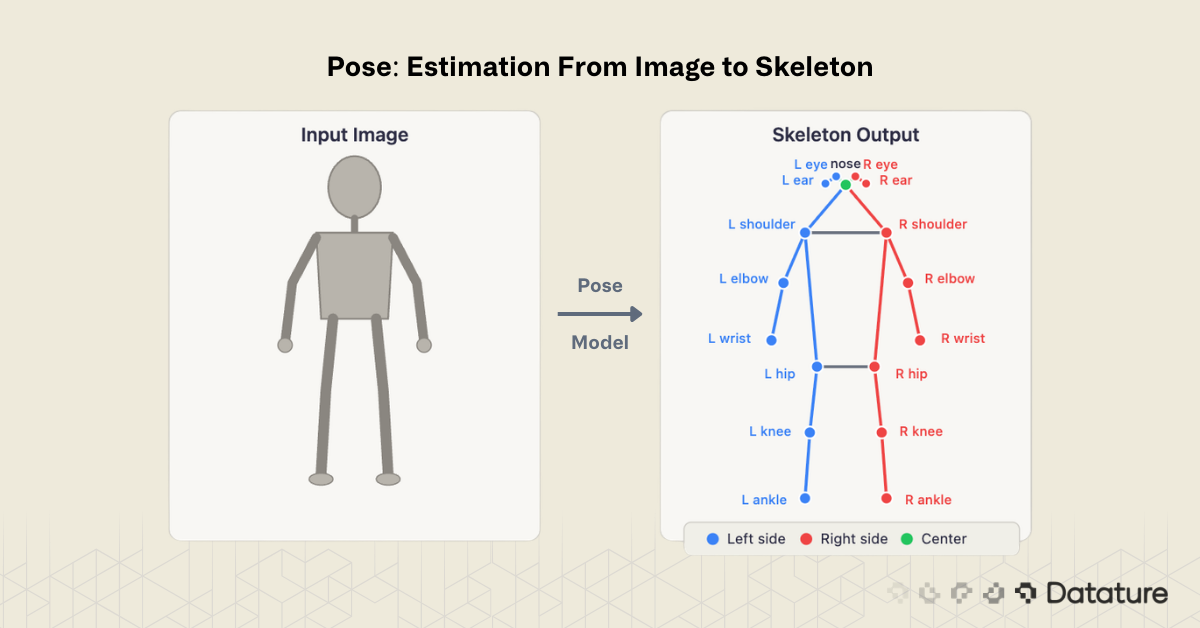
Pose estimation is the computer vision task of detecting and localizing anatomical keypoints - such as elbows, knees, wrists, and ankles - within images or video frames. By connecting these keypoints with predefined edges, the model produces a skeleton representation that captures the posture and movement of a person, animal, or articulated object.
Unlike object detection, which draws a rectangular bounding box around a subject, pose estimation reveals how the subject is positioned. A bounding box tells you "there is a person here." A pose skeleton tells you "this person is raising their left arm while bending their right knee." That structural information is what makes pose estimation critical for applications ranging from sports analytics and physical therapy to workplace safety monitoring and gesture-based human-computer interaction.
As of 2026, pose estimation models have matured considerably. YOLO26-Pose runs in real time on edge hardware. ViTPose++ achieves state-of-the-art accuracy on COCO Keypoints. And multi-person pose estimation — once a major bottleneck — is now handled reliably by both top-down and bottom-up approaches.
This guide explains what pose estimation is, how it works, the dominant model architectures, practical applications, evaluation metrics, and how to build and train keypoint models using Datature Nexus.
How Pose Estimation Works
Every pose estimation pipeline follows the same fundamental pattern: take an image as input, predict a set of keypoint coordinates, and optionally connect those keypoints into a skeleton.
Keypoints and Skeletons
A keypoint is a specific anatomical landmark - for example, the left shoulder, right hip, or nose. The COCO Keypoints benchmark defines 17 keypoints for the human body, covering the head (nose, eyes, ears), upper body (shoulders, elbows, wrists), and lower body (hips, knees, ankles). Each keypoint prediction consists of three values: an x-coordinate, a y-coordinate, and a confidence score indicating how certain the model is that the keypoint is visible.
A skeleton is the set of edges connecting keypoints into a meaningful structure - left shoulder to left elbow, left elbow to left wrist, and so on. The skeleton definition is fixed by the dataset schema, not learned by the model.
Two Approaches: Top-Down vs Bottom-Up
Multi-person pose estimation — detecting keypoints for every person in a scene — is solved using one of two strategies:
Top-down methods first detect each person with a bounding box (using an object detector like YOLO), then run a keypoint estimator independently on each cropped region. This approach is more accurate because the keypoint model operates on a clean, person-centered crop, but it scales linearly with the number of people: more people means more inference passes.
Bottom-up methods detect all keypoints in the entire image simultaneously, then group them into individual skeletons using association algorithms. This makes inference time roughly constant regardless of crowd size, but associating the correct keypoints to the correct person is harder, especially in crowded or occluded scenes.
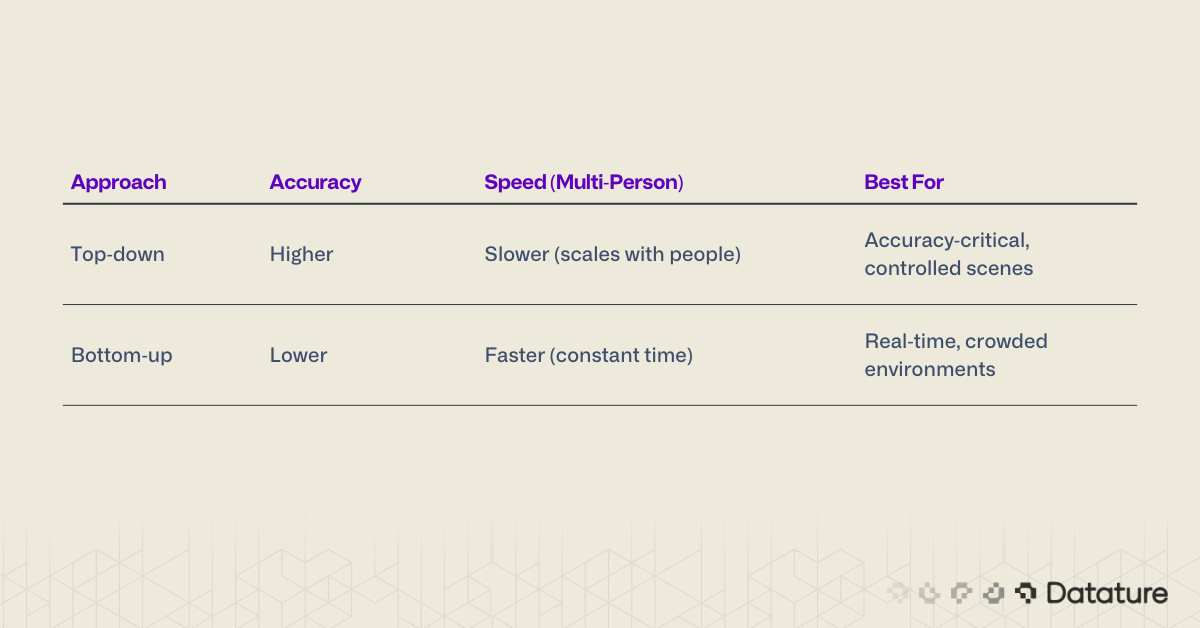
Most production systems in 2026 use top-down pipelines because the object detection step (person detection) is now extremely fast, making the overall latency acceptable.
Heatmap-Based Prediction
The dominant technical approach for keypoint localization uses heatmaps. For each keypoint, the model outputs a 2D probability map where the peak value indicates the predicted keypoint location. A 17-keypoint model produces 17 heatmaps, each the same spatial resolution as the feature map. The final keypoint coordinates are extracted by finding the argmax (peak location) of each heatmap.
Heatmap-based methods have historically outperformed direct coordinate regression because they preserve spatial structure and handle uncertainty naturally - a flat heatmap means the model is unsure, while a sharp peak means high confidence. However, newer approaches like SimCC (used in RTMPose) bridge the gap by treating keypoint localization as 1D coordinate classification on discretized x and y axes, achieving heatmap-level accuracy without generating full 2D heatmaps. The field has moved beyond a strict heatmap-vs-regression binary.
Challenges: Occlusion and Common Failure Modes
The single biggest challenge in pose estimation is occlusion - when one body part is hidden behind another person, an object, or the person's own body (self-occlusion). Models handle this using visibility flags in annotations: each keypoint is labeled as visible, occluded (present but hidden), or absent (outside the image frame). Under occlusion, heatmap confidence degrades naturally — the model produces a diffuse, low-confidence peak rather than a sharp one.
Other common failure modes include: truncation at image edges (person partially out of frame), unusual poses not well-represented in training data (e.g., handstands, crawling), loose or heavy clothing that obscures joint locations, and small person scale where the subject occupies very few pixels. Understanding these failure modes is essential for building robust systems — and for curating training data that covers edge cases.
.png)
Key Pose Estimation Models in 2026
The field has converged on several dominant architectures:
YOLO-Pose (YOLO26-Pose)
The YOLO family added native pose estimation starting with YOLOv8. YOLO26-Pose is the latest iteration, performing detection and keypoint estimation in a single forward pass. It predicts bounding boxes and 17 keypoints per person simultaneously, making it the fastest option for real-time applications. YOLO26 supports five tasks - classification, detection, segmentation, pose, and OBB - all within a unified architecture.
Best for: Real-time applications, edge deployment, scenarios where both detection and pose are needed.
ViTPose / ViTPose++
ViTPose applies a plain Vision Transformer backbone (ViT) to keypoint estimation with minimal modifications. ViTPose++ extends this with multi-dataset training, achieving state-of-the-art results on COCO, AIC, MPII, and CrowdPose benchmarks simultaneously. It demonstrates that a simple, non-hierarchical transformer can outperform specialized architectures when trained at scale.
Best for: Maximum accuracy, research benchmarks, scenarios where latency is secondary.
RTMPose
RTMPose (Real-Time Multi-Person Pose Estimation) from the MMPose team balances accuracy and speed. It uses a CSPNeXt backbone with a SimCC (Simple Coordinate Classification) head instead of heatmaps, treating keypoint localization as a classification problem on discretized x and y coordinates. This approach is faster than heatmap decoding while maintaining competitive accuracy.
Best for: Production systems that need a balance of speed and accuracy.
MediaPipe Pose / BlazePose
Google's MediaPipe Pose (powered by the BlazePose architecture) is designed specifically for on-device inference on phones and browsers. It detects 33 keypoints (more than COCO's 17), including fingers and feet, and runs at 30+ FPS on mobile devices. However, it only handles single-person pose estimation.
Best for: Mobile and browser applications, single-person tracking, fitness apps.
HRNet (High-Resolution Network)
HRNet maintains high-resolution feature maps throughout the entire network rather than downsampling and then upsampling (as ResNet-based models do). This preserves fine spatial detail that is critical for precise keypoint localization. HRNet and its successor HRFormer remain widely used as backbones in top-down pipelines, and many ViTPose experiments use HRNet as a baseline. While no longer the accuracy leader, HRNet is a mature and well-understood choice for production pose systems.
Best for: Production top-down pipelines where a proven, well-documented backbone is preferred.
Historical Note
OpenPose (Cao et al., 2017) was the pioneering real-time bottom-up multi-person pose estimation system. It introduced Part Affinity Fields (PAFs) for keypoint grouping and made multi-person pose estimation practical for the first time. While superseded in accuracy by newer models, OpenPose remains one of the most cited papers in pose estimation and established the bottom-up paradigm described above.
.png)
Applications of Pose Estimation
Pose estimation powers a wide range of real-world systems:
Sports Analytics and Coaching. Professional sports teams use pose estimation to analyze athlete biomechanics — joint angles during a golf swing, stride length in sprinting, or body positioning during a basketball free throw. Frame-by-frame skeleton data enables coaching feedback that was previously only available through manual video review.
Healthcare and Physical Therapy. Pose models track patient movements during rehabilitation exercises, measuring range of motion, detecting compensatory movements, and providing objective progress metrics. Remote telehealth systems use webcam-based pose estimation so patients can perform guided exercises at home with real-time feedback.
Workplace Safety. Manufacturing and construction sites deploy pose estimation to detect unsafe postures — improper lifting technique, workers entering restricted zones, or failure to maintain safe distances from machinery. Alerts are triggered in real time when a detected pose matches a predefined unsafe pattern.
Action Recognition. Pose skeletons serve as input features for action recognition models like ST-GCN++, which classify temporal sequences of keypoints into activities (walking, running, falling, waving). This approach is more privacy-preserving than raw video analysis since only skeleton data is processed.
Gesture and Sign Language Recognition. Hand and body keypoints drive gesture-based interfaces and sign language translation systems. MediaPipe's 33-keypoint model, which includes hand landmarks, is widely used for this purpose.
Retail and Customer Analytics. Anonymized pose data tracks customer movement patterns, dwell time at displays, and interaction with products — all without capturing identifiable images.
Autonomous Driving and Robotics. Pedestrian pose estimation helps autonomous vehicles predict intent — a person turning their head toward the street may be about to cross. Robotic systems use pose estimation to understand human actions and respond safely during human-robot collaboration.
Evaluation Metrics
Pose estimation models are evaluated using Object Keypoint Similarity (OKS), which measures the distance between predicted and ground truth keypoints, normalized by the scale of the person and a per-keypoint constant that accounts for natural labeling variance (for example, the hip is easier to localize precisely than the wrist).
The primary metrics are:
- AP (Average Precision): The mean AP across OKS thresholds from 0.50 to 0.95, analogous to mAP in object detection. This is the headline metric reported on COCO.
- AP50 / AP75: AP at specific OKS thresholds. AP50 is lenient (allows more spatial error); AP75 is strict.
- AP-M / AP-L: AP for medium and large persons, revealing whether a model struggles with smaller subjects.
- PCKh (Percentage of Correct Keypoints): Used on the MPII benchmark. A keypoint is "correct" if it falls within a threshold distance of the ground truth, normalized by head size.
2D vs 3D Pose Estimation
This guide focuses on 2D pose estimation - predicting keypoint locations in image coordinates (x, y). 3D pose estimation additionally predicts depth (x, y, z), producing a full spatial skeleton. 3D methods either use multi-camera setups, depth sensors (LiDAR, structured light), or 2D-to-3D lifting models (e.g., MotionBERT, PoseFormerV2) that infer depth from monocular 2D predictions. Key benchmarks include Human3.6M and 3DPW. 3D pose is critical for biomechanical analysis, AR/VR motion capture, and robotics — expect a dedicated deep dive on this topic from us soon.
Tip
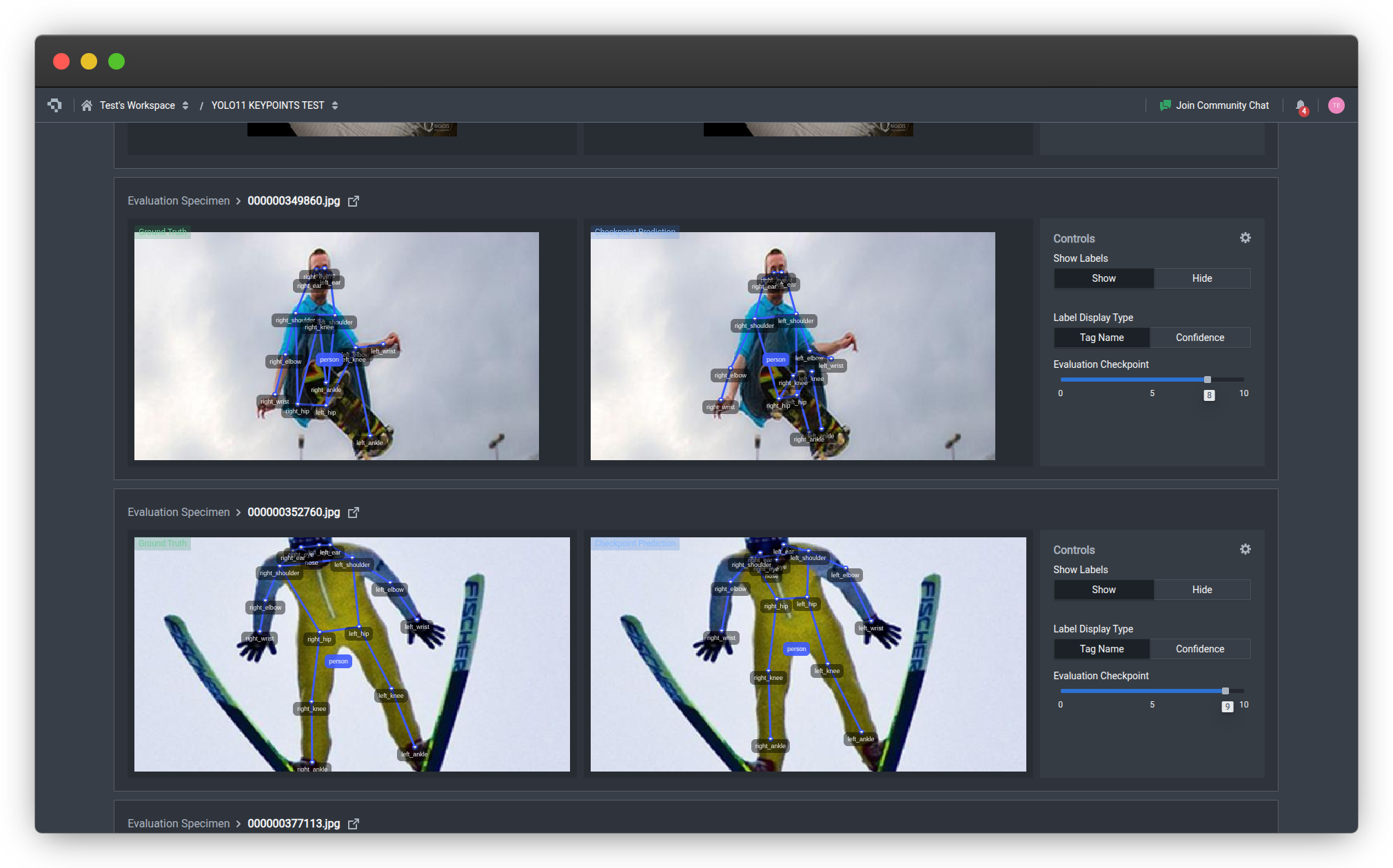
When evaluating your own model, look beyond headline AP. Check AP-M separately - small and medium persons are where most models underperform. Use Datature Nexus's evaluation tools to visualize predicted vs ground truth keypoints on your hardest test images.
How to Build Pose Estimation Models on Datature Nexus
Datature Nexus supports keypoint annotation and model training for pose estimation through an end-to-end workflow. Here is how the process works:
1. Annotate Keypoints
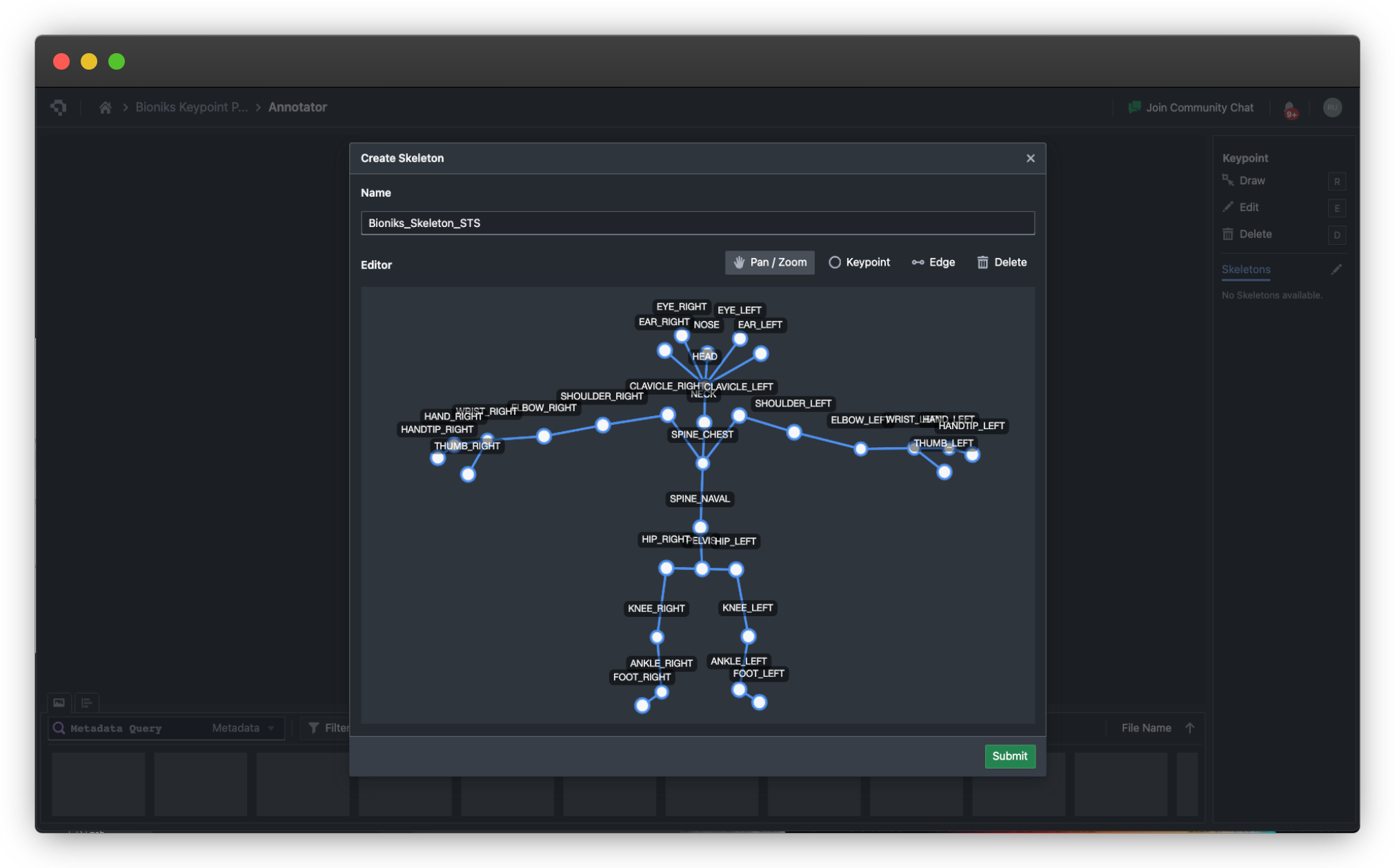
Upload your images to Nexus and define a keypoint schema (ontology) that specifies which keypoints to label and how they connect into a skeleton. Nexus provides a visual keypoint annotation tool where you click to place each landmark on the image. The platform supports custom keypoint definitions - you are not limited to the COCO 17-point schema. For animal pose, hand keypoints, or industrial part landmarks, define your own skeleton topology - see FAQ below on how you can create custom skeletons and joints.

2. Train a Keypoint Model
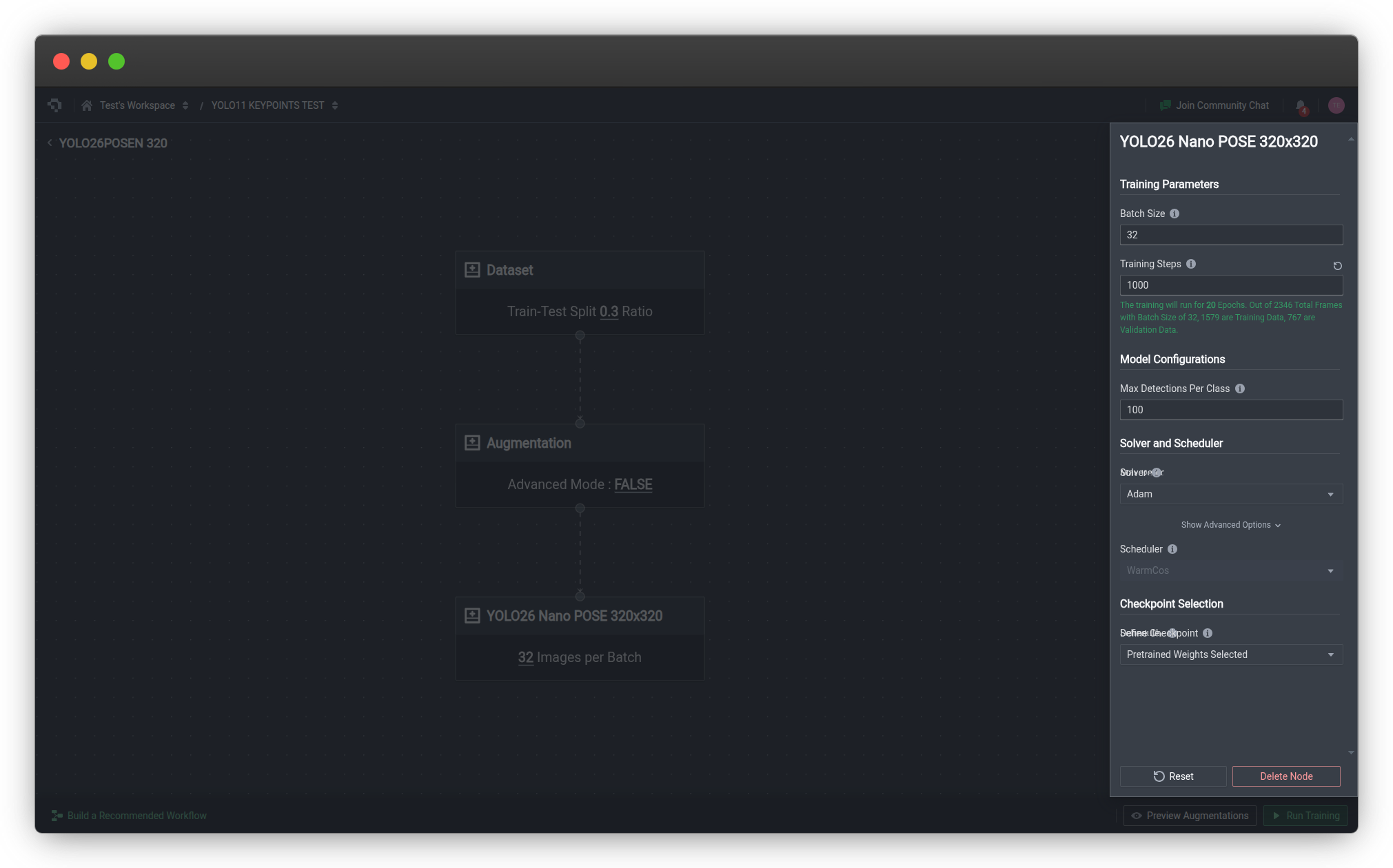
Once your dataset is annotated, configure a training run in Nexus. Select a keypoint estimation architecture, set your hyperparameters (learning rate, batch size, epochs), and launch training. Nexus handles GPU provisioning, data augmentation, and checkpoint management automatically. We offer image augmentation functions and have seen model accuracy improves whendesigning the right kind of augmentation (flips, color distort) that enables the model to perform better under various lighting condition by improving the aberations it has seen during training-time.
3. Evaluate and Iterate
After training, review model performance using the built-in evaluation tools. Visualize predicted keypoints overlaid on test images to identify failure modes - missed keypoints, incorrect associations, or poor localization on occluded joints. Use class metrics and low confidence sampling to find the hardest examples and improve your dataset.
4. Deploy
Export your trained model or deploy it directly via Datature's API deployment for cloud inference, or export to formats like TFLite or ONNX for edge deployment on Raspberry Pi or Android devices.
For a complete step-by-step walkthrough, see the Build a Keypoint Estimation Model tutorial on Datature's developer portal, or explore the full developer documentation.
Frequently Asked Questions
What is the difference between pose estimation and object detection?
Object detection locates subjects with rectangular bounding boxes and assigns class labels. Pose estimation goes further by identifying specific anatomical landmarks (keypoints) within the detected subject, revealing body structure and posture rather than just location.
How many keypoints does a pose model typically detect?
The COCO benchmark defines 17 keypoints for the human body. Some models like MediaPipe detect 33 (including hands and feet). Custom schemas can define any number - hand pose models use 21 keypoints per hand, face mesh models use 468 landmarks.
Can pose estimation work on animals?
Yes. Animal pose estimation (evaluated on benchmarks like AP-10K and Animal Kingdom) applies the same techniques with different keypoint definitions - for example, four paw joints, tail base, nose, and ear tips for quadrupeds. The underlying model architecture is the same; only the keypoint schema and training data differ. You will need to create your own custom skeleton, which Datature supports. This is exceptionally helpful when you are building a skeleton forsay a golf player and need additional points for the golf club to track the swing - same for other sports.
Does pose estimation work in real time?
Yes. YOLO26-Pose and RTMPose both achieve real-time inference (30+ FPS) on modern GPUs. MediaPipe runs at 30+ FPS on mobile phones. For multi-person scenarios, bottom-up approaches maintain constant inference time regardless of the number of people.
What is the minimum data needed to train a custom pose model?
For fine-tuning a pretrained model (transfer learning from COCO), 200–500 annotated images with keypoints is a reasonable starting point. Training from scratch requires significantly more - typically 10,000+ annotated instances. Using Datature Nexus's annotation tools with a well-defined keypoint ontology makes the labeling process efficient. Datature also allows you to train models from checkpoints, this way, you do not need that much initial data to get the model going.
Great, how can I get started with Datature?
You can build your own pose estimation models with Datature Nexus today. I'm attaching a video tutorial specifically on how you can accomplish this easily ↘
.png)
.png)