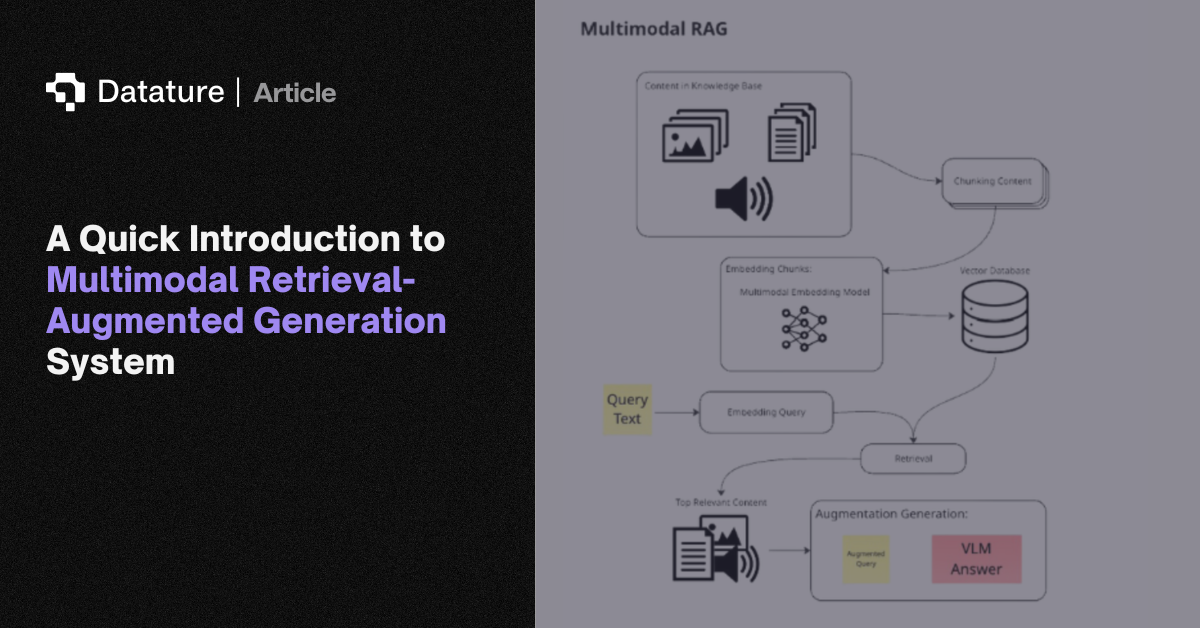

Retrieval Augmented Generation (RAG) is a process that enhances language models by connecting them to a system that pulls relevant information from external sources, such as databases, documents, or manuals, to use as context to generate a response.
What is RAG?
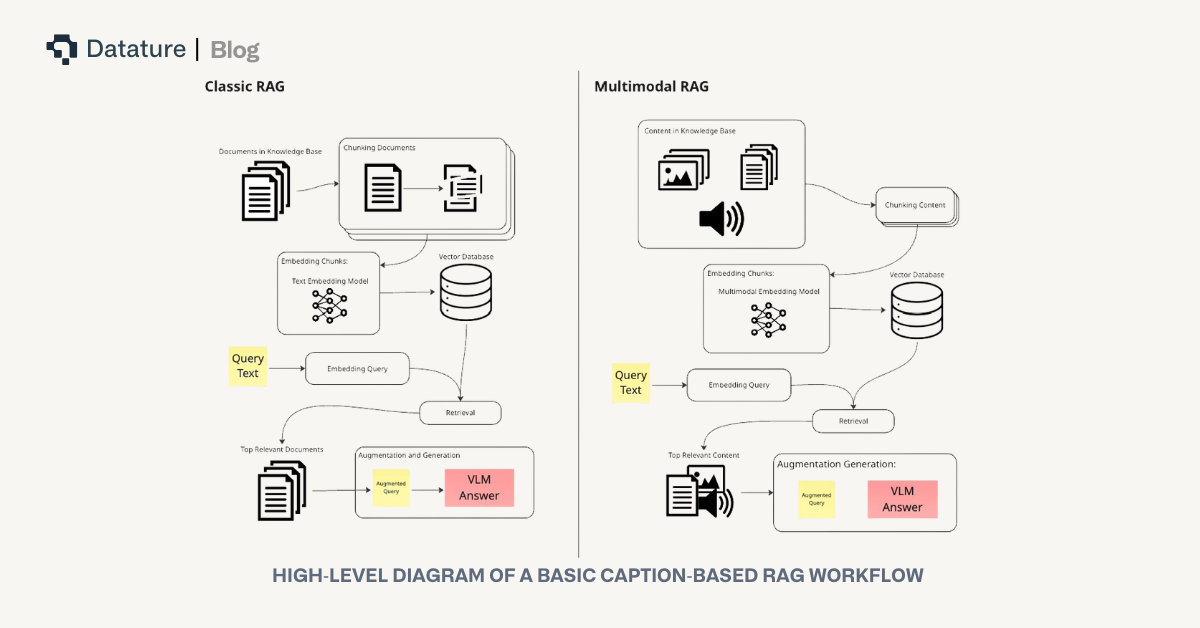
At its core, RAG combines retrieval with generation. A user query is embedded and searched against a knowledge base to surface the most relevant information. These retrieved results are then provided to a large language model to produce an answer grounded in the external content rather than only relying on the model's pretraining.
Why use RAG with your LLM?
Since LLMs solely rely on pretraining knowledge and are predictive in nature, LLMs are often plagued by hallucinations, factual errors, and reliance on knowledge that may be outdated. RAG, which leverages a knowledge base, grounds outputs with authoritative sources to lower the aforementioned risks of pure LLM-focused workflows. Instead of requiring exhaustive pretraining on every scenario, the system retrieves and integrates the right information dynamically. This integration ensures that responses are more accurate and relevant to answering the query
What Is Multimodal RAG?
While classic RAG systems work primarily with text, real-world information is stored not just as words, but also as images, diagrams, videos, tables, and audio files. Multimodal RAG extends this RAG process to all these content formats. A multimodal RAG system ingests data from varied modalities, encodes each into compatible vector representations, and retrieves them to support complex, context-rich queries. For example, retrieving specific assembly instructions that include both step-by-step text and construction diagrams, which is an example we will explore later on in this article’s demo of multimodal RAG.
Implementing Multimodal RAG
To implement multimodal RAG, we have to consider four key parts to a reliable RAG system: embedding, retrieval, reranking, and augmentation. Each step in this system has its own challenges, especially when introducing images, but understanding these four stages is the foundation for getting a reliable system up and running.
Embedding Modalities For Retrieval
First, the embedding step transforms raw data into dense vector representations in a shared space. These embeddings capture the semantic meaning of a piece of data. Embeddings allow for quick and efficient retrievals of relevant documents by comparing the embeddings of queries and documents. This efficiency is especially critical when working with large knowledge bases where fast and accurate retrieval is essential for RAG to provide timely, contextually grounded responses. In a multimodal system, this can be done with a single multimodal embedding model, which directly maps both text and images into the same vector space, or with separate models for each modality. The choice impacts how retrieval is performed downstream. The original assets (text, images, tables, or diagrams) are stored as metadata with each embedding vector and fed to the LLM during retrieval, ensuring that the generated content is grounded in the actual source material.
Embedding typically involves a "chunking" step when working with information sources like documents or images. Chunking is the process of dividing one or more large sources into smaller, semantically coherent pieces, like paragraph breaks, so that retrieval can be more contextually accurate and fine-grained. For images, chunking may mean dividing an image into smaller visual patches and embedding them individually, allowing for localized matching of details.
Retrieving Embeddings
Once embeddings are generated, we can begin the retrieval process. In the retrieval process, the query is first converted into a vector representation. If the query is text-only, this is straightforward: the text is passed through a text embedding model. When images are included, however, additional steps are required. One approach is to embed both the text and images together into a single query embedding using a multimodal embedding model, such as Alibaba’s gme-Qwen2-VL-7B-Instruct. Another approach is to convert the image into a textual description with a vision-language model and then combine that description with the text query, embedding the combination altogether.
Once the query has been embedded, retrieval is typically performed using a similarity search algorithm, such as cosine similarity. This metric measures the cosine of the angle between the query vector and the vectors of the candidate documents, where a result closer to zero, means higher similarity. Then, the documents with the top-k highest similarity scores are then selected and passed along to the next stage of the RAG pipeline. Another widely used approach is Approximate Nearest Neighbor (ANN) search, which many vector store providers adopt. ANN algorithms provide fast retrieval of vectors that are close to the query in high-dimensional space, balancing speed and accuracy even in large-scale knowledge bases.
Reranking
Reranking refines the top-k retrieved documents, pushing the most relevant items to the top of the final results list. It is applied after initial embedding-based retrieval, which can be noisy or insufficiently semantically aware. Unlike embedding retrieval, which is fast and designed to capture a broad set of potentially relevant documents, reranking uses a powerful model to produce a smaller, more precise set of results using those retrieved documents. In multimodal retrieval, reranking models such as MonoQwen2-VL-v0.1 often re-encode query-document pairs and assign a relevance score.
However, reranking has a significant limitation: it can only act on the candidates provided by the initial retrieval. If the first retrieval step surfaces poor matches, reranking will simply reshuffle irrelevant documents rather than recovering the correct ones. As a result, reranking should be seen as a refinement layer, not a fix for weak embeddings or poorly optimized queries. For further readings on addressing these typical pitfalls, see here.
Augmentation
Once the top documents are retrieved and reranked, they are passed into the generation stage. A formatting template is used to augment the original query with the retrieved document to form a new query that will be input into the model. In practice, pipelines usually supply the top three to five most relevant documents. An additional part of the prompt may be augmented in this process to tell the model how it should answer the original query using the system-retrieved context and format its output.
The above-described template may look like this:
message = [
   {
       "role": "user",
       "content": [
           {"type": "text", "text": "User Query:"},
           {"type": "text", "text": query},
           {"type": "text", "text": "User Query Image:"},
           {"type": "image", "image": query_image},
           {"type": "text", "text": "System Retrieved Context:"},
       ]
       + [{"type": "image", "image": img} for img in reranked_retrieved_images]
       + [
           {
               "type": "text",
               "text": (
                   "Please answer the user's query based ONLY on the retrieved images. "
                   "Do not assume or hallucinate information. "
                   "If a retrieved image does not provide relevant information, ignore it. "
                   "Make your answer clear and self-contained, as the user cannot see the retrieved images."
               ),
           }
       ],
   }
]
This ensures that the model’s output is grounded in actual source material rather than relying solely on memorized knowledge, which is critical for accuracy in tasks like answering questions about technical manuals or identifying specific components in images.
Advanced Retrieval Architectures: ColQwen2.5
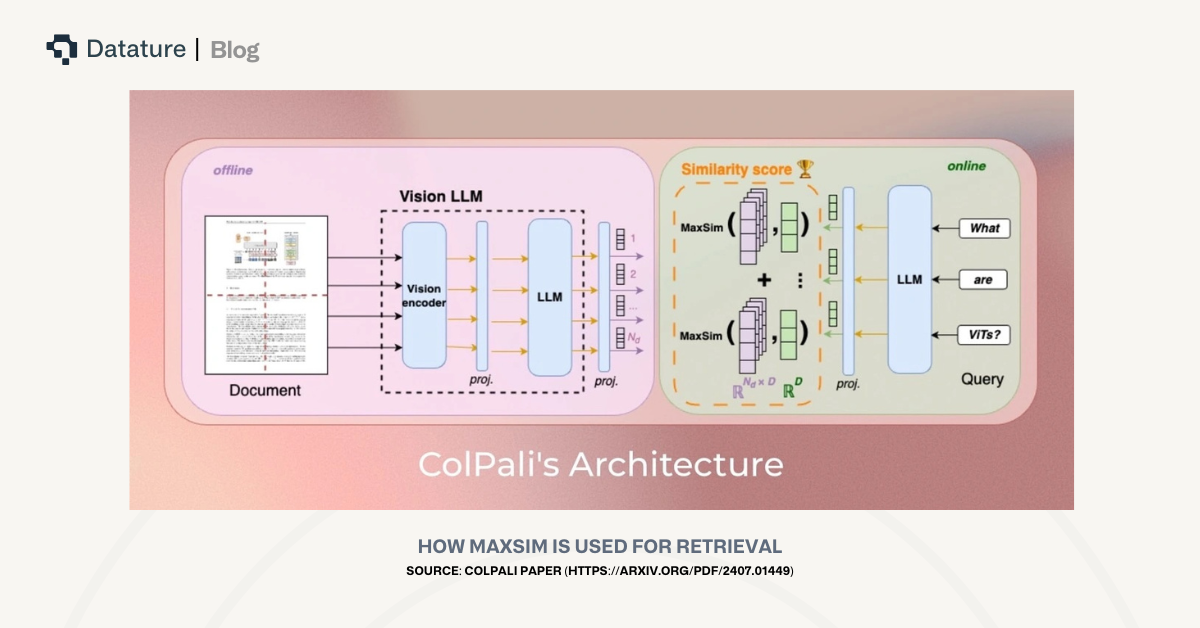
While cosine similarity is a common and acceptable method for comparing embeddings for relevancy, it may fail to fully capture matches that are subtle but critical. For example, in technical manuals, small but important elements, such as a single screw in a diagram or a brief label in a table, may determine the relevancy of a document. Embeddings of an entire document, even when chunked, can dilute these small local signals, causing documents critical to answering the query to be ranked lower than less important ones.
To address this, ColBERT-style architectures, such as Vidore’s colqwen2.5-v0.2, generate embeddings at a token- or patch-level: each text token and each visual patch receives its own vector. Instead of computing similarity at the document level, these models use MaxSim, which calculates the cosine similarity between each query token and every token or patch in a candidate document, selects the maximum score for each query token, and sums these maximums to produce the final relevance score. By focusing on local matches, this approach ensures that small but highly relevant elements receive appropriate weight, improving retrieval accuracy over standard cosine similarity.
Challenges in Multimodal Document Retrieval
Multimodal retrieval brings difficulties that go well beyond traditional text-only RAG. Images are especially problematic, as a single embedding of a full manual page often misses fine-grained visual details. At the same time, queries are almost always expressed in text, and they are at times describing actions (“which step does this screw belong to?”) rather than static objects. This creates a mismatch between the way information is represented in images and the way it is expressed in queries.
These challenges can be addressed by adding semantic structure and capturing the “why” of an image rather than just the “what.” The specific strategies that can address the challenges multimodal document retrieval pipelines face will be discussed in the following sections.
Approaches to Implement Multimodal RAG
Approaches to adopting multimodal RAG generally fall under these 3 main overarching strategies:
- Embedding all modalities used into the same vector space
- Grounding all modalities into one primary modality first (usually text), and then embedding
- Embedding different modalities in their own vector spaces
Below are some retrieval approaches we’ve explored:
- Image-only retrieval: Relies on visual embeddings of document pages to match queries based on image similarity.
- Caption-based retrieval: Uses descriptions of visual elements to enable semantic search aligned with natural language queries.
- Unified image and caption retrieval: Combines visual and textual embeddings into a single representation to capture both modalities.
- Hybrid dense and sparse retrieval: Merges embedding-based methods with lexical search to balance semantic understanding and exact keyword matching.
Focusing on Caption-Based Retrieval
Among these strategies, caption-based retrieval is effective and reliable for technical documentation and instructional manuals. It strikes the right balance between interpretability, semantic depth, and alignment with natural language queries.
Unlike image-only methods, captions explicitly describe not just what objects are present but also the relationships and actions depicted, information that is crucial in instruction-based documents. This encapsulation of visual nuances is harder to execute using image embeddings. Compared to fusion or hybrid search systems, caption-based retrieval provides a semantically rich representation that avoids unnecessary noise and integrates naturally with text-based search infrastructure.
Caption-Based Text Retrieval: Deep Dive
How does Caption-Based Retrieval work?
In caption-based retrieval, a vision-language model generates detailed textual descriptions for each visual segment of the document. The prompts guiding the model are carefully designed to emphasize visible elements, step numbers, and explicit actions, tailored to the type of visual data. These captions are then embedded into a text-searchable vector space, where natural language queries can be directly compared against them. This workflow enables semantically rich search, allowing the system to surface the correct instructions even when queries use different wording or describe actions in varied ways.
Workflow Breakdown
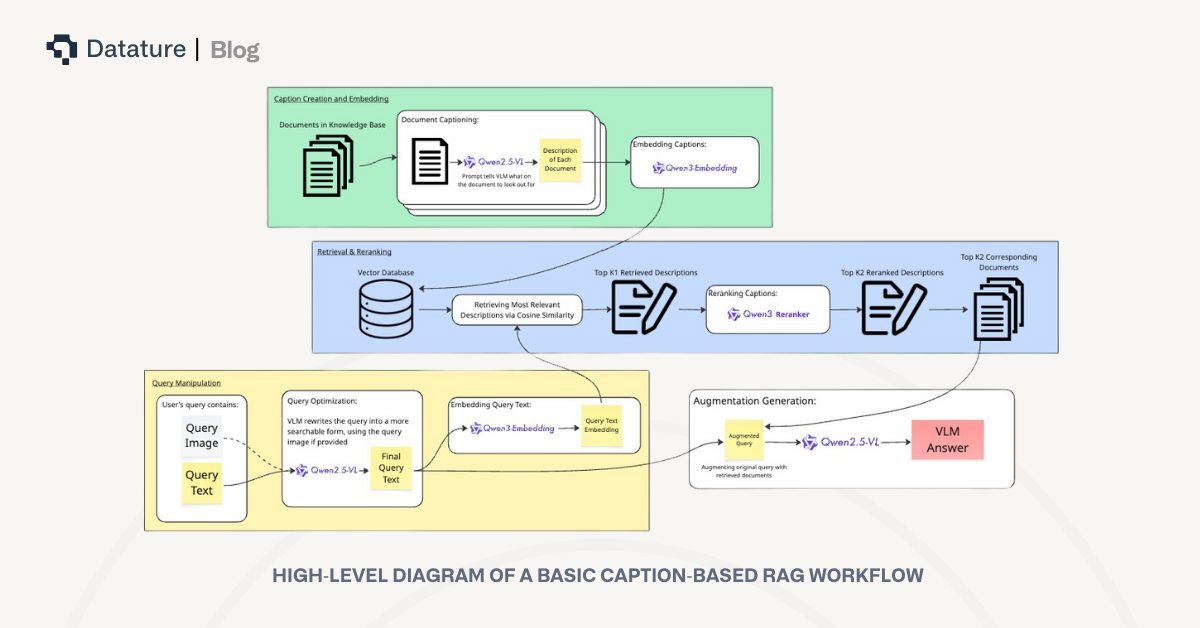
We’ve tested the caption-based RAG system using this workflow:
- VLM Captioning: Each document page is passed through a vision-language model (ex. Qwen2.5VL). The model is prompted to generate a detailed description of the document, with a prompt that is custom for the type of documents used to tell the model what to look out for. For example, in our case with IKEA manual documents, a good caption would include the step number, part labels, instructions, etc, which is we I used the following prompt:
prompt = f"""You are a helpful assistant describing IKEA manual pages, so they can be embedded and searched for. Use common words so descriptions are easy to find. Don't use any bolding, headings,or special formatting.
   Every output you create should follow this format:
   - A concise purpose of the page / what it is for specifically
   - Give a concise, detailed description listing only the visible elements (labels, numbers, measurements).
   - Give instructions on how to build the page using these visible elements only if it seems like it is a build instruction page. If not, ignore this part.
   - Additional information: You must include the step number, page number, and other text in short bullet points. Don't assume anything here. If there's no info on this page, don't output."""
- Embedding: Generated captions are converted into vectors using a high-performing text embedding model (ex. Qwen3 Embedding).
- Query Matching: User queries are embedded in the same space. The system retrieves the top-k closest document captions via similarity search, typically returning highly relevant results.
- Reranking: The retrieved captions are reranked using a powerful reranking model (ex. Qwen3 Reranker).
- VLM Processing and Answering: The corresponding documents of the top-k reranked captions are then given to the VLM, answering the user’s query with complete context. The VLM uses the retrieved documents in this format:
conversation = [{
   "role": "user",
   "content":
       [{"type": "text", "text": "My Query image:"}] +
       [{"type": "image", "image": query_image}] +
       [{"type": "text", "text": "My Query:"}] +
       [{"type": "text", "text": query}] +
       [{"type": "text", "text": "System retrieved images related to the query:"}] +
       [{"type": "image", "image": img} for img in reranked_retrieved_images] +
       [{"type": "text", "text": """Please answer my query and my query image based on the system retrieved images. Only answer my query based on the retrieved images. Do not assume anything.
       Note, some system retrieved images may not answer my query and query image. If an image can't answer my query, do not use any information from that image in your output."""}]
}]
Strengths and Weaknesses
Caption-based retrieval offers a compelling balance of precision and interpretability. By grounding images in natural language, it inherits the advantages of text embeddings, which capture rich semantic relationships and handle synonyms, paraphrases, and intent far better than lexical or image-only search. In practice, this translates into strong accuracy.
However, the approach is not without limitations. Caption quality is critical. Vague, incomplete, or poorly structured descriptions can easily degrade retrieval performance. Certain purely visual cues, such as color, small objects, or gestures, may be omitted, which depend on the prompt used for captioning. There is also an upfront computational cost with generating captions, but with this initial processing complete, the system supports fast and accurate retrieval across large document collections.
Other Multimodal RAG Approaches
Image-Only Retrieval
This approach relies solely on embeddings derived from the visual features of input documents, images, or visual segments. In practice, this means converting each chunk of data into a dense vector and searching for the closest matches to a query embedding. While this method can work when queries are tightly aligned with object-level features, such as asking “retrieve me the images with screws with label 1231482,” it often struggles with implied visual elements. For example, with documents containing instructions involving actions or intent, image-only retrieval often fails. Reranking techniques, applied after initial retrieval, offer some improvements but cannot compensate for poor first-pass matches.
Unified Image and Text Embeddings Retrieval
We’ve also explored unified embeddings, which combine both the visual embedding of a page and its caption embedding into a joint representation. While this theoretically preserves both image-level detail and semantic richness, in practice, the results are mixed. In some cases, the fusion even introduces noise, particularly if the caption already captures most of the relevant information.
Hybrid Dense and Sparse Retrieval
Hybrid retrieval combines embedding-based methods with traditional lexical techniques such as BM25. In our implementation, we used unified image-text embeddings for the dense embedding component, while lexical search provided the sparse ranking signal. Reciprocal rank fusion is then applied to merge the two result sets. In practice, however, performance often fell short as the lexical retrieval struggled with synonyms and paraphrasing, and its weaknesses could dilute the gains provided by dense embeddings.
Conclusion
Caption-based text retrieval stands out as the best approach for semantic multimodal document search and RAG workflows in manual-rich domains. Its blend of VLM captioning and high-quality text embeddings delivers accurate, fast, and semantically robust retrieval, handling synonyms, paraphrasing, and detailed user queries without the fragility of purely lexical search or image-only retrieval. Alternative strategies are useful in specific edge cases, but caption-based retrieval serves as the foundation of reliable visual multimodal RAG systems.
What’s Next?
If you’re interested in exploring the topics mentioned in this article, linked here is a Colab Notebook that demonstrates an implementation of an end-to-end caption-based RAG system, from data ingestion to retrieval and generation. This is the problem we are solving over with Datature Vi. Where developers can fine-tune their own Vision-Language Models with all the required tools a (Annotations, Model Evaluations, RLHF, and Deployment). If thiis is something you are building, do give our introduction video a watch.
If you have any further questions, feel free to join our Community Slack to post your questions or contact us to discuss implementing a multimodal RAG system.
.png)
.png)